
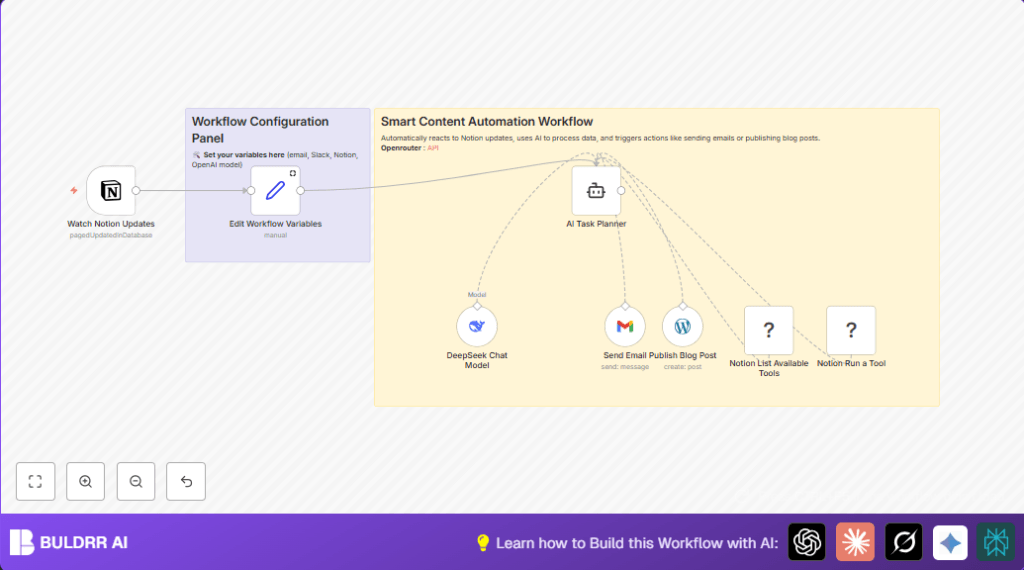

What This Automation Does
This workflow watches a Notion database for page updates every hour.
It uses AI to make SEO-friendly blog posts from those updates.
Then it publishes drafts on WordPress.
It emails a person the post link.
Finally, it updates Notion with the blog details and status.
This saves lots of manual work and stops mistakes.
Tools and Services Used
- Notion API: To monitor and update the database.
- DeepSeek AI Model: To create SEO-optimized articles.
- Gmail via OAuth2: To send notification emails.
- WordPress API: To publish blog post drafts.
- MCP Notion Client: To run tools and update Notion pages.
- n8n: For building and running the automation.
Inputs → Processing → Outputs
Inputs
- Updated page content from a chosen Notion database.
- User-set variables like email address and database IDs.
Processing Steps
- Watch Notion Updates triggers when a page changes.
- Edit Workflow Variables sets dynamic data like email and IDs.
- AI Task Planner creates a neat SEO blog post with title and subtitles.
- Publish Blog Post sends the AI content to WordPress as a draft.
- Send Email notifies a chosen email with the blog post link.
- Notion List Available Tools gathers MCP tools available.
- Notion Run a Tool updates the original Notion page with post info and marks it “publish”.
Outputs
- SEO-optimized blog draft visible in WordPress.
- Email sent with title and URL.
- Notion page updated with post details.
Who Should Use This Workflow
This is for content managers or editors who use Notion for ideas.
They want to save time writing and publishing blogs.
This cuts errors from copying text and slow workflows.
Anyone wanting faster, better SEO posts with auto email alerts will find it useful.
Beginner Step-by-Step: How to Use This Workflow in n8n
1. Import the Workflow
- Download the workflow file using the Download button on this page.
- Open the n8n editor where you want to use it.
- Click on “Import from File” in n8n and upload the downloaded workflow file.
2. Add Credentials
- Set up your Notion API credentials in n8n.
- Connect your DeepSeek AI account with the lmChatDeepSeek node.
- Provide Gmail credentials with OAuth2 for the gmailTool node.
- Add WordPress API keys for the wordpressTool node.
- If you use MCP tools, configure MCP Notion client API keys.
3. Update Workflow Variables
- In the Edit Workflow Variables node, enter your email address to get notifications.
- Enter your Notion database ID.
- Make sure the notionItemId uses the expression
= $json.idso it grabs the right page.
4. Test the Workflow
- Edit a page in your Notion database to trigger the workflow.
- Check that a blog draft appears in WordPress.
- Look for the notification email arriving in your inbox.
- Confirm the original Notion page gets updated with the blog post link and status.
5. Activate the Workflow for Production
- Turn on the workflow toggle in the n8n editor near the workflow name.
- This will let it watch Notion updates constantly.
- Monitor n8n execution logs and Gmail sent folder to ensure smooth runs.
- Review published WordPress drafts regularly to check quality.
If self hosting n8n, consider checking self-host n8n for setup tips.
Customization Ideas
- You can change the publishing status in the Notion Run a Tool node, e.g. to “draft” or “review”.
- Adjust the article length or style by editing the prompt in the AI Task Planner node.
- Modify the Send Email node to add author names, dates, or extra details.
- Add extra nodes after publishing to auto-post on social media platforms.
Troubleshooting
- Notion API returns 403 Forbidden
Cause: Notion API lacks permissions.
Fix: Go to Notion Settings > Integrations and allow the API access.
Re-authenticate in n8n. - WordPress post not created
Cause: API key wrong or lacks rights.
Fix: Check WordPress API keys and tokens.
Test connection inside n8n node. - Emails not sent by Gmail node
Cause: Expired or bad OAuth2.
Fix: Reconnect the Gmail account.
Verify OAuth2 scopes. - AI response incomplete or wrong
Cause: Prompt too vague or rate limits hit.
Fix: Make the prompt clearer in the AI Task Planner.
Check API usage limits.
Pre-Production Checklist
- Confirm Notion database ID and API access.
- Test the Notion update triggers.
- Validate DeepSeek AI credentials and ability to generate content.
- Confirm WordPress API can create draft posts.
- Test Gmail node can send emails to your address.
- Run one full workflow from Notion update to WordPress draft and email.
- Backup Notion data before big updates or batch processing.
Conclusion
This workflow quickly changes Notion page updates into SEO blog drafts.
It sends emails with post links and logs everything back in Notion.
You save many hours previously spent copying and formatting.
The content is consistent and errors drop sharply.
Next, try adding social media posting or analytics tracking.
