
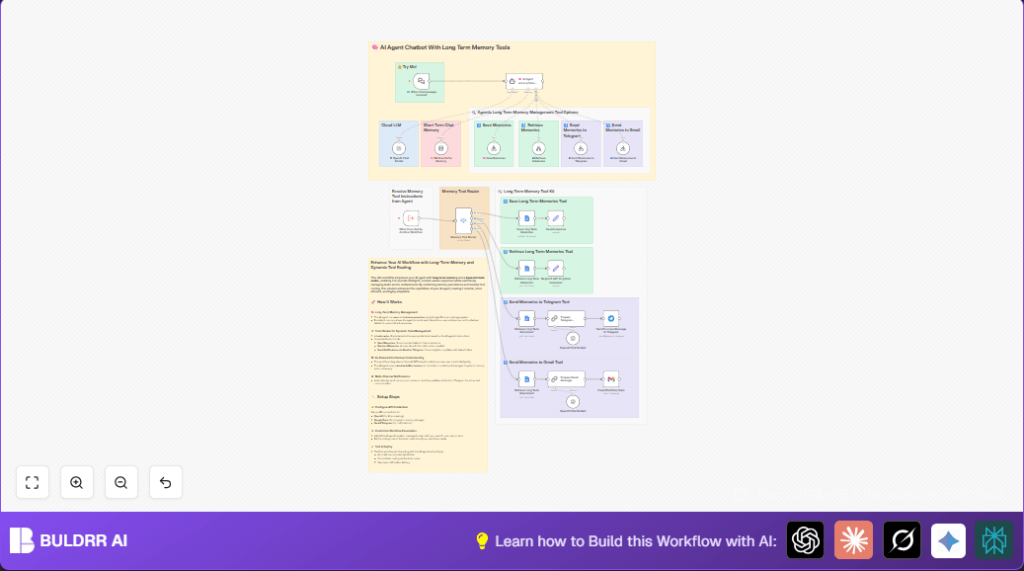

What This Automation Does
This workflow is a smart AI agent that saves and finds important chat memories automatically.
It helps chatbot remember what users said before and share updates via Telegram and email.
This stops users from repeating themselves and keeps support staff informed without manual work.
The AI reads chat input, stores or gets memories from Google Docs, and sends notifications using clear routing rules in n8n.
This makes chatbot replies better and faster with long-term memory and shows info to the team on time.
Who Should Use This Workflow
This workflow suits tech startups or small companies wanting smarter chatbots.
It is good for teams that want to save key chat details automatically.
You should use it if you want to avoid manual memory tracking and improve customer support response.
Anyone with basic n8n experience can activate this without coding.
Tools and Services Used
- OpenAI GPT Model: Processes user chat and generates responses.
- Google Docs: Saves and retrieves long-term chat memories.
- Telegram Bot API: Receives user messages and sends notifications.
- Gmail API: Sends email notifications.
- n8n Platform: Automates workflow operations and routing.
Beginner Step-by-Step: How to Use This Workflow in n8n
Import Workflow
- Open the n8n editor.
- Download this workflow file using the Download button on this page.
- Use the n8n “Import from File” option to load the workflow into your editor.
Configure Credentials and Settings
- Add or update your OpenAI API Key in the credential manager.
- Set up Google Docs OAuth2 credentials with access to your memory document.
- Insert your Telegram Bot token and chat ID. Use environment variable
{{ $env.TELEGRAM_CHAT_ID }}if needed. - Update Gmail OAuth2 credentials for sending emails.
- Modify document URLs, email addresses, or other IDs if your account differs.
Test the Workflow
- Trigger a test message through the Chat Trigger node.
- Observe if memory saves to Google Docs.
- Check if notifications arrive in Telegram and email.
Activate for Production
- Toggle the workflow active in the n8n editor top-right corner.
- Ensure environment variables and credentials stay secure.
- Monitor executions in the n8n dashboard for errors.
Using this simple import and configure method lets beginners deploy the workflow fast without building from scratch.
For more hosting options on your own server, see self-host n8n.
Inputs, Processing Steps, and Outputs
Inputs
- User chat messages come through a webhook in the Chat Trigger node.
- Upstream workflows can also trigger the memory management workflow.
Processing Steps
- The AI agent node reads chat text and decides action by setting a route.
- The Switch node directs data to save memories, fetch past data, or send notifications.
- Save memories are stored as JSON snippets with timestamps into a Google Docs file.
- Retrieval nodes pull saved memories from that same Google Doc.
- Message prep nodes format the retrieved data for either Telegram or Gmail.
- Telegram and Gmail nodes send updates to the right channels.
- A window buffer memory node keeps recent short-term chat context for smarter replies.
Outputs
- Contextual chatbot replies with long-term memory awareness.
- Notifications sent automatically to Telegram chats.
- Email reports delivering formatted memory summaries.
Edge Cases and Common Failures
- Google Docs 403 Error: Usually means OAuth2 permissions or document sharing is wrong. Recheck credentials and sharing.
- AI Agent Routes Not Working: If route keys are incorrect or missing, routing fails. Make sure AI system messages output correct
$json.routevalues. - Telegram Messages Not Received: Check bot token, chat ID, and environment variables. Test manually.
Customization Ideas
- Switch Google Docs nodes to Google Sheets or databases to store memories differently.
- Use different OpenAI GPT models by changing the model name in LangChain nodes.
- Change message formats in Chain LLM nodes to fit brand or add info.
- Add new routes in the Switch node to notify Slack or SMS.
- Change short-term message history size in the buffer memory node.
Conclusion
✓ The workflow gives AI chatbots long-term memory to remember users better.
✓ Notifications keep support teams updated automatically via Telegram and email.
→ Manual tracking of chat info is removed.
→ Chatbots answer with more context and personalize conversations.
→ Teams save time on reporting and follow-ups.