

Chat with Search Console Data Using n8n and OpenAI

Save hours analyzing your Google Search Console data by chatting naturally with an AI-powered agent built on n8n, OpenAI GPT-4, and Postgres. This workflow fetches customized insights effortlessly with simple chat commands.
agent
lmChatOpenAi
memoryPostgresChat
+8
Workflow Identifier: 1655
NODES in Use: agent, lmChatOpenAi, memoryPostgresChat, toolWorkflow, webhook, set, switch, httpRequest, aggregate, respondToWebhook, executeWorkflowTrigger
Chat with Search Console data using n8n and OpenAI

Press CTRL+F5 if the workflow didn't load.

Learn how to Build this Workflow with AI:

What This Automation Does

This workflow creates a chat interface to talk with Google Search Console data in simple English.
It helps to get answers about website performance without coding or complex dashboards.
The main result is fast, clear insights shown as easy markdown tables in chat.

You can ask questions like “How did my site do last month?” or “Show top queries for product pages.”
The bot talks to Search Console API behind the scenes.


Who Should Use This Workflow

This is good for people who work with website data but do not want to write code.
Anyone needing quick Search Console reports in natural language will benefit.


Tools and Services Used


Beginner Step-by-Step: How to Use This Workflow in n8n

Download and Import

  1. Click the Download button on this page to save the workflow JSON file.
  2. Open your n8n editor.
  3. Go to Import from File and upload the saved workflow.

Configure Credentials

  1. Add your Google Search Console OAuth credentials under n8n credentials.
  2. Enter your OpenAI API Key in the OpenAI Chat Model node.
  3. Set up Postgres credentials pointing to your database.

Update Identifiers

  1. Check if any property URLs, emails, or table names need updating in the workflow nodes.
  2. Update webhook Basic Auth username and password if needed.

Test and Activate

  1. Send a test POST request to the webhook with sample chatInput and sessionId.
  2. Verify you receive a chat reply in markdown with insights.
  3. Activate the workflow in n8n for production use.

For self hosting n8n, see self-host n8n.


Inputs, Processing, and Outputs

Inputs

  • User chat messages sent as JSON payloads to the Webhook node.
  • Session identifier to keep track of conversation.

Processing

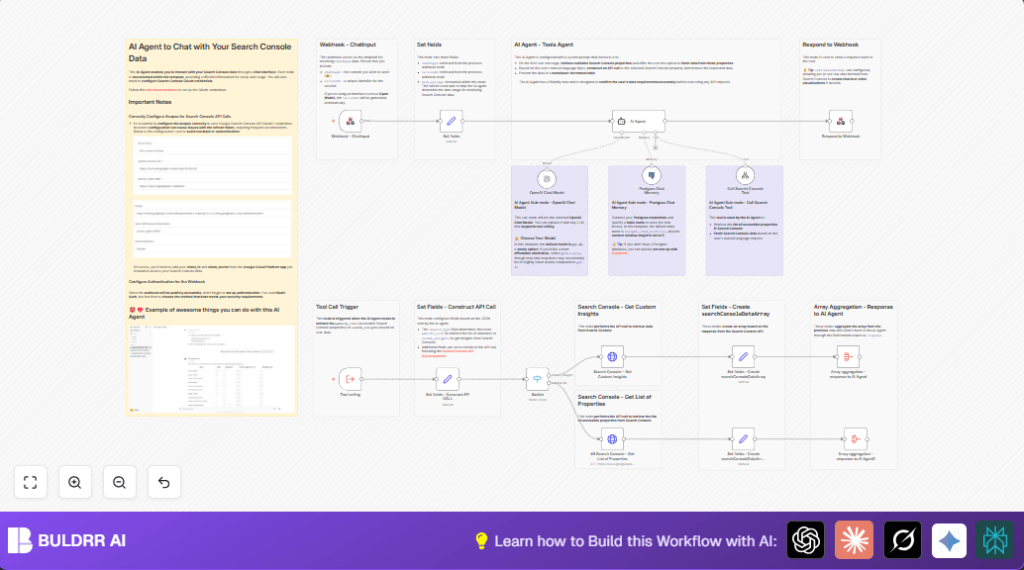
  • Set fields node extracts chatInput, sessionId, and adds current date.
  • AI Agent using GPT-4o interprets user input, manages conversation memory in Postgres.
  • Agent calls the Search Console Tool sub-workflow for data retrieval.
  • Set fields – Construct API CALL builds API request parameters dynamically.
  • Switch node routes between listing properties or custom data fetch.
  • HTTP Request nodes call Google Search Console API using OAuth2.
  • Set fields and Aggregate nodes format and combine API results.

Outputs

  • AI-generated chat reply showing requested Search Console insights.
  • Results are formated in markdown tables for readability.
  • Chat history saved for follow-up questions.

Common Edge Cases and Failures

  • If OAuth2 token refresh fails, check Google Cloud OAuth scopes.
  • If webhook responds with unauthorized, verify Basic Auth settings.
  • If API call returns empty data, confirm property URLs and date ranges are correct.

Customization Ideas

  • Change system prompt in the AI Agent node to focus on specific Search Console metrics.
  • Adjust default row limits or dimensions in Set fields – Construct API CALL.
  • Use other OpenAI models in the OpenAI Chat Model node for cost control.
  • Replace webhook Basic Auth with token-based authentication if your system needs it.

Conclusion

This workflow lets you ask Google Search Console questions in simple chat.
It removes need for APIs or complicated dashboards.

Users save hours weekly and cut errors doing data reports.
You get fast answers, easy tables, and chat memory for follow-ups.

Next steps might be adding scheduled reports or Slack alerts.
You made data analysis less painful and more human.


Chat with Search Console data using n8n and OpenAI

Visit through Desktop to Interact with the Workflow.

Author
Written By
Vikash Kumar
Building AI agents, n8n workflows and end-to-end automation for 30+ Brands across India, the US, Europe, Dubai & Australia. 7+ years of Experience saving founders real hours every week - no code required.
Author
Written By
Vikash Kumar
Building AI agents, n8n workflows and end-to-end automation for 30+ Brands across India, the US, Europe, Dubai & Australia. 7+ years of Experience saving founders real hours every week - no code required.

Frequently Asked Questions

Yes. The workflow supports any model compatible with LangChain tool calling but features may change.
Check Google Cloud OAuth scopes and make sure they match Search Console API requirements exactly.
Yes. Postgres stores chat context to improve conversation but make sure database has access controls and encryption.
Yes. Session IDs and Postgres memory keep each conversation separate and concurrent.

Related Workflows

Automate Twist Channel Creation and Messaging with n8n

This workflow automates creating and updating a channel in Twist and sending a personalized message to specific users. It eliminates manual setup errors and saves time managing Twist communications.

Automate Ideogram Image Generation with Google Sheets & Gmail

This workflow automates graphic design image generation via Ideogram AI, storing image data in Google Sheets and Google Drive, with email alerts via Gmail. It saves designers hours by automating image creation, remixing, review, and record-keeping.

Automate IT Support with Slack and OpenAI in n8n

Streamline IT support by automating Slack message handling using n8n and OpenAI. This workflow handles Slack DMs, filters bots, queries a Confluence knowledge base, and delivers AI-generated responses, improving support efficiency and response time.

Automate Crypto Analysis with CoinMarketCap & n8n AI Agent

Discover how this unique n8n workflow leverages CoinMarketCap’s multi-agent AI to deliver precise, real-time cryptocurrency insights directly via Telegram. Manage crypto data analysis efficiently with automated multi-source API integration.

Automate Gumroad to Beehiiv Subscriber Sync with n8n

Learn how to automatically add new Gumroad sales customers as Beehiiv newsletter subscribers using n8n automation. This workflow saves time by syncing sales data to Google Sheets CRM and notifying your Telegram channel instantly.

Generate On-Brand Blog Articles Using n8n and OpenAI

This workflow automates the creation of on-brand blog articles by analyzing existing company content using n8n and OpenAI. It extracts article structures and brand voice to produce consistent draft articles, saving significant content creation time.
1:1 Free Strategy Session
Your competitors are already automating. Are you still paying for it manually?

Do you want to adopt AI Automation?

Every hour your team does repetitive work, you're burning real money.
While you wait, faster businesses are cutting costs and moving quicker.
AI and automations aren't the future anymore — they're the present.

Book a live 1-on-1 session where we show you exactly which of your daily tasks can be automated — and what it’s costing you not to.