
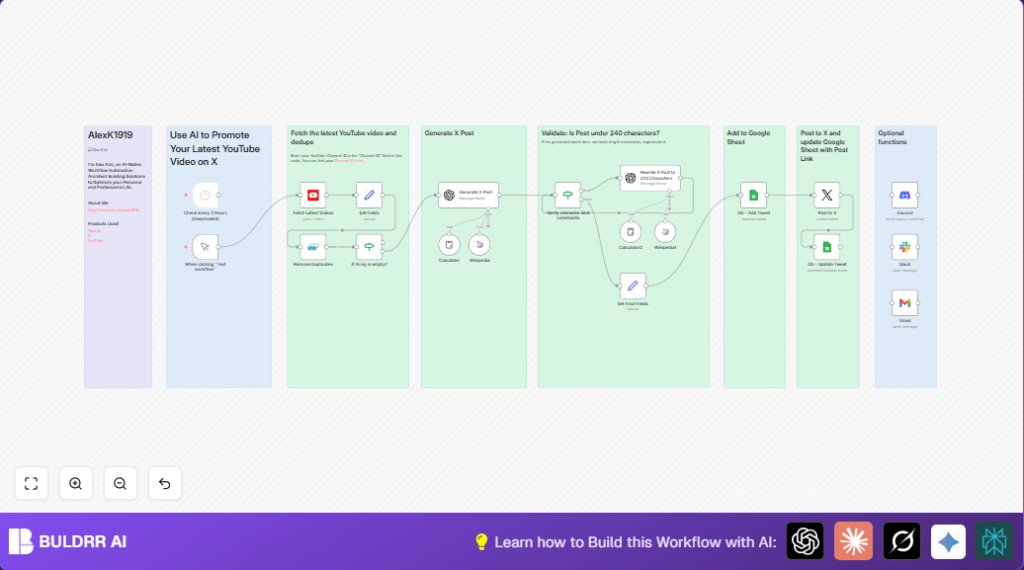

What This Automation Does
This workflow finds newest YouTube videos from one channel and makes posts for X automatically.
It stops repeated posts and makes sure tweets are short enough.
The posts get pasted on X and all info is saved in Google Sheets.
This saves many hours of work and stops mistakes like too long tweets or missing tracking.
The process uses YouTube to get videos, OpenAI to write tweets under 220 characters with video links, then posts them on X with OAuth2 access.
It also updates a Google Sheet to log what was posted and when.
Tools and Services Used
- YouTube Data API: Fetches new videos from a channel.
- OpenAI GPT-4o-mini: Writes catchy X posts under character limits.
- X (Twitter) API via OAuth2: Posts tweets automatically.
- Google Sheets API: Logs posts with date, content, and status.
- n8n Automation Platform: Connects all nodes and runs flow.
Input, Processing, and Output
Inputs
- Channel ID for YouTube channel.
- OAuth2 credentials for YouTube, X, Google Sheets.
- OpenAI API Key.
Processing Steps
- Get videos published in last 20 hours from YouTube.
- Extract video IDs.
- Remove duplicates already posted.
- Check if any videos left.
- Use OpenAI to write tweet with video title, description, and video URL.
- Check tweet length; rewrite if too long.
- Prepare data for Google Sheets logging.
- Post tweet on X using OAuth2.
- Update Google Sheets record with post URL and status.
Outputs
- Published tweet with latest video link.
- Complete log entry in Google Sheets.
Who Should Use This Workflow
Anyone who uploads videos on YouTube and wants quick posts on X without extra work.
Great for content creators, marketers, and small businesses who want to save time.
No deep coding required; only basic n8n and credential setup.
Users with multiple channels or social accounts can customize as needed.
Beginner Step-by-Step: How to Use This Workflow in n8n
Import the Workflow
- Download the workflow JSON file using the Download button on this page.
- Open n8n editor already logged in.
- Click Import > Import from File, select the downloaded JSON.
Configure Credentials and Parameters
- Add or update OAuth2 credentials for YouTube, X, Google Sheets in n8n credential manager.
- Update YouTube node
channelIdif needed. - In OpenAI nodes, confirm the prompt uses:
Write an engaging post about my latest YouTube video for X (Twitter) of no more than 220 characters in length. Link to the video at https://youtu.be/{{ videoId }} use this title and description: {{ title }} {{ description }}. If no description, guess the context. The link must be at the end. - Update Google Sheets node with correct spreadsheet ID and sheet name.
Test and Activate
- Run the workflow manually to verify video fetching, post generation, and logging.
- Ensure tweets appear on the X account and Google Sheets updates.
- Activate the schedule node to run every 2 hours or desired interval for production.
If you use self-host n8n, refer to self-host n8n for server setup and secure deployment.
Important Expressions and Prompts
Use this JavaScript expression to get videos from last 20 hours in YouTube node’s publishedAfter field:
=< new Date(new Date().getTime() - 1200 * 60000).toISOString()
Extract video ID in Set node using:
{{ $json.id.videoId }}
OpenAI prompt for writing X post:
Write an engaging post about my latest YouTube video for X (Twitter) of no more than 220 characters in length. Link to the video at https://youtu.be/{{ videoId }} use this title and description: {{ title }} {{ description }}. If no description, guess the context. The link must be at the end.
Common Problems and How to Fix
- No videos fetched from YouTube node.
Cause: Wrong channel ID or missing YouTube Data API scope.
Fix: Check channel ID in YouTube advanced settings. Verify OAuth2 OAuth scopes include YouTube Data API. - Posts fail to publish on X due to OAuth2 error.
Cause: Expired or lacking Twitter permissions.
Fix: Reauthenticate Twitter OAuth2 in n8n credentials and check app permissions. - OpenAI returns unrelated or short text.
Cause: Poor prompt or missing input data.
Fix: Use example prompt exactly and confirm title and description inputs.
Customization Ideas
- Switch Twitter node to another social node such as Mastodon.
- Add HTTP Request node to shorten YouTube URL before posting.
- Include hashtags or mentions by updating OpenAI prompt or Set node.
- Enable scheduled runs with the existing schedule node.
- Extend to post video thumbnails alongside tweets or save them in Google Sheets.
Summary
✓ Finds newest YouTube videos automatically.
✓ Writes engaging, tweet-ready messages using OpenAI.
✓ Limits tweet length to platform max.
✓ Posts to X with OAuth2 permissions.
✓ Logs posts details to Google Sheets.
✓ Saves hours of repetitive manual work.
✓ Keeps a clean, updated content record.
