
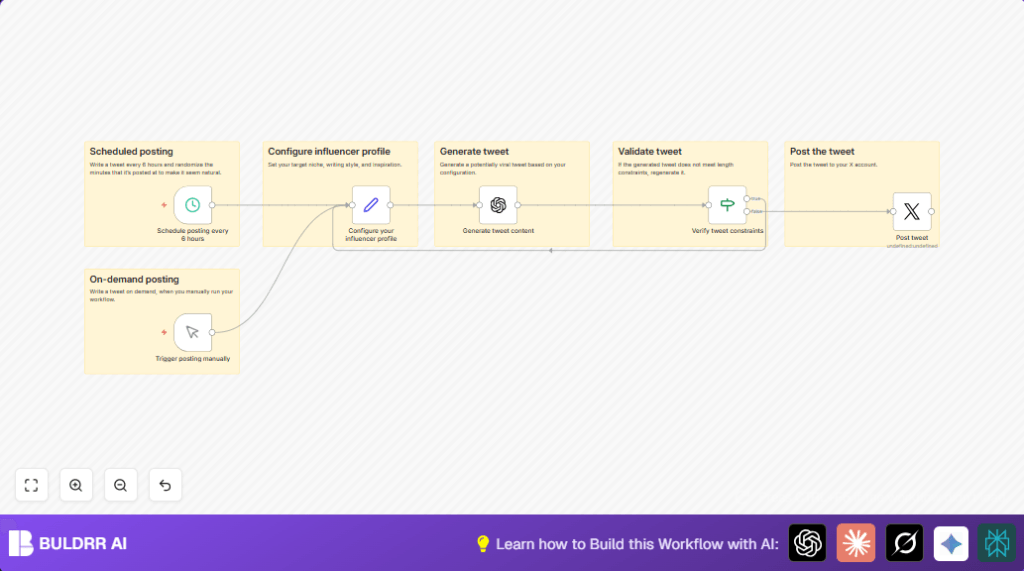

Every tweet is AI-written by GPT-4 Turbo based on your niche, tone, and style. You set it up once, and the workflow handles the writing and posting on its own — 4 times a day, every day, without you touching it.
No manual writing. No scheduling tools. No extra subscriptions.
What This Workflow Does
This workflow has two jobs: write tweets and post them on a schedule.
AI-Written Tweets: OpenAI GPT-4 Turbo reads your influencer profile — your niche, writing style, and inspiration text — and generates a fresh, unique tweet each time. Every tweet is written to fit your voice, stays under 280 characters, and sounds human, not robotic.
Schedule & Post: Once the tweet is written and validated, the workflow posts it directly to your X (Twitter) account. It runs every 6 hours with a randomized minute so your posting pattern looks natural and avoids platform flags.
The result: your X account stays active with 4 AI-written tweets per day — without you writing or scheduling anything manually.
Who Should Use This Workflow
This is for social media users who want to share high-quality tweets regularly but don’t have time to write or post many times per day.
It fits well for influencers focused on a specific topic wanting a consistent voice.
If you want to avoid robotic posting patterns and keep content under Twitter rules, this is helpful.
Tools and Services Used
- n8n: To automate tweet generation and posting.
- X (Twitter) API: For posting tweets via OAuth2 connection.
- OpenAI GPT-4 Turbo: For writing engaging tweets in a style set by the user.
- Langchain integration: Connects n8n with OpenAI.
Beginner Step-by-Step: How to Use This Workflow in n8n
Step 1: Import Workflow into n8n
- Download the workflow file using the Download button on this page.
- Open your n8n editor.
- Use the Import from File option to bring this workflow into n8n.
Step 2: Configure Credentials
- Add your OpenAI API key in the Generate tweet content node’s credentials.
- Connect your X (Twitter) account via OAuth2 in the Post tweet node.
Step 3: Update Profile Settings
- Open the Configure your influencer profile
Setnode. - Change the niche, style, and inspiration text to match your voice.
Step 4: Test the Workflow
- Use the manualTrigger node to run the workflow once.
- Check your X account to confirm the tweet posted.
Step 5: Activate for Production
- Turn on the Schedule posting every 6 hours node.
- Check logs to be sure tweets post on the planned schedule with random minutes.
- If self hosting n8n, consider using self-host n8n for reliable server uptime.
Inputs → Processing Steps → Output
Inputs
- User writes niche, style, inspiration text in the Configure your influencer profile node.
- Trigger to start: manualTrigger node or scheduled every 6 hours with random minute.
Processing Steps
- Generate tweet: OpenAI GPT-4 Turbo receives profile info and writes tweet under 280 characters.
- Validation: Verify tweet constraints
Ifnode checks tweet length. - Loop on fail: If tweet is too long, the workflow repeats generation until tweet fits.
Output
- The final tweet text is posted to X timeline immediately through the Post tweet node.
Edge Cases and Failure Handling
If the workflow does not post tweets, check the X OAuth2 credentials.
Re-authenticate in the Post tweet node if expired.
If tweets longer than 280 characters appear, adjust the OpenAI prompt to stress the 280-limit.
Use the validation node to loop tweets until they are valid length.
If scheduled posting triggers at wrong times, try setting fixed minutes first.
Confirm you run a recent n8n version and check logs for trigger times.
Customization Ideas
- Change niche or tone by editing the profile node’s text.
- Adjust posting frequency in the schedule node, like posting every 4 hours.
- Add custom hashtags or emojis by modifying system messages in the OpenAI prompt.
- Use manual trigger node for spontaneous posts.
- Expand validation rules in the
Ifnode to reject tweets missing hashtags.
Summary of Results
✓ 4 AI-written tweets posted automatically every day
✓ Each tweet crafted by GPT-4 Turbo in your exact niche and voice
✓ Schedule & Post runs hands-free — no manual input needed
✓ Randomized posting minutes prevent robotic patterns
✓ Built-in length validation keeps every tweet under 280 characters
✓ Works 24/7 — even when you’re offline
✓ Save 1–2 hours daily on writing and scheduling
