
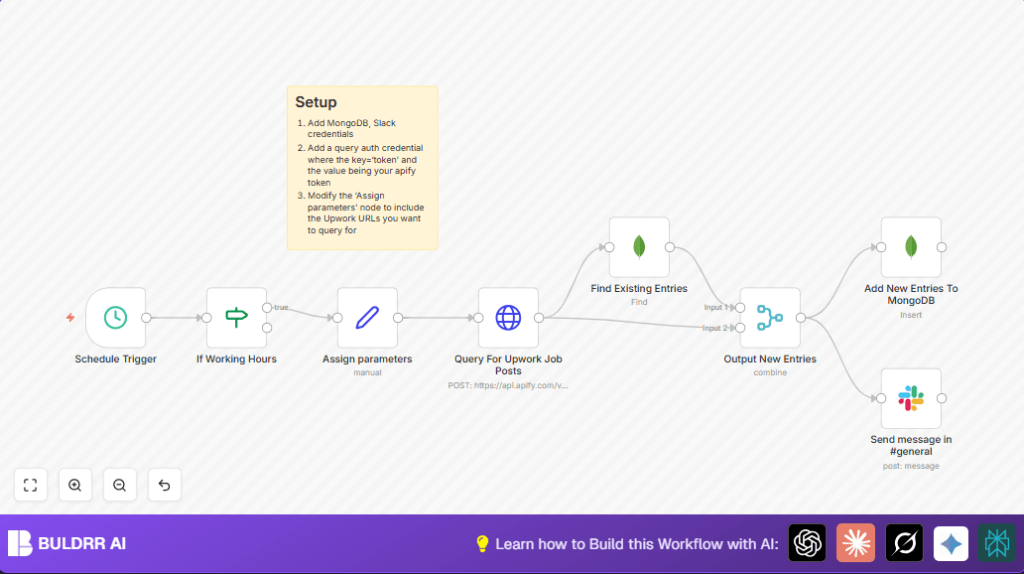

What This Automation Does
This workflow checks Upwork every 10 minutes from 3 AM to 3 PM server time to find new Python and Java jobs. It removes duplicate jobs by comparing title and budget with stored data in MongoDB. New jobs get saved in the database and a message with details is sent to a Slack channel.
This saves a lot of time by automating job search and notifying you fast about relevant gigs so you can apply quicker.
What This Workflow Does
The workflow inputs are URLs for Upwork job searches about Python and Java and a proxy country code.
It processes by sending those URLs to an Apify API to scrape current job posts. Then it checks MongoDB for duplicates based on title and budget. Unique job posts get saved to the database. After saving, it sends each new job as a Slack message in a chosen channel.
The outputs are saved unique jobs in MongoDB and Slack notifications for those jobs.
Tools / Services Used
- n8n: Automation editor and runner.
- Apify API: Provides fresh scraped Upwork job posts.
- MongoDB: Database to store job posts and check duplicates.
- Slack: For sending notifications about new job posts.
- Optional Proxy service: Provides a country-specific proxy (e.g., France) to avoid IP blocks.
Who Should Use This Workflow
Freelancers who spend many hours daily searching Upwork for new jobs.
Anyone who wants to get notified quickly about fresh Python or Java gigs without the hassle of manual searching and duplicate tracking.
Beginner Step-by-Step: How to Use This Workflow in n8n
1. Download and Import
- Click the Download button on this page to get the workflow file.
- Open the n8n editor (cloud or self-hosted). If self hosting, see self-host n8n.
- Use the menu to select Import from File and upload the downloaded workflow JSON.
2. Configure Credentials
- Add your MongoDB credentials with read/write permissions.
- Add your Apify API Key in HTTP Query Authentication credentials.
- Add your Slack API token that can post messages to the
#generalchannel.
3. Adjust Settings
- Check the Assign parameters node and edit the job search URLs if needed.
- Update proxy country code if you want another location for scraping.
- If needed, update Slack channel name or MongoDB collection names.
4. Test and Activate
- Run the workflow manually once to test it and see job data and notifications.
- If no errors, activate the workflow to run automatically every 10 minutes within working hours.
Inputs, Process, and Outputs Explained
Inputs
- Arrays of URLs from Upwork searching Python and Java jobs.
- Proxy country code (like “FR”) for location-specific scraping.
- Current time hour for checking working hours.
Processing Steps
- Schedule Trigger runs every 10 minutes.
- If node checks time is between 3 AM and 3 PM.
- Set node assigns URLs and proxy code.
- HTTP Request calls Apify API with URLs and proxy to scrape Upwork jobs.
- MongoDB Find checks if jobs exist already by title and budget.
- Merge node filters out duplicates, keeping only new jobs.
- MongoDB Insert saves new jobs in MongoDB.
- Slack node sends detailed notification messages.
Outputs
- New job posts stored in MongoDB collection.
- Slack messages about new, fresh jobs in the chosen channel.
Common Problems and Fixes
No new jobs in Slack
The Merge node might remove all jobs as duplicates.
Check MongoDB query and merge settings to make sure unique jobs pass through.
MongoDB insert fails
There might be permission issues or missing fields.
Check MongoDB user rights and field mappings in the insert node.
HTTP Request authentication error
Apify API Key missing or wrong.
Double-check Apify credentials in HTTP Query Authentication and correct node selection.
Customization Ideas
- Change job keywords by editing URLs in the Assign parameters node.
- Adjust working hours time range in the If node to fit your schedule.
- Add more Slack nodes to notify different channels based on job category.
- Update proxy country code to scrape jobs from other countries.
- Add more data fields to save in MongoDB for richer job information.
Deployment Notes
After testing, activate the workflow to run every 10 minutes during set hours.
Enable n8n execution logs to watch for errors and performance issues.
Consider running on a self-host n8n server for full control and more customization if needed.
This automation can work continuously with little maintenance.
Summary of Benefits
✓ Automates job hunting by scraping Upwork every 10 minutes within working hours.
✓ Removes duplicate job posts efficiently using MongoDB.
✓ Saves new jobs persistently in a database for long-term tracking.
✓ Sends quick Slack notifications so you see fresh jobs immediately.
✓ Enables proxy usage to reduce IP blocks with location-based scraping.
✓ Saves hours of manual work and helps you respond faster to job offers.
