

What This Automation Does ⚙️
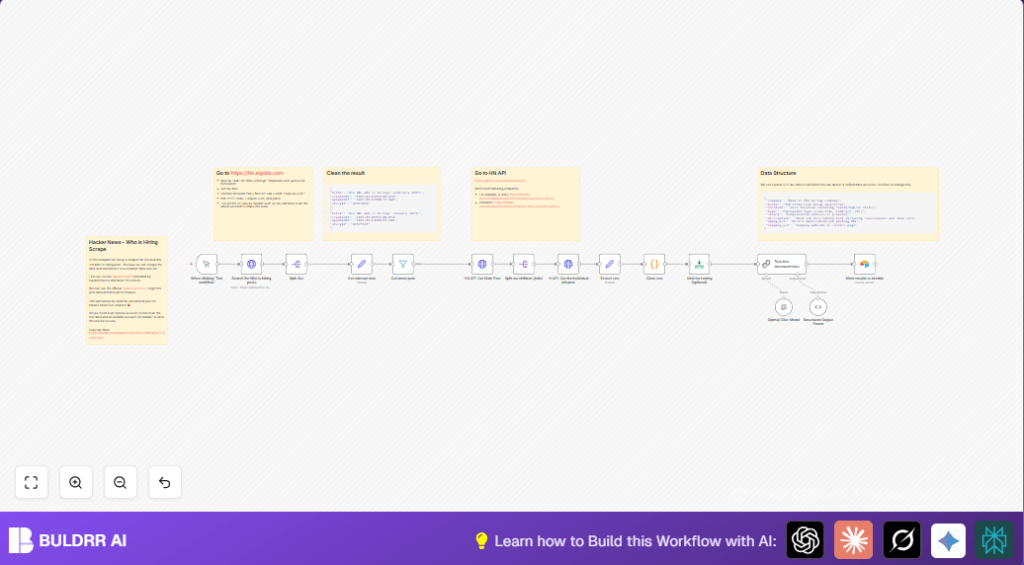
This workflow finds new job posts from Hacker News asking “Who is hiring?” every month.
It grabs posts from last 30 days, cleans the text, uses AI to pull out job details, and saves all in Airtable.
This saves hours of manual copying and keeps job data tidy and searchable.
It works by querying Hacker News search API for hiring posts, then fetching each full post and all job replies.
Cleaned text goes to OpenAI GPT-4o-mini to get structured data like company, role, location, and application links.
After that, the structured jobs are saved to Airtable for easy tracking.
Inputs → Processing → Outputs
Inputs
- API keys for Algolia to query Hacker News posts
- OpenAI API key for GPT-4o-mini model access
- Airtable base and table where jobs are stored
Processing
- Searches Hacker News posts titled exactly “Ask HN: Who is hiring?” within last 30 days
- Splits search results into individual posts
- Fetches full post data and all job-reply comments using official Hacker News API
- Cleans text with JavaScript code removing HTML tags and fixing characters
- Calls OpenAI GPT-4o-mini to parse cleaned text into structured job info JSON
- Filters posts by date and applies optional testing limits
Output
- New rows in Airtable with fields like company, job role, location, salary, job type, application URL, and description
- A reliable, searchable job listings database updated monthly
Who Should Use This Workflow
This helps recruiters, job boards, or anyone wanting fresh tech job listings.
Users who want to stop spending hours copying job posts by hand will find this handy.
It is also good for people who want neat, structured data from raw forum posts for analysis or outreach.
If you use self-host n8n or a cloud account, you can run this regularly.
See self-host n8n for running on your own server.
Tools and Services Used
- Hacker News Algolia API: To query relevant “Ask HN: Who is hiring?” posts.
- Hacker News Official API: Fetch full posts and comments by ID.
- n8n Workflow Automation: Orchestrates API calls, processing, and data flow.
- OpenAI GPT-4o-mini: Parses unstructured job text into a clean JSON format.
- Airtable API: Stores cleaned and structured job listings.
Beginner Step-by-Step: How to Use This Workflow in n8n
Step 1: Import the Workflow
- Download the workflow file using the Download button on this page.
- Open your n8n editor.
- Click on “Import from File” and select the downloaded workflow JSON.
Step 2: Add Your Credentials and API Keys
- Go to Credential settings in n8n.
- Add your Algolia API Key and App ID for the Hacker News search node.
- Add your OpenAI API key for the GPT-4o-mini node.
- Add Airtable API key and connect to your base and table where job posts will be saved.
Step 3: Configure IDs and Table Columns (if needed)
- Check ‘Search for Who is hiring posts’ node has the right search query.
- Verify ‘Write results to airtable’ node matches your Airtable base and table columns.
- Check the cleaning JavaScript code inside the ‘Clean text’ node to customize if wanted.
- Review prompt text in ‘OpenAI Chat Model’ node if needed.
Step 4: Test the Workflow
- Trigger the workflow manually using the Manual Trigger node.
- Watch each node run and verify it fetches data and saves correctly.
Step 5: Activate for Production Usage
- Switch the Manual Trigger node to a scheduled trigger for automation (weekly/monthly).
- Monitor workflow runs occasionally for errors.
Edge Cases and Failure Points
- If API keys are missing or wrong, HTTP requests will fail with 403 Forbidden.
- If too many job posts are processed, OpenAI API limits can be hit causing timeouts.
- Unclean or malformed text can produce incomplete JSON parsing from GPT.
- Duplicates may occur if Airtable is not cleared or de-duplication logic added.
Customization Ideas
- Change search filter in ‘Search for Who is hiring posts’ node to target other “Ask HN” posts.
- Adjust days threshold in ‘Get latest post’ filter for different date ranges.
- Edit JavaScript in ‘Clean text’ to tweak text cleaning rules.
- Replace Airtable node with Google Sheets or SQL database node to change storage.
- Switch OpenAI model in ‘OpenAI Chat Model’ node for cost or accuracy balance.
Summary of Benefits
✓ Saves over 5 hours monthly by automating job post collection.
✓ Turns messy forum posts into clean, structured job records.
✓ Keeps job listings fresh by filtering last 30 days automatically.
✓ Stores data in Airtable for easy management and search.
✓ Flexible to adjust filters, cleaning, and storage options.
✓ Works with self-host n8n or cloud setups for scheduled runs.
