
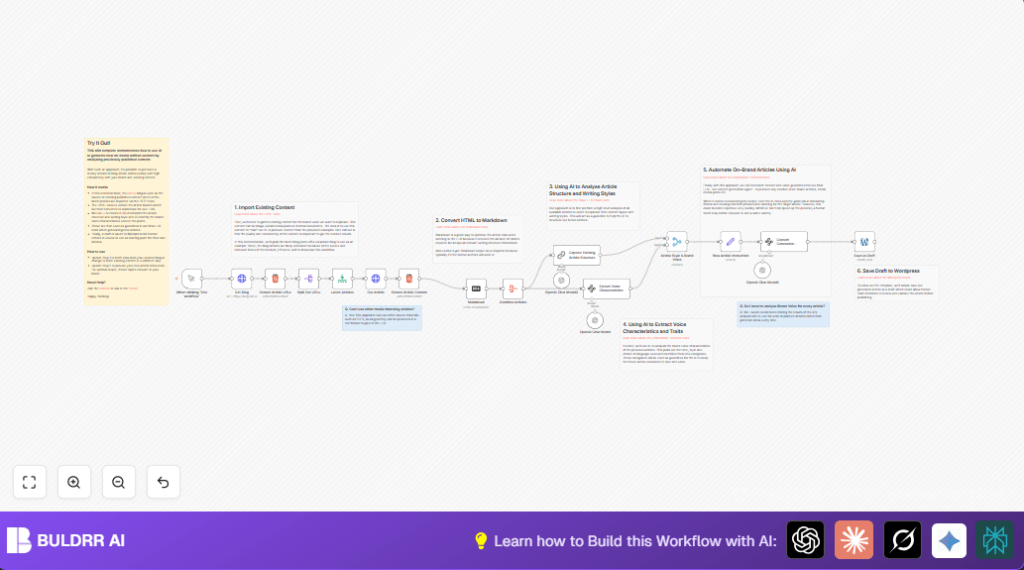

What This Workflow Does ⚙️
This workflow fetches the latest blog articles and learns your brand voice and style automatically.
It then uses AI to write new blog drafts matching your style.
The result is on-brand content saving time and keeping your blog consistent.
The workflow grabs article URLs, reads each article, and changes the HTML to Markdown for better AI use.
Then, it analyzes structure and tone with OpenAI, and uses that info to create a fresh draft.
Who Should Use This Workflow
People managing company blogs who want to keep a consistent tone.
Anyone who finds editing old content and keeping messages uniform hard.
It helps content teams save hours of manual review.
Non-technical marketers can get quick blog drafts without deep writing skills.
Tools and Services Used
- n8n: Workflow automation platform.
- OpenAI API: AI text analysis and generation.
- WordPress REST API: Saves drafts to WordPress.
- HTTP and HTML Extract nodes: Fetch and parse web pages.
- Markdown node: Converts HTML to Markdown for AI.
Inputs → Processing Steps → Output
Inputs
- URL of your blog homepage to fetch latest articles.
- WordPress site credentials for posting drafts.
- OpenAI API key for text analysis and content generation.
Processing Steps
- Download homepage HTML with HTTP Request.
- Extract article links using HTML Extract.
- Split the URLs into individual items.
- Limit processing to five newest articles.
- Fetch each article HTML content.
- Extract article body with HTML selectors.
- Convert HTML article to Markdown for better AI input.
- Aggregate Markdown articles into one set.
- Analyze article structure and style using OpenAI chat nodes.
- Extract brand voice details from articles.
- Combine structure and voice features for content instructions.
- Set instructions for new article creation.
- Use AI to generate a new blog draft matching brand style.
- Create a draft post automatically in WordPress.
Output
A draft blog post saved in WordPress matching brand voice and style.
This can be reviewed and published by content teams.
Beginner Step-by-Step: How to Use This Workflow in n8n
Step 1: Import Workflow
- Download the full workflow file using the Download button on this page.
- Open the n8n editor where you create workflows.
- Click “Import from File” and select the downloaded workflow file.
Step 2: Configure Credentials and Settings
- Add your OpenAI API Key in the n8n credential manager.
- Enter WordPress site credentials with API access in the WordPress node.
- Check the HTTP Request node URLs to match your blog homepage.
- Edit the Set node with new article instructions to your preferred blog topic.
Step 3: Test and Run
- Click “Test workflow” to run the entire process manually.
- Look at node outputs to ensure article URLs and content are fetched correctly.
- Verify the AI generates a draft post saved as a WordPress draft.
Step 4: Activate Workflow for Production
- Once testing is successful, click “Activate” in n8n.
- Optionally, add a scheduled trigger to run this weekly.
- Use the workflow as a reliable content draft generator.
For users running self-host n8n, load this workflow the same way inside your system.
Customization Ideas
- Change the blog URL in the Get Blog node to your blog site.
- Use the Limit node to process more or fewer articles.
- Edit the instructions in the Set node to guide AI for specific topics.
- Replace article sources with PDFs or other content by changing HTTP nodes.
- Set WordPress node to publish immediately by changing the post status.
Common Problems and Fixes
- No article links found: Update CSS selectors in Extract Article URLs node matching your blog’s HTML.
- OpenAI API errors: Check your API key and usage quotas.
- Empty Markdown outputs: Verify article HTML extraction selectors.
- WordPress post errors: Confirm API access and credentials.
Pre-Production Checklist ✅
- Confirm OpenAI API keys are saved in n8n credentials.
- Test HTTP requests can access your blog URLs.
- Verify CSS selectors match the blog’s actual HTML.
- Run manual test and check node outputs for correct data.
- Backup WordPress site or use a testing environment before going live.
Result Summary
✓ Saves hours by automating blog draft creation.
✓ Guarantees consistent writing style and tone.
✓ Produces new drafts quickly for marketing teams.
✓ Integrates with WordPress for easy content management.
