

What This Workflow Does
This workflow takes a simple list of article prompts from a Google Sheet and turns them into full draft blog posts on WordPress, with SEO-friendly content and images created automatically.
It stops manual writing and publishing errors and saves about 8-10 hours per week.
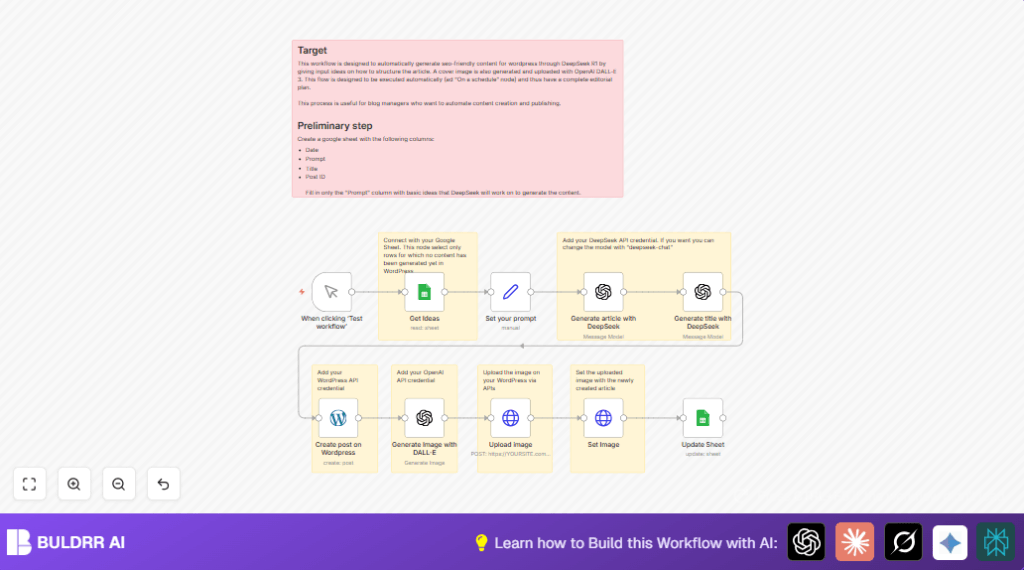
It pulls prompts, makes articles with DeepSeek, makes titles, creates posts, generates images with DALL·E 3, uploads them, and updates the sheet with results.
Who Should Use This Workflow
This workflow is for people managing blogs or content sites who want to do less manual work and avoid mistakes.
If you keep your article ideas in Google Sheets and use WordPress, this helps you post drafts faster.
Tools and Services Used
- Google Sheets API: To get and update article prompts and post info.
- DeepSeek OpenAI Models: To write SEO-rich HTML articles and make catchy titles.
- WordPress REST API: To create draft posts and upload images.
- OpenAI DALL·E 3: To create realistic cover images for posts.
- n8n Automation Platform: To connect all steps and run the workflow.
Inputs, Process, and Outputs
Inputs
- Google Sheets rows with article concept prompts.
- API access tokens and credentials for Google Sheets, WordPress, and OpenAI.
Processing Steps
- Get prompts from Google Sheets.
- Send each prompt to DeepSeek to generate a full SEO article in HTML format.
- Use DeepSeek again to create a short SEO-friendly title from the article.
- Create a new WordPress post in draft status with generated title and content.
- Generate a photographic cover image from the title using DALL·E 3.
- Upload the image to WordPress via REST API.
- Set the uploaded image as the featured image on the post.
- Update Google Sheets row with post ID, publish date, and the title.
Outputs
- Draft WordPress blog posts with SEO content.
- Featured images attached to posts.
- Google Sheets updated with new post details for tracking.
Beginner Step-by-Step: How to Use This Workflow in n8n
Import Workflow File
- Download the workflow file using the Download button on this page.
- Open your n8n editor (self-hosted or cloud) and click on “Import from File”.
- Select the downloaded workflow file to load it inside n8n.
Configure Credentials and IDs
- Add your API credentials for Google Sheets, WordPress, and OpenAI inside n8n’s credentials manager.
- Update the Google Sheets node with your Sheet ID and sheet name if different.
- Check and update WordPress node with your site URL and authentication settings.
- If any prompt texts or settings appear in Set your prompt or OpenAI nodes, make sure they are correctly copied.
Test the Workflow
- Run the workflow once manually by clicking the test button on Manual Trigger.
- Look at the execution results at each step to confirm articles, titles, and images create properly.
Activate for Production
- Change the trigger node from Manual Trigger to the scheduler node if you want automatic runs.
- Enable the workflow to run in background.
- Monitor workflow executions for any errors.
If running self-hosted n8n, use a reliable VPS to keep automation working smoothly. You can find help here: self-host n8n.
Customization Ideas
- Use a different DeepSeek model for a chatty style by changing
modelId. - Set the WordPress post status to
publishto skip the draft review step. - Adjust the DALL·E 3 prompt style to generate artistic or illustrative images.
- Add SEO metadata like meta descriptions or tags in the WordPress post creation step.
- Switch the trigger to run on a schedule for fully hands-free automation.
Common Problems and Solutions
Authentication Failed on Google Sheets or WordPress Nodes
Cause: API keys might be wrong or expired.
Fix: Go to n8n credential manager, log in again, and update credentials.
DeepSeek Returns Empty Content
Cause: Prompt might not be clear or exceeded API usage limits.
Fix: Check prompt setup, make sure the OpenAI plan allows the model use.
Image Upload Fails in HTTP Request Node
Cause: Authorization headers missing or incorrect for WordPress media upload.
Fix: Verify WordPress API credentials and correct HTTP headers.
Production Readiness Checklist
- Google Sheets rows have prompts but empty titles and post IDs.
- All API credentials are valid and working.
- Tested workflow manually with expected outputs.
- Backed up Google Sheets data before letting workflow update.
- WordPress API endpoints respond correctly with credentials.
Summary of Benefits
✓ Saves 8-10 hours each week by automating content creation and publishing.
✓ Reduces mistakes from manual copy-paste and data entry.
→ Turns simple Google Sheets prompts into full WordPress draft posts.
→ Automatically adds SEO titles and cover photos to improve ranking.
✓ Keeps editorial tracking clean by updating Google Sheets with final post info.
