

What This Workflow Does
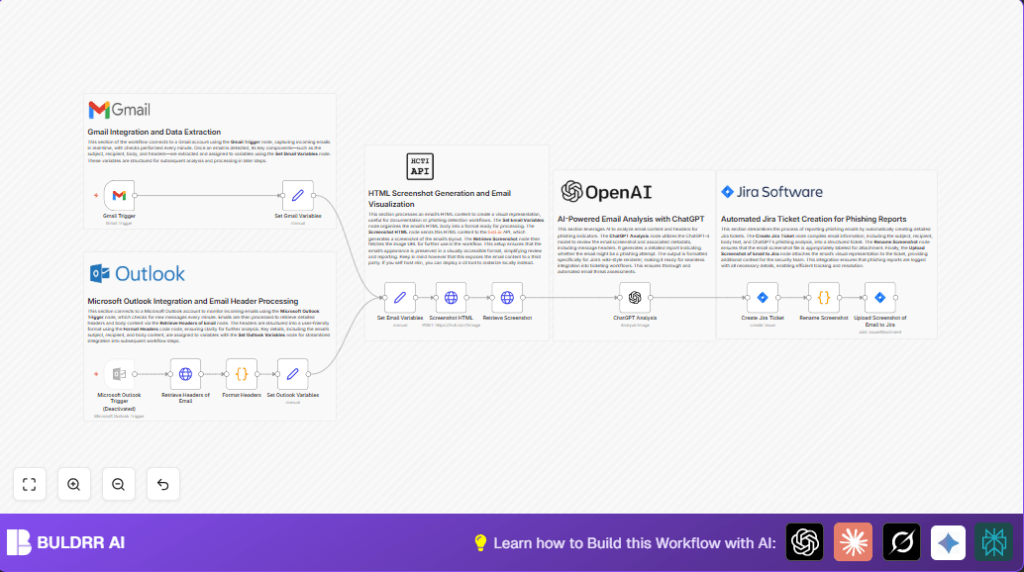
This workflow scans Gmail inbox every minute to catch new emails quickly.
It takes the email’s subject, recipient, body, and headers and organizes them clearly.
The email’s HTML content is turned into a screenshot image using the hcti.io API.
ChatGPT-4 AI analyzes the email to check if it might be phishing using the LangChain node.
Then the workflow makes a Jira ticket with all extracted info and the screenshot attached.
This helps security teams act fast on suspicious emails with full text and visuals.
Who Should Use This Workflow
This workflow is for people who get many emails and want to find phishing fast.
IT security workers can save hours from looking manually for scams.
It fits companies that use Gmail, OpenAI, Jira, and want clear phishing reports.
Tools and Services Used
- Gmail: Detects incoming emails every minute.
- hcti.io API: Makes screenshot images from HTML email bodies.
- OpenAI ChatGPT-4 via LangChain node: Reads email content and headers to find phishing signs.
- Jira Software Cloud: Creates tickets with email details and images for security team review.
- n8n automation platform: Runs the workflow, connects all parts. Supports self-hosting via self-host n8n.
Inputs, Processing, and Outputs
Inputs
- New emails arriving in Gmail inbox (checked every minute).
- Email content: HTML body, text, subject, recipient, headers.
Processing
- Extracts key parts of email using the Set nodes.
- Uses hcti.io API to convert HTML body into a visual screenshot image.
- Downloads the screenshot image file for attachment.
- Calls ChatGPT via LangChain to analyze the screenshot and headers for phishing risks.
- Creates a Jira ticket with email info and AI analysis in the description.
- Renames screenshot file and uploads it as an attachment to the Jira ticket.
Outputs
- A Jira issue with full email details, AI phishing analysis, and screenshot attached for fast review.
How to Use This Workflow in n8n
Import Workflow
Download the workflow file using the Download button on this page.
Inside the n8n editor, select “Import from File” and choose the downloaded workflow.
Set Credentials
- Add credentials for Gmail with OAuth2.
- Enter API keys and authentication for hcti.io in the HTTP Request node settings.
- Input OpenAI API Key for the LangChain ChatGPT node.
- Configure Jira credentials with rights to create issues and upload attachments.
Update Settings
- Adjust email polling frequency if needed in the Gmail Trigger node.
- Change Jira project IDs or issue types as required.
- Modify ChatGPT prompt if you want custom AI questions or analysis details.
Test Workflow
Run the workflow on a test email to confirm the screenshot is generated, AI analysis runs, and Jira ticket creates correctly.
Activate Workflow
Turn on the workflow to run automatically every time a new email arrives. Monitor logs for errors.
Customization Ideas
- Enable the Microsoft Outlook Trigger node to support Outlook inbox monitoring.
- Change email check timing in Gmail Trigger to balance email catching speed and API limits.
- Edit the AI ChatGPT prompt for specifics like spear phishing or malware detection.
- Replace hcti.io API with local HTML screenshot tools like Puppeteer to avoid sending data outside.
- Add Jira custom fields or labels to mark tickets by risk level or department.
Common Issues and Fixes
- No emails trigger Gmail node: OAuth2 credentials may be missing or expired. Renew Gmail connection and check filters.
- Screenshot API errors: Check hcti.io API keys, request format, and rate limits.
- Jira tickets missing or no attachments: Ensure Jira API user has permission to create issues and add attachments.
Pre-Production Checks
- Verify Gmail OAuth2 credentials and API scopes allow email reading.
- Test hcti.io API with manual calls to confirm access and limits.
- Check OpenAI API key quota and permissions for ChatGPT-4 use.
- Confirm Jira credentials can create issues and upload files.
- Run workflow with sample emails and review Jira tickets, screenshots, and analysis accuracy.
Summary
✓ Scans Gmail every minute for new emails.
✓ Converts email HTML to image for visual proof.
✓ Uses AI (ChatGPT-4) to analyze emails for phishing risk.
✓ Creates Jira tickets with full info and attachments.
✓ Saves hours of manual work for security teams daily.
