

What this workflow does
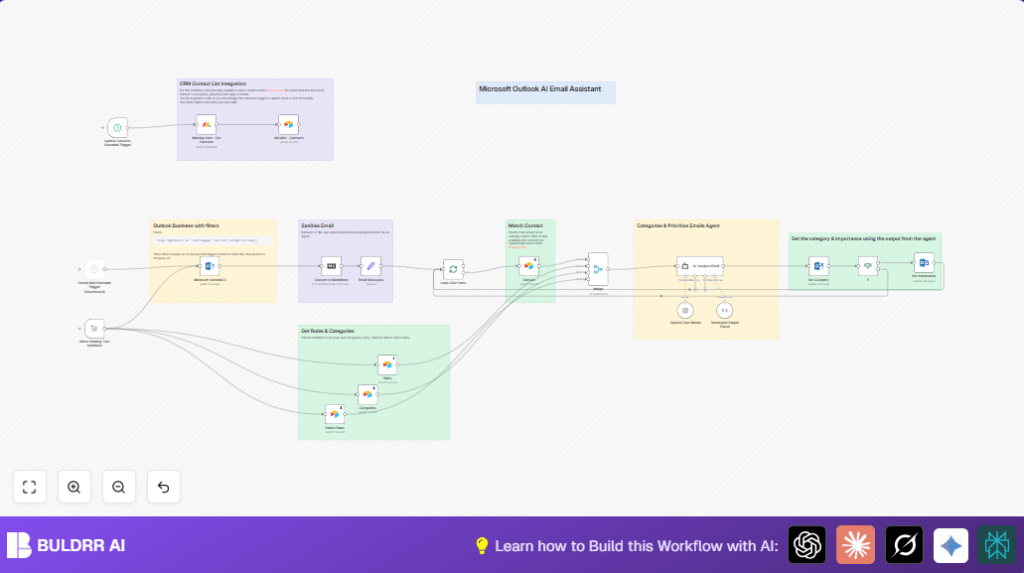
This workflow gets unread and unflagged emails from a specific Microsoft Outlook folder.
It cleans the email content, fetches contacts from Monday.com, and keeps contacts updated in Airtable.
Then the workflow uses AI to categorize each email by subject, sender, and body.
After AI assigns category and subcategory, the workflow updates the email in Outlook with this info.
If the AI flags an email as ‘Action’, its importance is set to High.
This helps users save time in sorting emails and avoid missing urgent tasks.
Who should use this workflow
This is good for people who get many emails and spend too long sorting them manually.
It is helpful for anyone wanting AI to help organize Microsoft Outlook inbox automatically.
Users with contact information stored in Monday.com and using Airtable for managing rules benefit more.
Tools and services used
- n8n: Workflow tool coordinating all steps.
- Microsoft Outlook: Provides emails to process and updates email categories.
- OpenAI GPT-4o via Langchain: AI categorizes emails based on content.
- Monday.com: Supplies up-to-date contact data.
- Airtable: Stores contacts, categories, and rules for AI classification and management.
Inputs, processing steps, and output
Inputs
- Unread, unflagged emails from a selected Outlook folder.
- Contact data from Monday.com boards.
- Existing categories and categorization rules from Airtable tables.
Processing
- Convert email body from HTML to markdown text.
- Clean email content by removing HTML tags and special characters.
- Sync Monday.com contacts to Airtable for fresh data.
- Fetch categorization rules, categories, and delete rules from Airtable.
- Process each email individually in a loop.
- Match email sender address with contacts in Airtable.
- Ask AI agent to analyze and assign category and subcategory.
- Parse AI response and update email category in Outlook.
- If subcategory is “Action,” set email importance to High.
Output
- Email categorized and flagged correctly in Outlook.
- Action emails prioritized by higher importance.
- Contacts and classification rules kept current in Airtable.
Beginner step-by-step: How to use in n8n
Importing workflow
- Download the workflow using the Download button on this page.
- Open your n8n editor and choose “Import from File.”
- Select the downloaded workflow file to load it into n8n.
Adding credentials and IDs
- Add Microsoft365 Email Account credentials for Outlook access.
- Add OpenAI API credentials with GPT-4o access.
- Add Monday.com API user credentials.
- Add Airtable API key and connect to your bases and tables.
- Update folder ID in Microsoft Outlook node to specify the email folder.
- Update Monday.com board and group IDs if needed.
- Update Airtable base, table, and view IDs if yours differ.
Testing and activating
- Run the workflow manually to check it fetches emails, processes, and updates categories.
- Fix any errors shown during the test.
- When ready, activate the manual trigger or switch to schedule trigger running every 15 minutes.
- Monitor workflow runs for any issues after activation.
For users running a private server, explore self-host n8n options.
Customization and tips
- Change Outlook filter OData expression to control which emails to process.
- Edit Airtable categories and rules to add new classifications or delete old ones.
- Adjust AI temperature and model type in the AI node for different behavior.
- Replace Monday.com with other CRM tools if needed for contact data.
- Add extra Outlook actions like automated replies or folder moves based on categories.
Edge cases and troubleshooting
- No emails fetched: Check if Outlook folder ID and filter are correct. Remove filter to test if emails come through. Verify credentials.
- AI returns invalid data: Make sure email body cleaning is complete. Check AI node prompt instructions for errors. Confirm OpenAI API connectivity.
- Contacts not syncing: Confirm Monday.com and Airtable API keys are valid. Check board and table IDs. Run nodes one by one to debug.
Summary of results
✓ Save time by automating email sorting and tagging.
✓ Avoid missing urgent emails by AI detecting action items.
✓ Keep contact and rules data fresh without manual updating.
→ Inbox stays organized with minimal effort.
→ Email priorities set correctly for prompt attention.
