
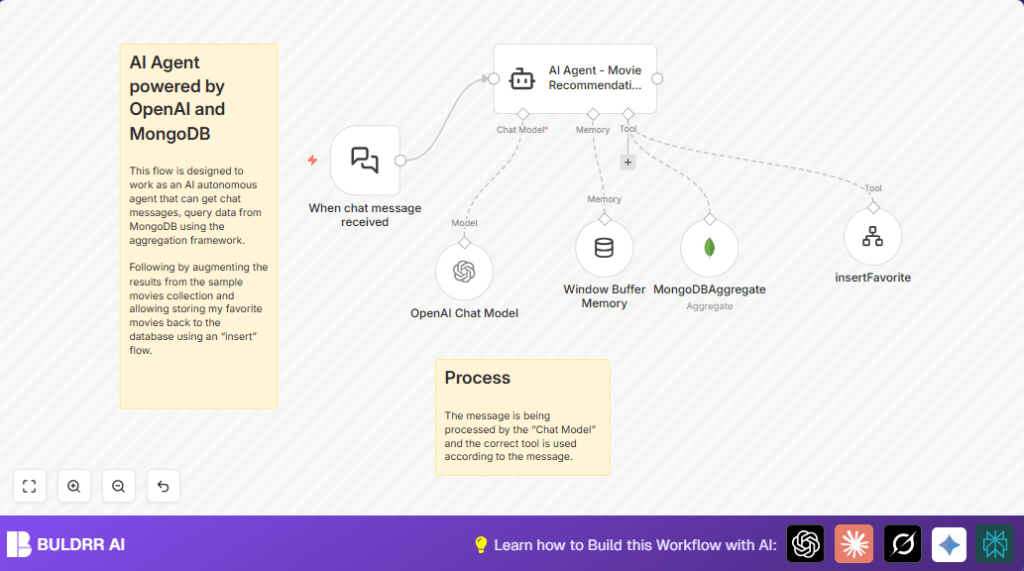

What this workflow does
This workflow acts as a chat assistant that listens for movie recommendation requests.
It uses AI to understand messages and build MongoDB queries to find movies.
It also can save users’ favorite movies into the database automatically.
This stops you from spending a lot of time writing queries or managing favorite lists manually.
Who should use this workflow
This is useful for anyone managing movie recommendations online.
People who want to automate chat replies and reduce errors when searching and saving movies will find this helpful.
No need to write complex queries every time or update favorites by hand.
Tools and services used
- Webhook node: Receives chat messages from users.
- AI Agent – Movie Recommendation node: Understands chat input and uses tools to handle queries and saving data.
- OpenAI Chat Model node: Processes user text to improve understanding.
- MongoDBAggregate node: Runs MongoDB aggregation queries generated by AI.
- Window Buffer Memory node: Keeps up to 10 past messages to keep chat context.
- insertFavorite tool workflow node: Adds user favorite movies into MongoDB.
Input → Process → Output
Inputs
- User chat messages sent to the webhook.
- User commands or confirmations to save favorites.
Processing steps
- Webhook node activates the workflow on incoming chat.
- AI Agent interprets chat, deciding what MongoDB query to run or if favorites need inserting.
- OpenAI Chat Model helps understand natural language requests.
- MongoDBAggregate runs AI-provided aggregation pipelines to fetch movie data.
- Window Buffer Memory keeps chat context so replies feel connected.
- insertFavorite workflow inserts favorite movie title data into MongoDB if user confirms.
Outputs
- Chatbot replies with movie recommendations matching user query.
- Database updates when favorites are added.
- Conversation memory for ongoing context.
Beginner step-by-step: How to run this workflow in n8n
Step 1: Download and Import Workflow
- Download the workflow file using the Download button on this page.
- Open your n8n editor.
- Click on “Import from File” and select the downloaded workflow.
Step 2: Configure API Keys and Credentials
- Add your OpenAI API Key in the OpenAI Chat Model node.
- Set up MongoDB credentials in the MongoDBAggregate and insertFavorite nodes.
- Update any references to collections, IDs, or database names if your setup differs.
Step 3: Check and Edit Prompts if Needed
- In the AI Agent node, make sure the prompt matches your style or needs.
- Copy the prompt below for exact use:
=Assistant for best movies context, you have tools to search using "MongoDBAggregate" and you need to provide a MongoDB aggregation pipeline code array as a "query" input param. User input and request: {{ $json.chatInput }}. Only when a user confirms a favorite movie use the insert favorite using the "insertFavorite" workflow tool of to insertFavorite as { "title" : "<TITLE>" }.
Step 4: Test the Workflow
- Send a test chat message via the webhook URL, such as “Recommend me 5-star movies”.
- Watch the workflow execution to ensure MongoDB returns movies and the chatbot replies.
- Test inserting a favorite movie by confirming in chat.
Step 5: Activate for Production
- Enable the workflow by switching it to active in n8n.
- Set your chat bot or frontend to send messages to the webhook URL.
- Monitor logs to catch errors early.
- Consider setting retries or alerts for failures.
For those using self-host n8n, see self-host n8n resources for setup options.
Customization ideas
- Change the number in Window Buffer Memory node to keep more or less chat history.
- Modify MongoDB collection or aggregation query type to target different movie genres.
- Add new AI tools in the AI Agent node to allow rating movies or handling comments.
Common issues and fixes
- Error executing MongoDB aggregation pipeline
Means the AI made a wrong query. Test the query outside n8n and adjust the AI prompt. - Webhook not receiving chat messages
Check if the Webhook node is set to public and the webhook URL used is correct. - Insert favorite workflow not running as expected
Verify the integration inside the AI Agent node and test the insertFavorite tool separately.
Summary of results
✓ Saves hours of manual work writing queries and data entry.
✓ Reduces mistakes by automating movie searches and favorites.
✓ Provides faster, more personal chatbot replies.
✓ Keeps conversation memory for better user experience.
✓ Allows easy updates to movie favorites in MongoDB.
