
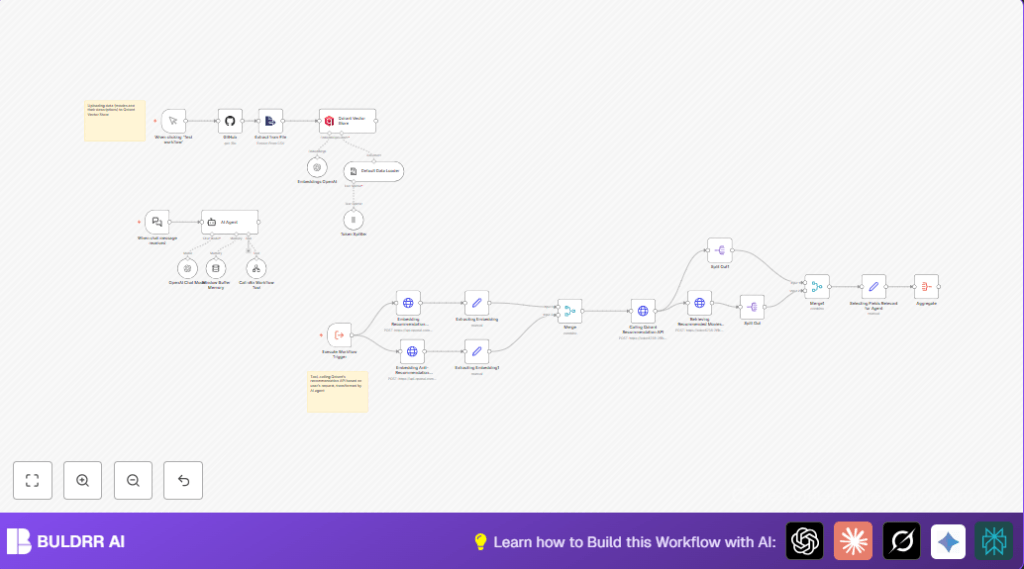

What This Automation Does
This n8n workflow recommends movies based on what a user likes and dislikes.
It reads movie data from a file, turns descriptions into vectors, and stores them in a database.
When the user gives examples, it finds the closest matching movies in meaning.
The workflow then talks back with a list of good movies to watch.
Its goal is to help users quickly find movies that fit their taste without hunting all day.
This system works by using vectors to measure how similar movie descriptions are to user inputs.
The movie data lives in Qdrant, a special vector database for fast searching by meaning.
With OpenAI, the workflow creates embeddings, which are basically lists of numbers representing text meaning.
These embeddings help compare user preferences to many movies and rank the best matches.
The final output is a friendly message listing three recommended movies with titles, years, and summaries.
Inputs, Processing, and Outputs
Inputs
- Movie Data CSV File: Contains movie titles, descriptions, and release years from GitHub.
- User Chat Message: Text describing movies the user likes (positive examples) and dislikes (negative examples).
Processing Steps
- Load movie data CSV from GitHub.
- Create text embeddings for each movie description using OpenAI embedding model.
- Store embeddings and metadata into Qdrant vector database.
- Receive user chat input via Webhook node.
- Generate embeddings for user’s positive and negative example texts.
- Query Qdrant recommendation API with positive and negative embeddings.
- Fetch detailed metadata for the top 3 recommended movies from Qdrant.
- Format the recommendations into a clear JSON structure.
- Use OpenAI GPT-4o-mini model in AI Agent node to create a conversational output message.
Output
A conversational chat response listing the top three movies that best match the user’s preferences.
The message includes movie titles, release years, and short descriptions.
The response is easy to read and hides any numeric scores or internal details.
Beginner Step-by-Step: How to Use This Workflow in n8n Production
Download and Import the Workflow
- Use the Download button on this page to save the workflow file locally.
- Open the n8n editor, already logged in.
- Click on “Import from File” and select the downloaded workflow JSON.
Configure Credentials and Settings
- Add OpenAI API Key to the workflow credentials to enable embedding and chat generation.
- Add Qdrant API credentials to allow loading and querying movie vectors.
- Check the GitHub node to make sure repository owner, name, and file path (e.g.,
mrscoopers/n8n_demo/Top_1000_IMDB_movies.csv) are correct. - Adjust any IDs, emails, or channels if this workflow integrates with external systems beyond the sample.
Test the Workflow
- Trigger the workflow manually or send a test message through the Webhook node with user positive and negative movie examples.
- Verify the output message shows three recommended movies with relevant info.
Activate the Workflow for Production
- Switch the workflow to active mode in n8n.
- Make sure the webhook URL for receiving user chats is accessible to the chatbot or frontend.
- Optionally monitor workflow executions to catch errors or slow responses.
For robust live running, consider self-host n8n to keep control over API keys and async scale.
Tools and Services Used
- GitHub API: Downloads movie CSV data.
- OpenAI Embeddings API: Converts movie descriptions and user examples into vectors.
- Qdrant Vector Database API: Stores movie vectors and performs semantic similarity search.
- n8n nodes: Includes Webhook node, GitHub node, HTTP Request node, Set node, Merge node, SplitOut node, and AI Agent node.
Customization Ideas
- Change the CSV source in the GitHub node to a different movie list.
- Update embedding model parameters in OpenAI nodes to use more recent or more efficient models.
- Increase or decrease the recommendation count in the Qdrant recommendation API call by changing the limit.
- Modify the prompt in the AI Agent node to change how movie recommendations are presented.
- Add extra metadata fields like genre or director to enrich movie info shown in results.
Troubleshooting Common Problems
GitHub Node Returns 404 or Fails
Check that the repository owner, name, and file path are exactly correct.
Make sure your GitHub credentials have permission to read the file.
OpenAI Embeddings API Errors or Empty Vectors
Verify the OpenAI API Key is valid and not expired.
Confirm that the input text (movie descriptions or user examples) are not empty or malformed.
Qdrant Recommendation Returns Few or No Results
Make sure movie data and embeddings were uploaded correctly to Qdrant.
Use Qdrant’s dashboard to check the collection and indexed points.
Re-run the movie upload process if vectors are missing.
Summary of Benefits
✓ Saves many hours by reducing manual movie hunting.
✓ Uses user examples to give personalized and relevant recommendations.
✓ Combines semantic search with conversational AI for natural replies.
✓ Easy to import and configure in n8n with provided workflow.
✓ Works with popular services like GitHub, OpenAI, and Qdrant.
