

What This Workflow Does
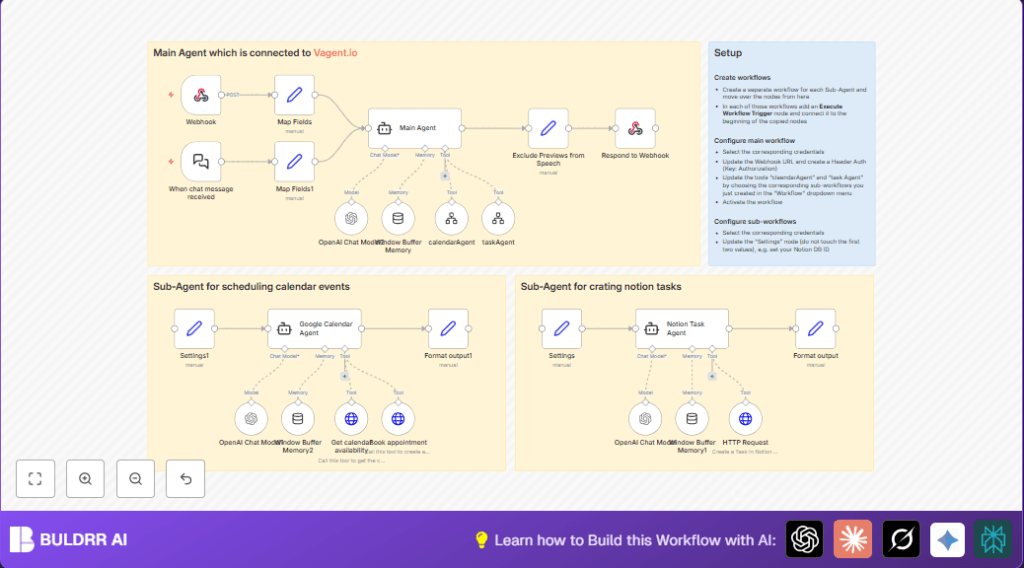
This n8n workflow listens to chat messages and figures out if the user wants to schedule a calendar event or create a task in Notion.
It uses AI agents to understand the request and routes it to the right tool automatically.
The workflow saves time by avoiding manual entry and prevents double-bookings or missed task details.
Who Should Use This Workflow
This workflow is good for anyone managing many meetings and tasks in Google Calendar and Notion.
It helps those who want to reduce time spent on manual scheduling and task logging.
Professionals with multiple projects and tight schedules will find it useful.
Tools and Services Used
- OpenAI GPT-4o Model: Understands chat messages with zero randomness for clear results.
- LangChain Agents: Split tasks between calendar and task creation based on user intent.
- Google Calendar API: Checks availability and books events.
- Notion API: Creates and manages tasks in the user’s Notion database.
- n8n Webhook: Receives secure POST chat requests with authentication headers.
- Window Buffer Memory: Saves conversation context for up to 15 chat turns per session.
Inputs, Processing, and Output
Inputs
The workflow starts with the Webhook node receiving JSON payloads with “prompt” (the chat text) and “sessionID” (to keep track of the conversation).
Processing Steps
- Extract and map raw chat data using a Set (Map Fields) node.
- The Main LangChain Agent reads the prompt and session context to decide which sub-agent to use.
- If the message relates to calendar events, the calendarAgent sub-workflow checks calendar availability via Google Calendar API.
- If booking conflicts exist, the calendar agent suggests alternative times and seeks user confirmation before scheduling.
- If it’s a task request, the taskAgent sub-workflow chats with the user for required info and then creates tasks in Notion.
- Window Buffer Memory nodes keep past conversation details so the AI remembers session context.
Output
The workflow replies through the Respond to Webhook node sending clean, formatted text back to the user.
Tasks appear in Notion, and calendar events show up in Google Calendar.
Beginner Step-by-Step: How to Use This Workflow in n8n
Step 1: Import Workflow
- Click the Download button on this page to save the workflow file.
- Inside n8n, go to the editor and select Import from File.
- Choose the downloaded file to load all nodes and settings.
Step 2: Add and Update Credentials
- Provide Google Calendar OAuth2 credentials in n8n’s credential manager.
- Provide Notion API key and update the Notion database ID in the HTTP Request node for task creation.
- Enter the OpenAI API key with GPT-4o enabled.
Step 3: Configure Webhook
- Make sure header authentication matches your chat client setup.
- Note the webhook URL path like “46116445-3b13-48c0-9a38-cd034bee92ac” to send chat messages.
Step 4: Test the Workflow
- Send a POST request to the webhook URL with a JSON body:
{
  "prompt": "Schedule a meeting with team",
  "sessionID": "session123"
}
Check if the workflow replies and creates calendar events or Notion tasks appropriately.
Step 5: Activate for Production
- Activate the main workflow and the two sub-workflows in n8n.
- Monitor logs to confirm smooth operation.
- Share the webhook URL and usage instructions with your team.
For running n8n on your own server, consider self-host n8n for better control.
Common Problems and Fixes
- 401 Unauthorized Errors: Usually caused by expired or wrong API keys.
Fix by redoing authentication in n8n credentials. - Memory Context Lost Between Requests: Happens when session IDs are not consistent.
Ensure the same sessionId key is used in all memory nodes. - Tasks Not Created in Notion: Could be wrong database ID or missing permissions.
Check the Notion database ID and API token scope.
Customization Ideas
- Change default timezone for calendar events by editing the Settings1 node.
- Modify Notion task priority options in the HTTP Request node payload.
- Increase conversation memory length by adjusting Window Buffer Memory nodes.
- Tweak OpenAI temperature to vary how creative AI responses are.
- Add more agents and sub-workflows for other services beyond calendar and tasks.
Summary of Results
✓ Saves roughly 5 hours per week by cutting manual scheduling and task entry.
✓ Prevents double-bookings and missed task details.
✓ Supports multi-turn chat conversations with lasting context.
✓ Automatically books Google Calendar events and creates Notion tasks.
→ Lets users focus more on managing work and less on data entry.
