

What This Workflow Does
This workflow lets users send many questions at once to the Anthropic Claude AI using n8n. It solves the problem of sending each query one by one, which wastes time and can cause errors or delays. The workflow sends all prompts in one batch, waits until the AI finishes processing, then gets all answers together. This makes the process faster and easier to manage.
It also splits the answers for each prompt so users can handle them separately if needed. This helps keep the system simple and responsive.
Who Should Use This Workflow
Developers who use Anthropic Claude API and want to save time by sending many prompts in one API call will find this helpful. Anyone using n8n to automate chatbot or AI question answering can use this. It is good if users want to reduce API errors, handle results easily, and speed up response times.
Tools and Services Used
- n8n Automation Platform: Runs the workflow and handles API calls.
- Anthropic Claude Batch API: Accepts batched prompts and processes them.
- HTTP Request Node: Sends and checks batch data with Anthropic API.
- Code Node: Parses JSONL response data into usable format.
- Other n8n Nodes: Execute Workflow Trigger, If, Wait, Split Out, Filter, and Set for controlling flow.
Inputs, Processing Steps, and Outputs
Inputs
The workflow starts with inputs:
anthropic-version: A string for the API version header.requests: An array of prompts to batch process.
Processing Steps
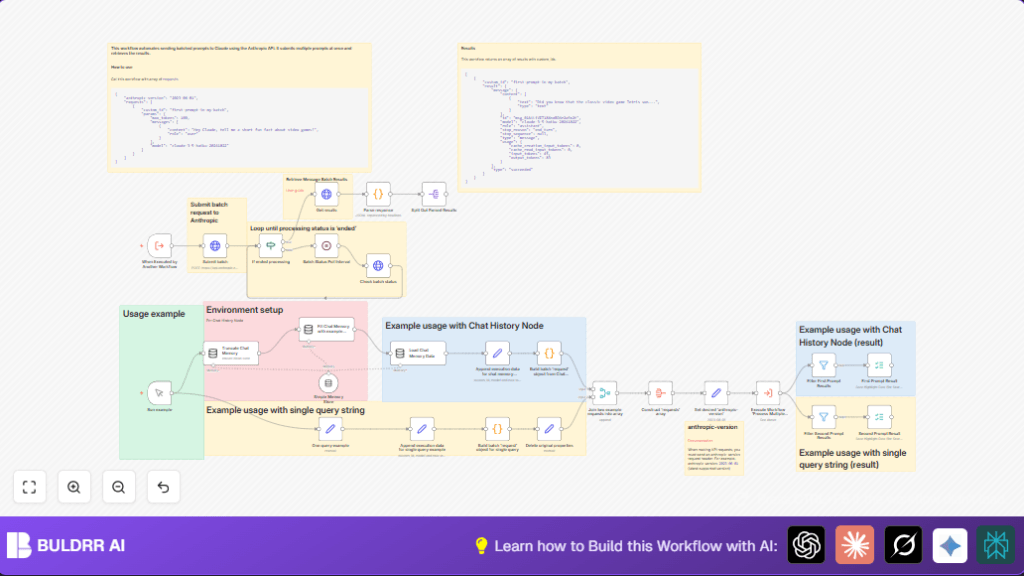
1. The Execute Workflow Trigger node accepts the input data.
2. The Submit batch HTTP Request node sends all prompts together to the Anthropic batch API.
3. The Check batch status node polls the API to see if processing is done.
4. If not complete, the Batch Status Poll Interval Wait node pauses for 10 seconds, then rechecks.
5. When status is “ended,” the Get results node fetches the batch response from a results URL.
6. The Parse response Code node splits the JSONL string into an array of JSON objects.
7. The Split Out Parsed Results node breaks the array into single items for filtering or processing.
8. Filter nodes separate results by unique custom_id so each prompt’s output can be used alone.
Outputs
The workflow produces structured, individual answers for each prompt sent, gathered efficiently from the batch API response. These can be saved or passed to other processes.
Beginner Step-by-Step: How to Use This Workflow in n8n
Importing the Workflow
- Download the workflow file using the Download button on this page.
- In the n8n editor, click “Import from File” and upload the downloaded workflow.
Set Up Credentials and Inputs
- Add your Anthropic API credentials (API Key) inside n8n Credentials.
- Update any IDs, emails, channels, or other fields in Set nodes if the workflow uses them.
- Enter the desired API version string and batch prompts in the input fields where required.
Testing and Activating
- Run the workflow once manually to test. Check that batch submissions work and answers come back.
- Fix any errors if they appear using the troubleshooting tips.
- Activate the workflow to run automatically when triggered for production use.
- Optionally, adjust wait time in the polling step or add more prompts as needed.
For self hosting n8n, see self-host n8n to run this workflow on your own server.
Common Edge Cases and Failure Points
- Parsing Errors: Empty lines in JSONL responses can cause parse failures. The code node already filters empty lines to avoid this.
- Incorrect Batch ID: If the batch ID is missing or wrong, the status check may return 404 errors. Ensure the ID from submission step passes correctly.
- Authentication Failures: Invalid Anthropic API keys cause call failures. Double-check credentials stored in n8n.
Customization Ideas
- Change the
anthropic-versionstring to use a different API version. - Add more prompts to the
requestsarray to batch bigger workloads. - Modify the Wait node duration for faster or slower polling on batch status.
- Use LangChain memory nodes to create chat history and feed context to prompts easily.
- Edit the code in Parse response to handle custom data extraction or formatting.
Summary
✓ Batch submits many prompts to Anthropic Claude API at once.
✓ Polls until processing ends and fetches all results together.
✓ Parses and separates individual prompt answers clearly.
✓ Saves time and reduces errors compared to single API calls.
✓ Easy to configure and run inside n8n for automating AI question answering.
