
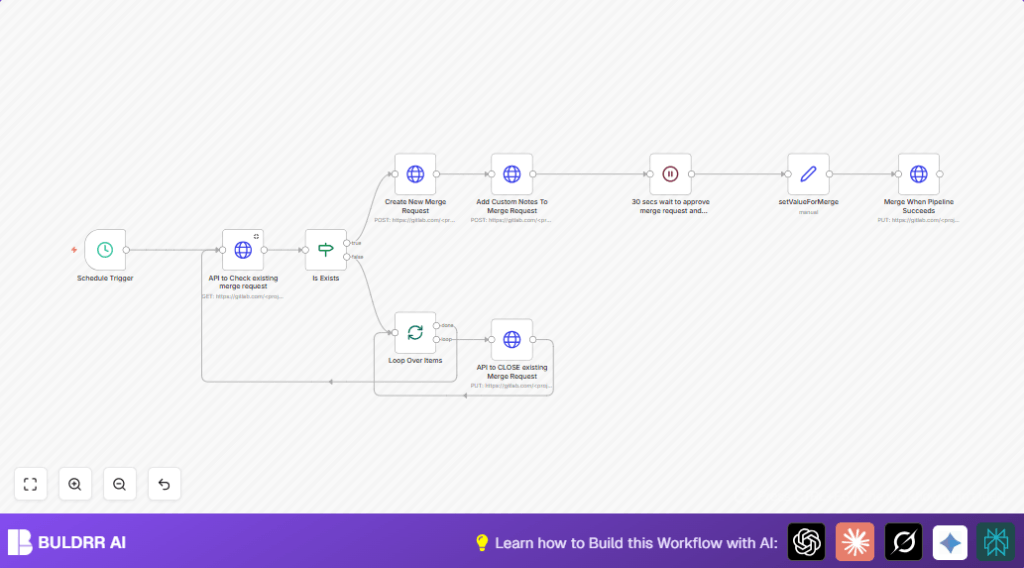

What This Workflow Does
This workflow automates managing GitLab merge requests. It looks for open merge requests on specific source branches to stop duplicates. It makes new merge requests when none found. It adds notes to new merge requests. It waits some seconds for approval and pipeline to finish. It merges requests only after pipeline passes, and can delete the source branch. It can also close old merge requests in batches.
This way, users save time and avoid mistakes. Merges happen safely after CI is complete.
Who Should Use This Workflow
This workflow is for people who use GitLab often with many branches. It fits developers or DevOps working with multiple merge requests. It helps those who want less manual checking and faster merges. It works for anyone needing reliable automation for merge requests and CI pipelines.
Tools and Services Used
- GitLab API: To read and modify merge requests.
- n8n automation platform: To build and run the workflow.
- HTTP Request nodes: To connect with GitLab API endpoints.
- Schedule Trigger node: To run the workflow regularly.
- Wait node: To pause before merge actions.
- Split In Batches node: To close multiple merge requests efficiently.
self-host n8n can be used if preferring own server hosting.
Beginner Step-by-Step: How to Use This Workflow in n8n
Import Workflow
- Click the Download button on this page to get the workflow file.
- Open n8n editor and choose Import from File.
- Select the downloaded workflow file to load it.
Configure Workflow
- Add your GitLab API Key in the credentials for HTTP Request nodes.
- Change the
<projectid>placeholders to your real GitLab project ID. - Update source branch, target branch, merge title, and comments if you want customized inputs.
Test and Activate
- Run the workflow manually to check it works well.
- Fix any errors by checking the tokens and dynamic fields.
- When ready, activate the workflow to run on schedule.
Inputs, Processing Steps, and Output
Inputs
- GitLab project ID.
- Source and target branch names.
- Merge request title and optional comments.
- GitLab personal access API Key.
Processing Steps
- Schedule trigger starts workflow on chosen interval.
- Check if open merge requests exist for given source branch using API.
- If none found, create new merge request with given title.
- Add comment notes to the new merge request.
- Wait 30 seconds for manual approval and CI pipeline finish.
- Set options for when to merge and if branch is removed.
- Send API request to merge MR when pipeline succeeds.
- Split batches to loop over older merge requests and close them.
Output
- New or updated merge requests with comments.
- Merged merge requests after successful pipeline.
- Older unneeded merge requests closed.
Edge Cases and Failures
- Errors if API Key is missing or wrong.
- Wrong project ID or branch names cause no merge requests found.
- Merge does not happen if pipeline fails or flags are wrongly set.
- Watch for API rate limits when running often.
Debug by testing API calls separately.
Customization Ideas
- Switch
merge_when_pipeline_succeedsflag to true to merge exactly post pipeline. - Change
should_remove_source_branchto false to keep branches after merging. - Add dynamic content in merge comments, like author name or timestamps.
- Increase wait time after comment to match longer pipeline durations.
Summary of Benefits and Results
✓ Saves time by automating merge request checks and creation.
✓ Avoids duplicate merge requests.
✓ Adds helpful comments automatically.
✓ Ensures merges only happen after pipeline success.
✓ Closes old merge requests in batches for cleaner project.
