
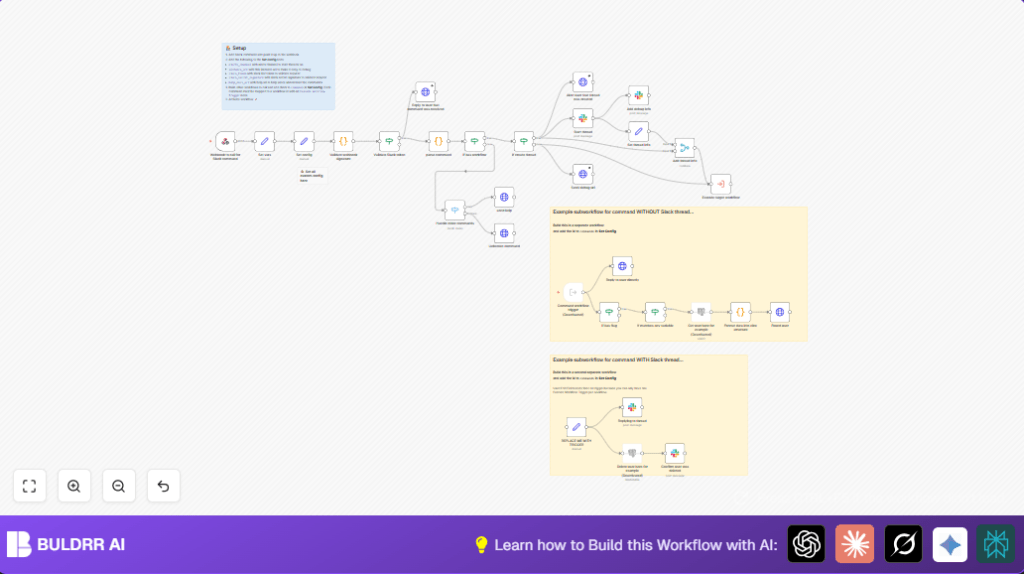

What This Workflow Does
This workflow helps automate Slack slash commands using n8n. It solves the problem of slow manual command handling by automatically checking commands, running related tasks, and sending back messages. This makes responses fast and consistent while keeping security strong.
The workflow validates Slack request signatures, parses command inputs, matches commands to workflows, posts replies in threads or direct messages, and handles unknown commands nicely.
Tools and Services Used
- Slack API: Receives slash commands, validates tokens, sends messages.
- n8n Workflow Automation: Runs the command parsing, validation, branching, and responses.
- Node.js crypto library: Checks Slack webhook signatures for request security.
- Slack Slash Commands: Entry points for user commands to trigger workflows.
- HTTP Request Node: Sends replies and debug info back to Slack.
- Subworkflows in n8n: Execute specific tasks like user management based on commands.
Inputs → Processing Steps → Outputs
Inputs
- Slack slash command post requests with command text and tokens.
- Slack signing secret and bot token from configuration.
- Predefined commands mapping to workflows.
Processing Steps
- Validate the request signature and timestamp using the Slack signing secret.
- Check if the Slack token matches the configured bot token.
- Parse the command text to find command name, flags, parameters, and environment variables.
- Match the command name against known commands to decide which subworkflow to run.
- Decide if a new Slack thread should start or reply directly.
- Execute the matched subworkflow dynamically inside n8n.
- Send back responses or error messages to Slack, threading messages as needed.
Outputs
- Slack thread messages showing command results or errors.
- Debug links to workflow runs posted in Slack.
- Error messages for unknown commands or failed validations.
Who Should Use This Workflow
This workflow is for Slack workspace admins or community managers who get many slash command requests. It is also good for anyone who wants secure and fast responses to Slack commands without writing code every time.
Users running self-host n8n or cloud n8n can easily import and deploy this for better Slack automation.
Beginner Step-by-Step: How to Use This Workflow in n8n
1. Importing the Workflow
- Download the workflow file by clicking the Download button on this page.
- Open the n8n editor where you want to use this workflow.
- Go to “Import from File” in n8n and select the downloaded workflow JSON to upload.
2. Setting Up Credentials and Configurations
- Open the Set config node in the workflow.
- Fill in your Slack Bot Token and Slack Signing Secret correctly.
- Update any channel names, workflow IDs, help documentation URLs, or environment variables if needed.
- Make sure subworkflows referenced exist and have proper permissions.
3. Testing the Workflow
- Trigger the Slack slash command configured to hit this workflow’s webhook.
- Watch the workflow execution in n8n to see if it runs without errors.
- Confirm that the Slack messages appear correctly with threading if configured.
4. Activating for Production
- Activate the imported workflow by turning on the toggle in n8n.
- Verify the webhook URL matches the Slack slash command Request URL.
- Make sure the Slack app permissions and tokens are up to date.
- Start using automated commands in your Slack workspace.
Customizing the Workflow
- Add new command keys to the commands object inside the Set config node to run additional subworkflows.
- Change the
startThreadboolean for each command to enable or disable Slack thread creation. - Update
help_docs_urlto provide users with your own documentation links. - Edit message text or format inside HTTP Request nodes to customize Slack notifications.
- Change environment variable parsing rules in the parse command node code to handle more variable names or value formats.
Troubleshooting Common Issues
- Incorrect signature error: Make sure Slack signing secret matches in Set config and system clock is correct.
- Command not recognized: Add the new command key and workflow ID to commands object.
- Slack replies not threaded: Check that
startThreadis true and thread timestamp info is used correctly.
Summary of Benefits and Results
✓ Saves time by automating Slack slash command handling.
✓ Prevents errors and unauthorized access using signature and token checks.
✓ Makes conversations clear by threading command replies.
→ Gives fast, accurate command responses inside Slack.
→ Enables easy addition of new commands without coding.
