

What This Workflow Does
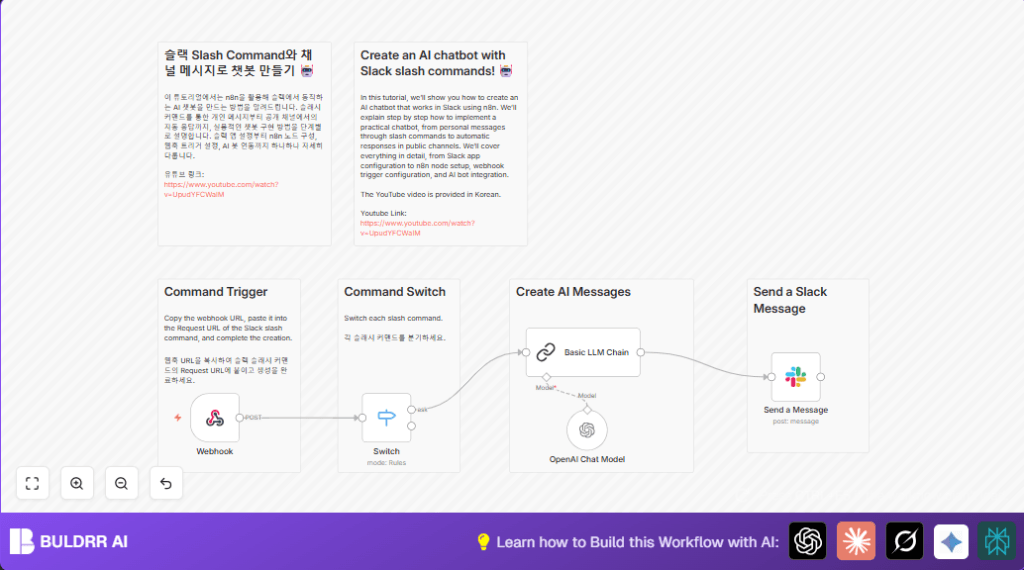
This workflow automates Slack responses using AI in n8n. It listens to Slack slash commands like /ask. Then it sends the command text to OpenAI GPT-4o-mini for an answer. Finally, it sends the AI reply back to Slack instantly. This reduces manual replies and saves time in team communication.
The goal is to make answering common questions faster and easier without waiting for people to type manual answers. It improves accuracy and speeds up conversations inside Slack.
Who Should Use This Workflow
This workflow is for anyone managing Slack channels who often replies to the same questions. It is useful for team managers, community managers, and support staff.
If answering many Slack queries takes hours, this workflow can save many work hours per week.
Tools and Services Used
- n8n Automation Platform: Runs the workflow and holds nodes.
- Slack API with Slash Commands: Sends user commands to n8n via a webhook.
- OpenAI API (GPT-4o-mini model): Generates AI text responses.
- Langchain Integration in n8n: Wraps OpenAI calls for conversation handling.
For users running their own n8n servers, consider checking self-host n8n options.
How the Workflow Works (Inputs → Process → Output)
Inputs
- User types a slash command in Slack (e.g.,
/ask How to automate Slack?). - Slack sends this command data as a POST request to n8n’s Webhook node.
Process
- The Webhook node captures the command and payload.
- A Switch node checks the
body.commandvalue (e.g.,/askor/another). - For each command, the workflow routes to the appropriate action.
- For
/ask, the input text is sent to the OpenAI Chat Model node configured with GPT-4o-mini. - The OpenAI node uses Langchain to create context-aware AI replies.
- The output then flows to a Basic LLM Chain node, which formats the AI text.
Outputs
- The formatted AI answer is sent back to the original Slack channel or user through the Send a Message Slack node.
- The Slack channel ID is extracted from the webhook payload to target the right conversation.
- The user sees the AI response instantly inside Slack.
Beginner Step-by-Step: How to Use This Workflow in n8n
Step 1: Import the Workflow
Download the workflow file from this page using the Download button.
Open n8n editor and go to the main screen.
Click on “Import from File” and select the downloaded workflow file.
Step 2: Adjust Settings
Add your Slack app credentials in the Slack nodes, including bot tokens and required scopes.
Paste your OpenAI API Key into the OpenAI Chat Model node credentials.
Check and update the webhook path if needed. It should match your Slack slash command Request URL.
Make sure the channel ID variable stays as {{ $('Webhook').item.json.body.channel_id }} in the Slack message send node.
Step 3: Test the Workflow
Trigger your slash command inside Slack, for example: /ask How to automate replies?
Verify the AI reply message appears promptly in Slack.
Step 4: Activate for Production
Turn on the workflow by toggling the active switch in n8n.
Run the workflow continuously so Slack commands get processed live.
Monitor for errors using the n8n executions panel.
Customization Ideas
- Add extra slash commands in the Switch node for different workflows.
- Change the AI model in the OpenAI Chat Model node to other Langchain-compatible models if needed.
- Format Slack messages with bold or italics using Slack’s plain text markdown.
- Log conversations by inserting Google Sheets nodes or Code nodes to save chats.
Common Issues and Solutions
- Slack slash command gives 500 error or no response
Cause: Wrong webhook URL or HTTP method not POST.
Fix: Copy exact URL from Webhook node and set method to POST. - AI response blank or unrelated
Cause: Missing API key or wrong prompt setup.
Fix: Add valid OpenAI API Key and use{{ $json.body.text }}to pass input text. - Slack message does not show
Cause: Missing permissions or wrong channel ID.
Fix: Add chat:write scope in Slack app and check channel ID extraction.
Summary of Results
→ Slash commands in Slack get instant AI answers automatically.
→ Saves many hours weekly on common question replies.
✓ Improves team speed and accuracy in Slack discussions.
✓ No more manual typing for repetitive queries.
✓ Easy to install and test inside n8n without coding.
