
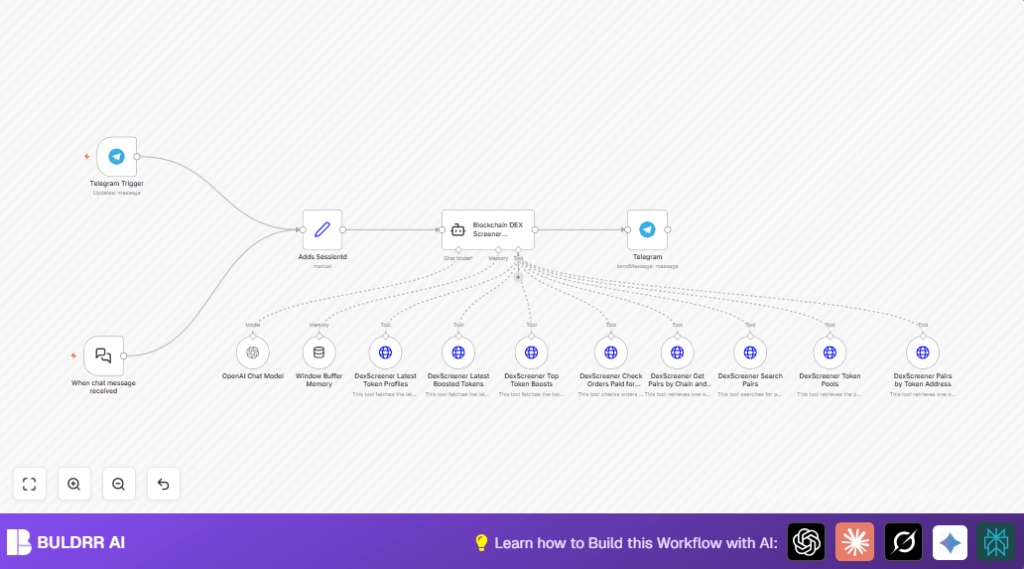

What This Workflow Does
This workflow helps users get live blockchain data from decentralized exchanges (DEX) using Telegram. It answers questions about tokens, trading pairs, boosts, and liquidity pools fast and in one place. It saves time by automating data fetching and giving clear answers inside Telegram chat.
The workflow listens to Telegram messages, understands what data is asked, collects live details from DexScreener API, and replies directly. So users avoid checking websites one by one and get instant info when they ask.
Who Should Use This Workflow
This is good for cryptocurrency traders, analysts, and anyone needing fast updates from decentralized exchanges. Users wanting token profiles, boosted tokens, trading pair info, or liquidity pool details on blockchains will find it useful. It helps avoid manual searching and keeps data fresh through live calls.
Tools and Services Used
- Telegram Bot API: Receives user messages and sends replies.
- OpenAI GPT-4o-mini Chat Model: Understands natural language questions and creates API call requests.
- LangChain Agents: Run the AI logic and manage different API tools.
- DexScreener Public API: Provides real-time blockchain DEX data without extra keys.
- n8n Workflow Platform: Orchestrates nodes from Telegram to AI and API calls, running the automation.
How the Workflow Works (Input → Process → Output)
Inputs
User sends messages with questions through Telegram chat to the bot. For example, asking about latest boosted tokens or specific trading pairs.
Processing Steps
- Telegram Trigger node receives the message.
- Set node adds a sessionId from chat ID to keep chat context.
- LangChain chatTrigger node receives the text for AI processing.
- OpenAI Chat Model (GPT-4o-mini) interprets the question to decide which DexScreener API tools to use.
- Window Buffer Memory keeps previous conversation context for smooth replies.
- LangChain Agent node calls different DexScreener HTTP Request toolHttpRequest nodes to fetch live data. These include token profiles, boosted tokens, trading pair searches, order checks, and liquidity pools.
- Data comes back as JSON, analyzed by the agent to create a friendly answer.
Output
The Telegram node sends back the generated answer formatted as text in the same chat, providing real-time DEX insights.
Beginner Step-by-Step: How to Use This Workflow in n8n
Importing the Workflow
- Download the workflow file from this page using the Download button.
- Open the n8n editor where the automation runs.
- Click on “Import from File” and select the downloaded file.
Configuring Required Settings
- Set up Telegram credentials by adding the bot token to the Telegram nodes.
- Enter your OpenAI API Key in the OpenAI Chat Model node credentials.
- Check the Set node to ensure sessionId maps to
{{$json.message.chat.id}}. - If needed, adjust any chain IDs, token addresses, or query parameters in the DexScreener HTTP Request nodes.
Testing and Activation
- Send test messages to your Telegram bot, like “Show boosted tokens” or “Info for ETH/USDT pair”.
- Make sure the workflow processes the message and responds correctly in Telegram.
- Activate the workflow by toggling it ON in n8n to run continuously.
- Make sure n8n is reachable by Telegram’s webhook for triggers to work (public URL setup).
- For production reliability, consider using self-host n8n if not already done.
Possible Input and Output Examples
- Input: “List latest boosted tokens”
- Process: Bot processes language, calls DexScreener API for boosted tokens data
- Output: Text reply with token names, boost percentages, and images
- Input: “Find trading pair for SOL/USDC”
- Process: Bot uses pair search API to find matching trading pair and liquidity info
- Output: Detailed info on pair including volume and addresses
Customization Ideas
- Add more HTTP nodes for other DEX APIs if needed.
- Switch OpenAI GPT-4o-mini to other GPT models for better or cheaper AI responses.
- Enable multilingual support by editing the LangChain system messages.
- Make Telegram messages richer with markdown or images if supported.
- Add delay or queue features to handle API rate limits better.
Common Issues and Solutions
- OpenAI Chat Model does not respond: Check API key validity and credits.
- Telegram messages don’t trigger workflow: Verify bot token and webhook URL settings.
- DexScreener API rate limits reached: Add delays or queue throttling between requests.
Summary
✓ Saves time by automating blockchain DEX data retrieval inside Telegram.
✓ Lets users ask natural language questions and get live token and trading info.
✓ Combines OpenAI GPT-4o-mini and LangChain with DexScreener APIs.
✓ Easy to import and configure in n8n for real-time insights.
