
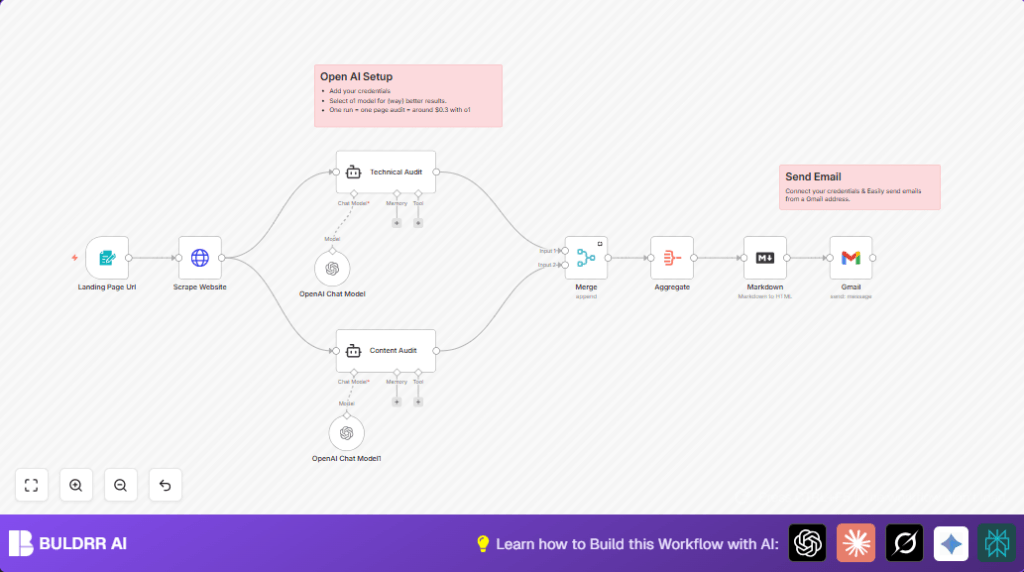

What the Workflow Does
This workflow audits website landing pages for SEO problems fast and clearly.
It uses AI to check both page technical parts and written content.
You get a full report by email automatically.
Who Should Use This Workflow
Marketers or website owners who want to find SEO errors quickly.
Anyone tired of manually checking pages and wants good advice fast.
Users who want reports emailed without extra work.
Tools and Services Used
- n8n Workflow Automation: Runs the whole audit process automatically.
- OpenAI API (GPT-4o Mini): Analyzes page code and content using AI models.
- HTTP Request: Gets the live page HTML from given URL.
- Gmail (OAuth2): Sends the finished SEO report email.
- Langchain Agents: Run AI audit prompts separately for technical and content checks.
How the Workflow Works
Input
- User enters a landing page URL in the form.
Processing Steps
- Form Trigger receives the page URL.
- HTTP Request downloads the page HTML content.
- Two Langchain Agent nodes analyze the HTML:
one checks technical SEO issues,
the other checks content and keywords. - Merge node combines both AI audit results.
- Aggregate joins audit texts into one report.
- Markdown node turns report into easy-to-read HTML.
- Gmail sends the report by email.
Output
A detailed SEO audit report arrives in email.
It shows technical fixes and content tips clearly.
Beginner Step-by-Step: How to Use This Workflow in n8n
Download and Import
- Download the workflow file using the Download button on this page.
- Open n8n editor where you want to add the workflow.
- Use Import from File option in n8n to load the workflow JSON.
Configure Credentials and Settings
- Add OpenAI API Key in the Langchain Agent nodes.
- Add Gmail OAuth2 credentials in the Gmail node.
- Check and update any emails, IDs, or URLs if needed to fit your setup.
- Verify the prompts in the Langchain Agent include {{$json.data}} expressions exactly as shown.
Test and Activate
- Run a test by submitting a URL to the form endpoint.
- Check if the email report sends and looks correct.
- Fix any errors from logs or node messages.
- Activate workflow in n8n for continuous use.
For more control or privacy, consider self-host n8n to run workflows on your server.
Inputs, Processing, and Outputs Explained
Inputs
- User input URL through Form Trigger.
- Page HTML fetched with HTTP Request.
Processing
- Technical SEO and content SEO checked by two Langchain Agent nodes.
- The audits are merged and combined using Merge and Aggregate nodes.
- Report formatting with Markdown node.
Outputs
- Final SEO audit report sent via Gmail node.
Customizations Ideas
- Edit Langchain Agent prompts to focus on local SEO or e-commerce specifics.
- Set Gmail node to send to multiple emails separated by commas for teamwork.
- Add Slack node after Merge to alert SEO team instantly.
- Insert HTML to PDF conversion node before Gmail to send PDF reports.
Common Problems and Fixes
OpenAI API rate limit or no response
Check OpenAI API keys in credentials.
Upgrade plan or add retries to handle limits.
HTTP Request returns 404 or empty page
Verify URL format and availability.
Use headers or proxy if site blocks requests.
Gmail node authentication fails
Reauthorize Gmail OAuth2 credentials.
Allow n8n access in Google security settings.
Pre-Production Checklist
- Submit test URL in form to check webhook trigger.
- Confirm HTTP Request gets page HTML.
- Verify prompts contain the {{$json.data}} placeholder.
- Make sure AI nodes produce clear audits.
- Check Merge and Aggregate nodes combine outputs correctly.
- Preview markdown output in HTML.
- Test Gmail sends email properly.
- Run full end-to-end test before going live.
Deployment Guide
Activate the workflow after confirming setup and tests.
It runs when the form URL is submitted.
Enable error logging in n8n for monitoring.
You may secure the form webhook with authentication.
Scale or split audits if API costs grow.
Summary
✓ Automates SEO audits by URL input.
✓ Uses AI models for technical and content checks.
✓ Sends clear reports by email automatically.
✓ Saves hours and avoids manual errors.
✓ Easy to import, configure, test, and launch in n8n.
