

What this workflow does
This workflow finds all images on a webpage and checks their alt texts.
If alt text is missing or too short, it creates better descriptions using OpenAI GPT-4.
It saves results in Google Sheets for easy review and tracking.
This fixes accessibility and SEO issues fast without manual work.
Who should use this workflow
Anyone needing to improve image alt texts on websites.
Great for website managers who want fast audits and fixes.
Best for pages with static HTML images, less so for sites with dynamic image loading.
Tools and services used
- n8n: to build and run the automation workflow.
- Google Sheets API: records image data and updates alt text.
- OpenAI GPT-4 (Langchain node): generates improved alt text descriptions.
- HTTP Request node: downloads webpage HTML.
Inputs, Processing & Outputs
Inputs
- A webpage URL to audit images from.
- Google Sheets credentials and open API access.
- OpenAI API key for GPT-4 access.
Processing steps
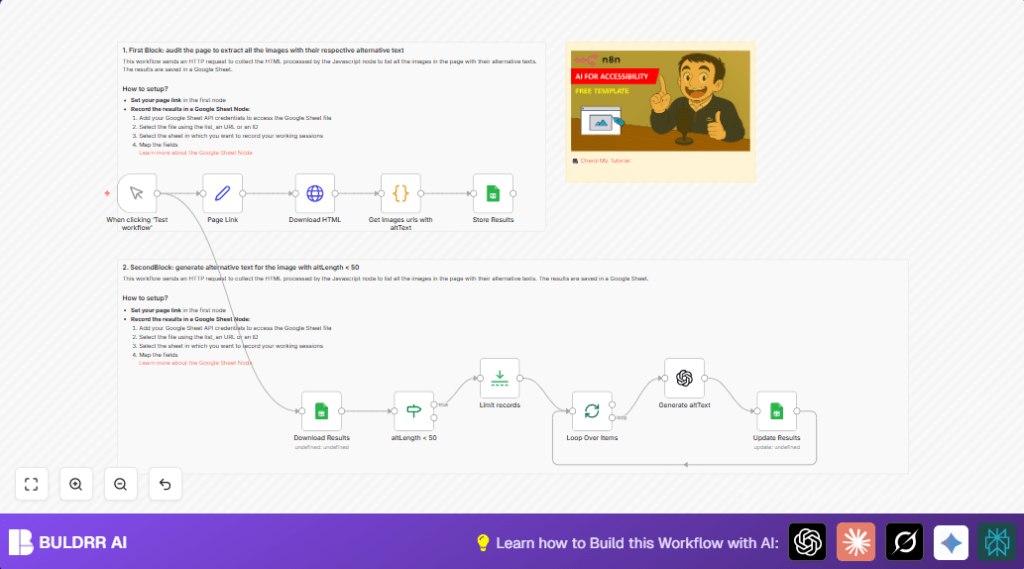
- Download page HTML using HTTP Request node.
- Extract all <img> tags with their src and alt attributes using a JavaScript Code node.
- Convert relative URLs to full URLs using base URL data.
- Save extracted data into Google Sheets to track all images.
- Reload data from Google Sheets and filter images with alt text shorter than 100 characters.
- Limit batch size to avoid too many API calls.
- Send each short alt text image URL to OpenAI GPT-4 using the Langchain node to get better alt text under 150 characters.
- Update Google Sheets rows with suggested new alt texts for audit review.
Outputs
- A Google Sheet with original and AI-improved alt texts per image.
- A clear list of images needing accessibility fixes.
Beginner step-by-step: How to use this workflow in n8n
Step 1: Import the workflow
- Download the workflow file using the Download button on this page.
- Open n8n editor.
- Use the Import from File option to load the workflow.
Step 2: Configure credentials and settings
- Add Google Sheets credentials with proper access.
- Add OpenAI API Key to the Langchain OpenAI node.
- Update the Google Sheets document ID and sheet name if different.
- Edit the Page Link node to set the webpage URL and base URL to audit.
Step 3: Test and activate
- Run the workflow manually once to ensure it works and data writes correctly.
- Check Google Sheet for results and new alt text suggestions.
- Activate the workflow for production use as needed.
Consider self-host n8n for running this regularly if preferred.
Key code snippet for image extraction
This JavaScript code extracts all image tags and alt texts from the page HTML and fixes relative URLs:
const html = $input.first().json.data;
const baseUrl = $('Page Link').first().json.baseUrl;

const imgTagRegex = /<img\b[^>]*>/gi;
const altAttrRegex = /alt\s*=\s*["']([^"']*)["']/i;
const srcAttrRegex = /src\s*=\s*["']([^"']*)["']/i;

const imageTags = html.match(imgTagRegex) || [];

const results = imageTags.map((tag, index) => {
  const altMatch = tag.match(altAttrRegex);
  const srcMatch = tag.match(srcAttrRegex);

  let alt = altMatch ? altMatch[1] : '[No alt text]';
  let src = srcMatch ? srcMatch[1] : '[No src]';

  if (src !== '[No src]' && !src.startsWith('http')) {
    if (baseUrl.endsWith('/') && src.startsWith('/')) {
      src = baseUrl + src.slice(1);
    } else if (!baseUrl.endsWith('/') && !src.startsWith('/')) {
      src = baseUrl + '/' + src;
    } else {
      src = baseUrl + src;
    }
  }

  return {
    index: index + 1,
    src,
    alt,
    altLength: alt.length,
  };
});

return results.map(item => ({ json: item }));
This code helps find which images need alt text improvement.
Common issues and tips
- No images found: The webpage might use JavaScript to load images after page load. Consider tools that run page scripts to scrape dynamic content.
- Google Sheets update errors: Check if Google Sheets API credentials have permission to edit the specific spreadsheet.
- OpenAI API limits: Make sure the API Key is correct and requests do not exceed quota.
- Broken URLs: Verify the base URL matches the audited webpage domain to resolve relative paths.
Customization ideas
- Change the minimum alt text length filter to catch more or fewer images needing updates.
- Adjust the batch size node to control how many images process per run.
- Switch to another GPT-4 or other OpenAI model if cost or speed is a concern.
- Add extraction of other image attributes in the code node like titles or dimensions.
- Store results in CSV or databases instead of Google Sheets if preferred.
Summary of results
✓ Quickly gathers images and alt text from any static (HTML) webpage.
✓ Finds alt texts that are missing or very short and generates better descriptions.
✓ Saves both original and improved alt texts in Google Sheets for easy audit.
→ Makes image accessibility and SEO fixes much faster and less error-prone.
→ Helps website managers track progress and improve user experience for all visitors.
