

What This Workflow Does
This workflow gets long-lived Facebook access tokens for user and page accounts automatically.
It solves the problem of manually exchanging short-lived tokens, which is slow and error-prone.
When run, it gives you fresh user and page tokens ready to use.
Who Should Use This Workflow
Developers or marketers managing Facebook apps who want to save time.
Anyone needing to refresh Facebook tokens without manual errors.
Tools and Services Used
- n8n: Automates the workflow with nodes.
- Facebook OAuth API: Exchanges tokens securely.
- Facebook Graph API: Retrieves page tokens.
- Set node: Holds your app credentials.
- HTTP Request nodes: Make Facebook API calls.
Inputs, Processing Steps, and Outputs
Inputs
- Your Facebook App client_id and client_secret.
- A short-lived Facebook user access token.
- (Optional) The app-scoped user ID.
Processing Steps
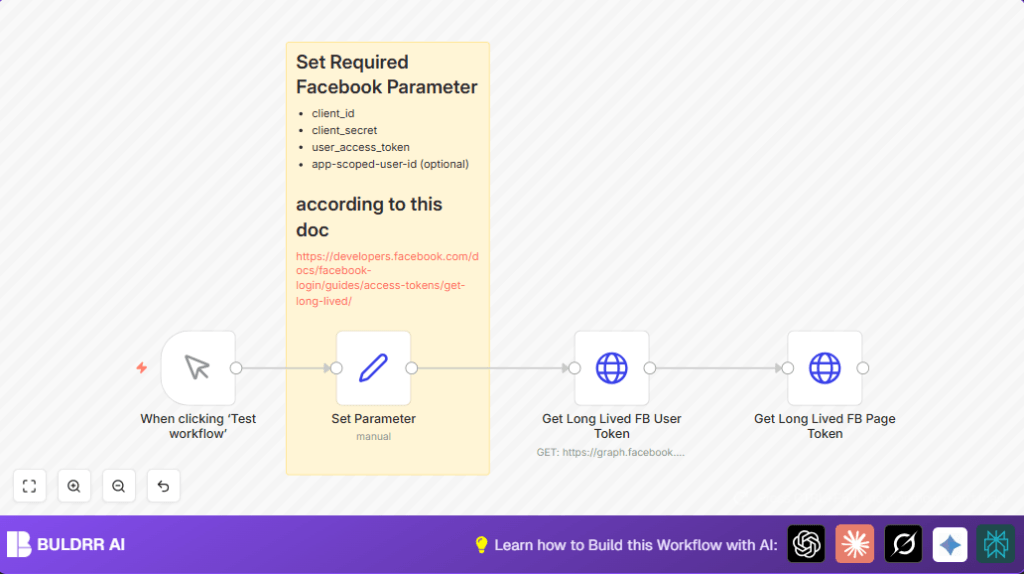
- The workflow starts manually or with a trigger.
- The Set node stores app credentials and token.
- The first HTTP Request exchanges the short-lived token for a long-lived user token.
- The second HTTP Request uses the long-lived user token to get pages this user manages.
Output
- A long-lived user access token.
- Long-lived page access tokens for each managed page.
Beginner Step-by-Step: How to Use This Workflow in n8n
1. Import the Workflow
- Download the workflow file using the Download button on this page.
- Open your n8n editor.
- Click on the three-line menu and choose Import from File.
- Select the downloaded workflow file to import.
2. Configure the Workflow
- Go to the Set Parameter node.
- Enter your Facebook App client_id and client_secret.
- Paste your short-lived Facebook user access token.
- Optionally enter the app_scoped_user_id if available.
- If you use n8n Credentials Manager, link your Facebook API Key here.
3. Test the Workflow
- Click the Manual Trigger node.
- Run the workflow and check if the tokens are returned successfully.
4. Activate for Production Use
- Replace the Manual Trigger with a Cron Trigger node for scheduled token refresh.
- Ensure all required IDs or tokens are updated regularly.
- Enable the workflow to run automatically.
- If self hosting n8n, see self-host n8n resources to configure.
Edge Cases and Common Errors
401 Unauthorized means the app ID, secret, or token is wrong or expired.
Check credentials and refresh the short-lived token.
Missing user ID means the app_scoped_user_id is wrong or not linked to the token.
Make sure the user ID matches the Facebook login token’s owner.
Customization Ideas
- Use n8n Credentials Manager to hide keys.
- Add error-checking nodes to catch API call problems.
- Save tokens into a Google Sheet or database for tracking.
- Send alerts on token expiration via email or chat integration.
Summary
✓ Saves time by automating Facebook token refresh.
✓ Reduces errors from manual token handling.
✓ Provides fresh long-lived user and page tokens.
✓ Easy to set up and customize in n8n.
✓ Supports scheduled token refresh for continual use.
