

Automate Pipedrive OAuth Token Refresh with n8n & Supabase

Discover how to automate refreshing your Pipedrive OAuth tokens using n8n and Supabase. Save hours by handling token expiry smoothly and maintaining seamless API access without manual interference.
httpRequest
supabase
webhook
+6
Workflow Identifier: 2199
NODES in Use: stopAndError, stickyNote, supabase, code, httpRequest, if, respondToWebhook, webhook, set
Automate Pipedrive OAuth token refresh with n8n and Supabase

Press CTRL+F5 if the workflow didn't load.

Learn how to Build this Workflow with AI:

What This Workflow Does

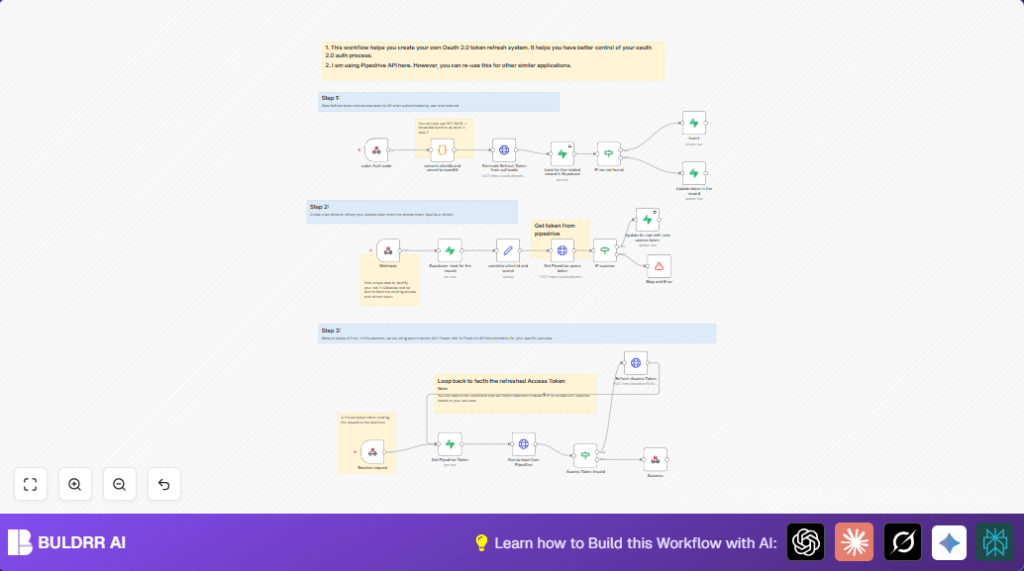
This workflow helps get and refresh Pipedrive API tokens automatically.

It stops API calls from failing because of expired tokens.

The main result is steady access to Pipedrive contacts without manual work.

The system does this by storing and updating tokens safely, then using them for API calls.


Who Should Use This Workflow

People who use Pipedrive with OAuth 2.0 and want to avoid manual token renewals.

Good for anyone needing reliable API access without stopping for token problems.


Tools and Services Used

  • n8n: The automation platform running the workflow.
  • Supabase: Where access and refresh tokens are stored securely.
  • Pipedrive API: The CRM system providing contact data.
  • Webhook with Basic Auth: To securely receive requests.

Beginner Step-by-Step: How to Use This Workflow in n8n

Import Workflow

  1. Download the workflow file by clicking the Download button on this page.
  2. Go to the n8n editor and choose “Import from File”.
  3. Select the downloaded file to load the workflow inside n8n.

Setup Credentials

  1. Add your Supabase credentials in the Supabase nodes.
  2. Provide your Pipedrive OAuth client_id and client_secret where needed.

Configure IDs and URLs

  1. Update any IDs such as AppId or Platform according to your app.
  2. Make sure the webhook URLs match your deployed URLs for token exchange.

Test Workflow

  1. Trigger the workflow manually or via webhook to test token fetching and API calls.
  2. Check the output to confirm contact data returns correctly.

Activate Workflow

  1. Switch the workflow toggle to active to enable production use.
  2. Make sure webhooks are accessible securely from outside sources.

For best control, consider running self-host n8n.


Inputs, Processing, and Outputs

Inputs

  • Webhook requests with user/app identification.
  • Stored access and refresh tokens from Supabase.
  • Pipedrive API authorization code when user authorizes.

Processing Steps

  • Receive authorization code and exchange it for tokens.
  • Save tokens to Supabase securely.
  • Listen for API requests needing Pipedrive data.
  • Retrieve tokens from Supabase.
  • Make authorized API calls with access token.
  • If the access token is expired or invalid, refresh it automatically.
  • Update stored tokens with new ones after refresh.
  • Repeat API call if needed after token refresh.

Outputs

  • Return requested Pipedrive contact data in JSON format.
  • Error messages if token refresh fails or API call errors.

Edge Cases and Failures

If the refresh token expires or is revoked, the workflow returns error messages.

In such case, manual re-authentication is needed to get new tokens.

Supabase query failures may happen if credentials or table names are wrong.

Verify database configuration carefully to avoid empty results.


Customization Ideas

  • Adapt the API call node to work with other OAuth 2.0 APIs by changing URLs and headers.
  • Add more detailed token error checks with a Switch node instead of just If.
  • Store token update history inside Supabase for audit purposes.
  • Add alerting with Slack or email nodes when token refreshes fail.

Summary

✓ Saves many hours by automating token refresh.

✓ Prevents API call failures due to expired tokens.

✓ Keeps Pipedrive data syncing steady and reliable.

→ Enables using Pipedrive API without stopping for token problems.

Automate Pipedrive OAuth token refresh with n8n and Supabase

Visit through Desktop to Interact with the Workflow.

Frequently Asked Questions

Yes. Changing the API endpoint, URLs, and OAuth parameters in the workflow nodes allows use with other OAuth 2.0 APIs.
Usually, token refresh requests do not use API call quotas. Check the API provider’s documentation to be sure.
Use HTTPS for connections, keep Supabase credentials private, and secure webhook access with Basic Auth.
The refresh token might be expired. Run the OAuth authorization flow again to get new tokens and update the database.
Author
Written By
Vikash Kumar
Building AI agents, n8n workflows and end-to-end automation for 30+ Brands across India, the US, Europe, Dubai & Australia. 7+ years of Experience saving founders real hours every week - no code required.

Related Workflows

Automate Twist Channel Creation and Messaging with n8n

This workflow automates creating and updating a channel in Twist and sending a personalized message to specific users. It eliminates manual setup errors and saves time managing Twist communications.

Automate Ideogram Image Generation with Google Sheets & Gmail

This workflow automates graphic design image generation via Ideogram AI, storing image data in Google Sheets and Google Drive, with email alerts via Gmail. It saves designers hours by automating image creation, remixing, review, and record-keeping.

Automate IT Support with Slack and OpenAI in n8n

Streamline IT support by automating Slack message handling using n8n and OpenAI. This workflow handles Slack DMs, filters bots, queries a Confluence knowledge base, and delivers AI-generated responses, improving support efficiency and response time.

Automate Crypto Analysis with CoinMarketCap & n8n AI Agent

Discover how this unique n8n workflow leverages CoinMarketCap’s multi-agent AI to deliver precise, real-time cryptocurrency insights directly via Telegram. Manage crypto data analysis efficiently with automated multi-source API integration.

Automate Gumroad to Beehiiv Subscriber Sync with n8n

Learn how to automatically add new Gumroad sales customers as Beehiiv newsletter subscribers using n8n automation. This workflow saves time by syncing sales data to Google Sheets CRM and notifying your Telegram channel instantly.

Generate On-Brand Blog Articles Using n8n and OpenAI

This workflow automates the creation of on-brand blog articles by analyzing existing company content using n8n and OpenAI. It extracts article structures and brand voice to produce consistent draft articles, saving significant content creation time.
1:1 Free Strategy Session
Your competitors are already automating. Are you still paying for it manually?

Do you want to adopt AI Automation?

Every hour your team does repetitive work, you're burning real money.
While you wait, faster businesses are cutting costs and moving quicker.
AI and automations aren't the future anymore — they're the present.

Book a live 1-on-1 session where we show you exactly which of your daily tasks can be automated — and what it’s costing you not to.