
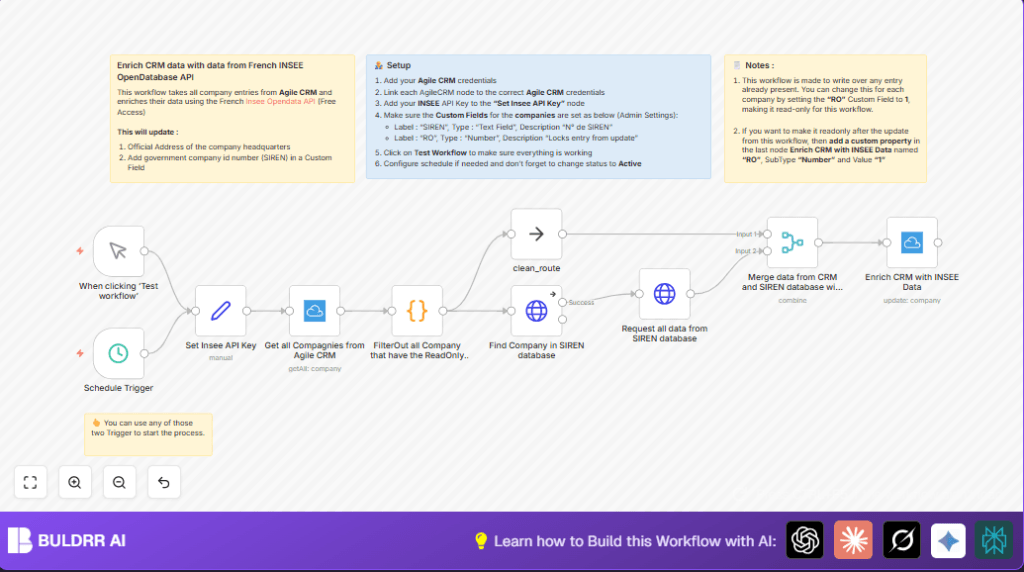

What This Automation Does
This n8n workflow updates company data in Agile CRM automatically using the French government INSEE API.
The main problem it solves is slow, manual updating of company addresses and SIREN numbers that often have mistakes.
The workflow gets all company records, skips those marked read-only, fetches official data from INSEE, and updates Agile CRM companies with accurate info.
After running, Agile CRM holds verified addresses and correct SIREN codes without manual work.
The inputs start with fetching all companies from Agile CRM through the Agile CRM API.
Next, the process filters out companies flagged as read-only to avoid unwanted updates.
It then sends the company name to the INSEE SIREN API to find matching official records.
With the SIREN result, a detailed company query fetches complete data including the exact address.
Finally, it merges the original CRM data with government data, and updates the CRM entry with correct address and SIREN in a custom field.
The output is the enriched Agile CRM database where each non-read-only company now contains an accurate, official address and the correct SIREN number from the INSEE database.
Who Should Use This Workflow
Users running Agile CRM in France who need current and reliable company data should use this workflow.
It helps sales, compliance, or operations teams who waste time fixing bad addresses and missing SIREN identifiers by hand.
If your company database grows fast or has many contacts, this automation cuts errors and manual effort.
It’s for users familiar with basic n8n automation but not deep programming.
Users who want to keep company info synchronized with official French government records benefit most.
Tools and Services Used
- n8n Automation Platform: Runs the automated workflow connecting systems.
- Agile CRM API: Supplies company data and accepts updates.
- INSEE OpenDatabase API (SIREN endpoint): Provides official French company registration data.
Beginner Step-by-Step: How to Use This Workflow in n8n
Step 1: Import the Workflow
- Download the workflow file using the Download button on this page.
- Inside your n8n editor, click on “Import from File”.
- Select the downloaded file to load the workflow.
Step 2: Configure Credentials and API Keys
- Open the Set Insee API Key node and replace the placeholder with your real INSEE API Key.
- Go to the Agile CRM nodes and connect your Agile CRM API credentials.
- Check that the custom fields named “SIREN” and “RO” exist in your Agile CRM, and update node fields if IDs or names differ.
Step 3: Test the Workflow
- Execute the workflow manually from the n8n editor.
- Look at each node’s output to verify companies are fetched, filtered, data pulled from INSEE, merged, and updated correctly.
Step 4: Activate Workflow for Production
- Turn the workflow switch ON in n8n.
- If you use the Schedule Trigger, confirm your n8n instance runs continuously. Self-host n8n is recommended for reliable scheduling.
- Regularly monitor workflow runs under the executions panel for errors.
Workflow Processing Steps
Input
- Fetch all companies from Agile CRM with the Agile CRM node.
- Get the INSEE API key from a Set node.
Processing
- Filter out companies marked “RO = 1” as read-only with a Code node.
- Query INSEE SIREN API with company names to find matches using the HTTP Request node.
- Get detailed company info from INSEE’s SIRET API endpoint.
- Merge Agile CRM company data and INSEE data by matching the company name.
Output
- Update each Agile CRM company with the official address and SIREN number in custom fields through the Agile CRM update node.
Code Snippet: Filtering Out ReadOnly Companies
The Code node filters out companies flagged with “RO = 1” to avoid updating protected records.
// Get input data
const input = $input.all();
const output = input.filter(item => {
    const properties = item.json.properties || [];
    return !properties.some(property => property.name === "RO" && property.value === "1"); // Remove all ReadOnly entries
}).map(item => {
    const companyId = item.json.id;
    const denominationUniteLegale = item.json.properties[0]?.value || null;
    return {
        json: {
            companyId,
            denominationUniteLegale
        }
    };
});

// Return the transformed output
return output;
This code makes sure only companies that can be edited move forward to the enrichment step.
Common Mistakes and How to Avoid Them
- Forgetting to update the placeholder INSEE API key in the Set Insee API Key node.
- Missing Agile CRM credentials or wrong permission scopes causing failures in fetching or updating companies.
- Incorrect JSON path expressions in the Agile CRM update node that break address or SIREN mapping.
- Company name mismatches causing the INSEE API to return no results—try adjusting query parameters or check company name data.
- Indexing errors in accessing nested INSEE API arrays—ensure response structures match expectations.
Customization Ideas
- Set updated companies to read-only automatically by adding or resetting the “RO” custom field to 1 to prevent future overwrites.
- Modify the INSEE API query to search by SIREN or other registration IDs for precise matches.
- Change schedule trigger frequency to match company update needs (daily, weekly, monthly).
- Handle companies with multiple headquarters by iterating through multiple “unitesLegales” and choosing the right address.
Pre-Production Checklist
- Test Agile CRM API credentials for reading and updating companies.
- Verify the INSEE API key is valid and active.
- Ensure the Agile CRM account has custom fields “SIREN” (text) and “RO” (number) created.
- Test workflow runs on sample companies to make sure data flows as expected.
- Backup CRM data before any large update runs for safety.
Summary of Results
✓ CRM companies have official addresses from the French government database.
✓ SIREN numbers are correctly stored in a dedicated Agile CRM field.
✓ No manual errors from wrong or outdated company data.
✓ Time savings by automated updates instead of weekly manual maintenance.
→ The user gains a cleaner, up-to-date CRM that helps sales and compliance.