
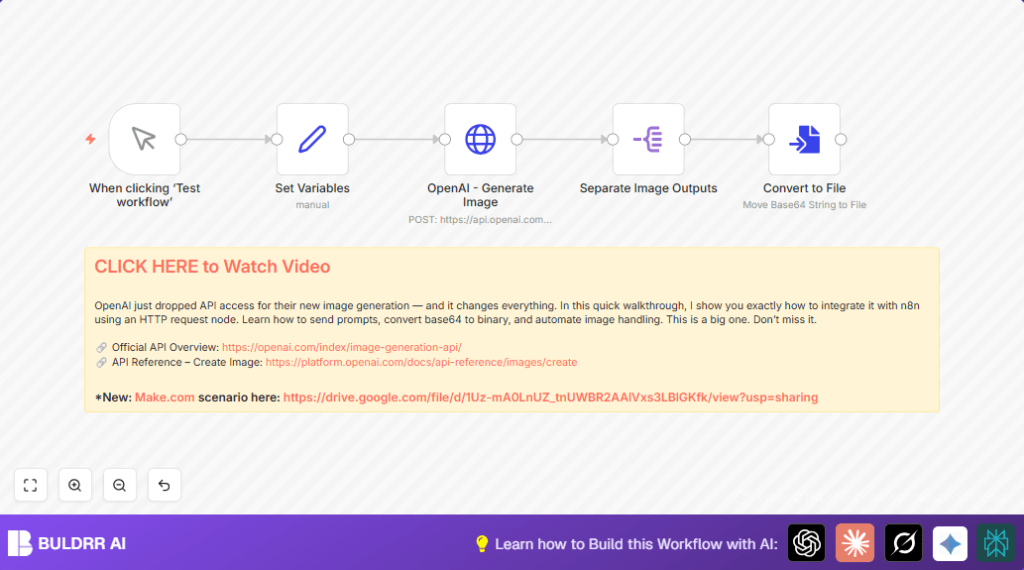

You write a prompt, the workflow sends it to the DALL-E 3 API via HTTP Request, and it returns finished image files ready to save or use. No manual downloading. No file conversion. Everything handled automatically.
If you are comparing DALL-E 3 vs FLUX for image generation in n8n, this is the OpenAI side of that decision.
What This Automation Does
This workflow sends a request to OpenAI to create images from a prompt automatically.
It gets several pictures in one go and breaks them apart.
Then it changes the images from base64 code into usable image files.
This saves lots of time normally spent downloading and changing files by hand.
- Sends a prompt and image settings directly to OpenAI’s image API.
- Handles many images at once by splitting the API response.
- Decodes base64 image data into binary files for use or storage.
- Minimizes errors by automating all these steps.
- Allows changing image size, quality, and model easily.
Who Should Use This Workflow
This is for creators, artists, or anyone who needs many AI-generated images fast.
This workflow is good if manual image generation and file handling take too long or cause mistakes.
Anyone with basic n8n skills and an OpenAI account can use it.
Tools and Services Used
- Tools and Services Used
– n8n automation platform: For building and running the workflow.
– OpenAI DALL-E 3 API: The specific model used to generate images from text prompts. DALL-E 3 produces highly detailed, prompt-accurate images and is OpenAI’s current recommended model for image generation tasks.
– HTTP Request node: Used to call the DALL-E 3 endpoint directly — giving you full control over parameters like size, quality, and number of images.DALL-E 3 vs FLUX in n8n:
Both are popular choices for automated image generation in n8n. DALL-E 3 (this workflow) is better for prompt accuracy and photorealistic results via the OpenAI API. FLUX (available as a separate workflow on Buldrr) is a strong open-source alternative with more control over style. If you need to compare both setups, see the FLUX image generation workflow guide.
- Tools and Services Used
Beginner Step-by-Step: How to Use This Workflow in Production
Import the Workflow
- Download the workflow file using the Download button on this page.
- Go to the n8n editor where you want to use it.
- Use the “Import from File” option to load the downloaded workflow.
Configure Credentials and Settings
- Add your OpenAI API Key to n8n credentials if not done yet.
- Check nodes like Set for variables such as prompt, image size, number, and model.
- Update any IDs, email addresses, folders, or channels if used.
Test and Activate
- Run the workflow manually once to make sure images generate and convert properly.
- If all works well, turn on the workflow’s Active switch to start production use.
Workflow Inputs, Processing Steps, and Outputs
Inputs
- Prompt text describing the desired images.
- Number of images to generate.
- Image size and quality preferences.
- OpenAI model name.
Processing Steps
- Manual Trigger starts the workflow.
- Set node stores the variables for image generation.
- HTTP Request node sends these to OpenAI’s image generation endpoint.
- Split Out node breaks the batch of images into single items.
- Convert to File node decodes base64 image data into normal files.
Outputs
- Several image files in binary format, ready to view or save.
- All done automatically without needing manual downloads or conversion.
Customization Ideas
- Change the image generation model in the Set node to try new styles.
- Adjust how many images and what size each image should be.
- Add storage nodes like Google Drive or AWS S3 after the file conversion to save images automatically.
- Link other nodes after conversion, such as notifications via Slack or email.
- Make prompts dynamic, feeding text from external sources or user inputs.
Troubleshooting
401 Unauthorized Error in HTTP Request Node
This means the OpenAI API key is missing or wrong.
Fix by checking Api Key in n8n credentials and updating if needed.
No Images After Split Out Node
This happens if the wrong field is chosen to split.
Set the field exactly to data as the API returns images there.
Convert to File Node Fails
Incorrect property name stops base64 decoding.
Use the property name b64_json exactly, taken from the Split Out node.
Pre-Production Checklist
- Make sure OpenAI API key is valid and active.
- Test manual trigger node works and starts the workflow.
- Verify variables in Set node match expected format.
- Check the workflow generates multiple images and converts them properly.
- Back up the workflow before using it live.
Deployment Guide
After testing, turn on the workflow by switching the Active button on.
Set who can trigger or change the workflow.
Watch the execution logs in n8n to catch errors and keep things running right.
Conclusion
This workflow helps automate creating images with OpenAI in n8n.
It turns base64 data into real image files without manual steps, saving time and effort.
This shows how to use HTTP requests and data processing nodes for smarter automation.
Next, users can add storage or notifications to make a full image workflow pipeline.
Explore more workflow automations to save time and create faster.
