
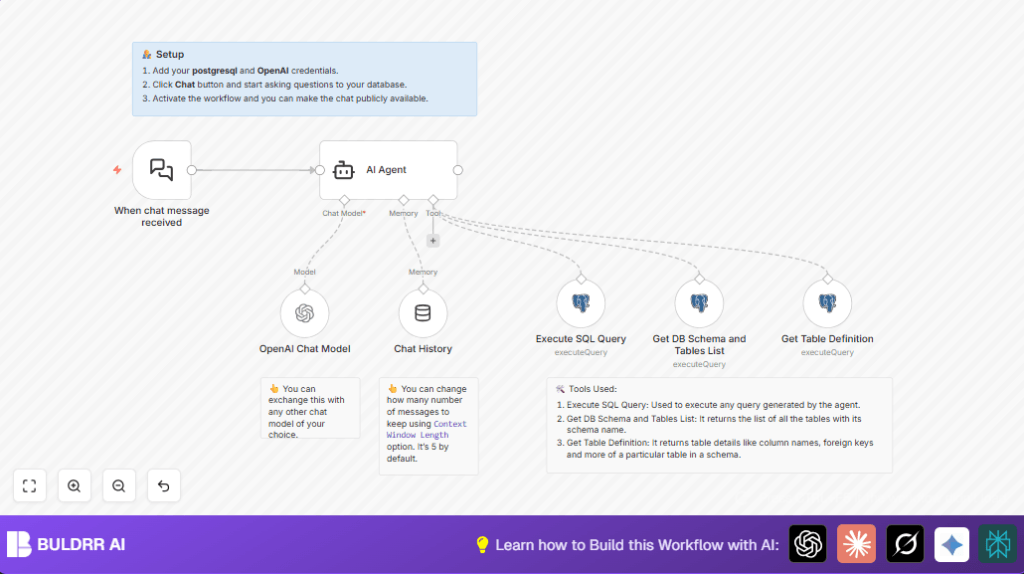

What This Automation Does ⚙️
This workflow helps users ask questions in plain English about a PostgreSQL database.
It fixes the slow and hard job of writing SQL queries by hand.
When users send a chat message, it turns the question into a database query automatically.
The system then runs that query and gives back easy answers.
This saves a lot of time and lowers mistakes in data answers.
The chat trigger starts when a new message comes in.
An AI Agent with OpenAI and LangChain looks at the question.
It learns from the database layout fetched live.
The AI runs the right SQL on the PostgreSQL database.
Chat history remembers past talks for smooth chat replies.
Finally, the OpenAI Chat Model makes the answers sound natural.
Tools and Services Used
- n8n: Automation platform where the workflow runs.
- PostgreSQL Database: Stores the data and schema.
- OpenAI: Provides AI models for language processing and SQL creation.
- LangChain AI Agent: Converts natural language to SQL and controls database queries.
- PostgreSQL metadata tables: Source of database schema and structure details.
Beginner Step-by-Step: How to Use This Workflow in n8n
Import the Workflow
- Download the workflow file using the “Download” button on this page.
- Open the n8n editor where you work.
- Go to “Import from File” and select the downloaded workflow.
Configure Credentials
- Add your PostgreSQL Database credentials by going to Settings – Credentials – Create New – PostgreSQL.
- Save them with a clear name like “Your Postgresql Database Credentials”.
- Add OpenAI API key credentials in the same way, naming them “Your OpenAI Account Credentials”.
Update Workflow Parameters
- Check if the workflow needs any specific IDs, emails, tables, or channel names updated.
- Make sure the SQL queries or schema names in the nodes reflect your actual database.
Test the Workflow
- Send a test chat message to trigger the workflow.
- Watch the execution results in n8n’s run history to confirm it works properly.
Activate for Production
- Turn on the workflow with the activation switch.
- Use the webhook URL from the Webhook node to connect your chat interface or website.
Workflow Inputs, Processing, and Outputs
Inputs
- User sends a question in natural language through chat.
- Database connection info to access PostgreSQL.
- OpenAI API key to use GPT-4o-mini model.
Processing Steps
- The When chat message received node captures the question.
- The AI Agent node reads the message.
- It fetches the current PostgreSQL database schema using the Get DB Schema and Tables List node.
- It retrieves full table definitions dynamically with the Get Table Definition node.
- The AI generates an SQL query using schema info.
- The Execute SQL Query node runs the AI’s SQL against PostgreSQL.
- The Chat History node stores past dialogues to keep context.
- The OpenAI Chat Model node creates clear, conversational answers.
Output
- The user receives an accurate, readable answer to their database question through chat.
Customizations ✏️
- Change the AI model in the OpenAI Chat Model node if needed for cost or speed.
- Adjust how many past messages the Chat History node keeps to control memory.
- Edit the system message text in the AI Agent to focus on specific topics.
- Modify SQL queries in PostgreSQL nodes to add filters or join tables for richer answers.
- Publish the workflow’s trigger webhook URL for real-time chat on websites or apps.
- For self hosting n8n, visit self-host n8n for resources.
Troubleshooting ????
- Connection refused or timeout errors in PostgreSQL nodes
Check database host, port, user, and network firewall settings. - AI generates wrong or strange SQL
Make sure the database schema info is current by running the Get DB Schema and Tables List node manually. - OpenAI authentication failures
Recheck API key and permissions in OpenAI dashboard and update credentials.
Pre-Production Checklist ✅
- Verify PostgreSQL and OpenAI credentials work in test runs.
- Test the When chat message received node with sample questions.
- Make sure metadata nodes return up-to-date schema info.
- Run test queries generated by AI for correct SQL syntax.
- Confirm final chat replies are clear and correct.
Deployment Guide
Enable the workflow by switching it on inside n8n.
Use the provided webhook URL in chat apps or websites to deliver questions.
Keep an eye on workflow runs for errors or delays.
Update keys and schema details often to stay accurate.
Summary
→ A chat system that answers questions about your PostgreSQL data.
→ By turning words into SQL automatically, it saves time.
✓ Works by reading your database layout live to make exact queries.
✓ Changes complex data access into easy conversation.
✓ Keeps chat context so replies feel natural and connected.
