
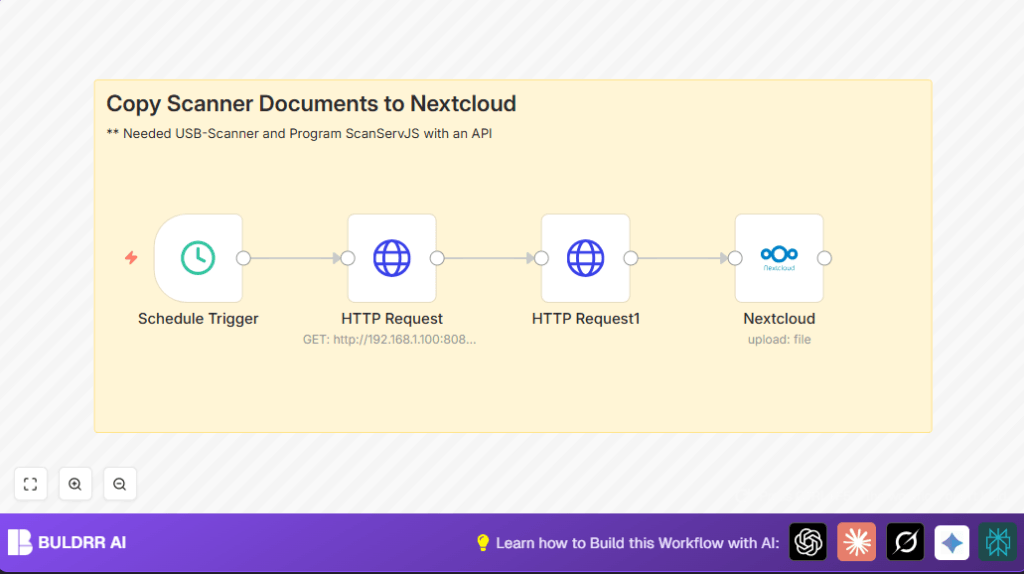

Automate PDF Scans to Nextcloud with n8n

Reduce manual handling of scanned PDFs by automating their transfer to Nextcloud using n8n. This workflow regularly fetches scanned files via API and uploads them directly, saving time and ensuring files are securely organized.
scheduleTrigger
httpRequest
nextCloud
+1
Workflow Identifier: 1738
NODES in Use: Schedule Trigger, HTTP Request, Nextcloud, Sticky Note
Automate PDF scans with n8n and Nextcloud

Press CTRL+F5 if the workflow didn't load.

Learn how to Build this Workflow with AI:

What this workflow does

This workflow checks a local scanner server every hour for new scanned PDF files.

It downloads those files and uploads them to a Nextcloud folder automatically.

This saves you from manually moving files, avoiding mistakes and saving time.


Tools and services used

  • ScanServJS API: Provides access to scanned PDF files from the USB scanner.
  • Nextcloud API: Allows uploading files to your cloud storage folder.
  • n8n Workflow Automation: Runs the tasks on schedule to connect the scanner and Nextcloud.

Inputs, processing, and output

Inputs

Processing

  • For each file name from the API, make an HTTP request to download the PDF as binary data.
  • Prepare the binary data for upload to Nextcloud.

Output

  • Upload each scanned PDF file to the specified /Scans folder in Nextcloud, using the original file names.
  • Files are stored safely and ready to access from any device via Nextcloud.

Beginner step-by-step: How to run this workflow in n8n production

Step 1: Download the workflow file

  1. Use the Download button below to grab the workflow file.

Step 2: Import workflow in n8n

  1. Inside the n8n editor, click on the top-right menu and choose “Import from File”.
  2. Select the downloaded JSON workflow file.

Step 3: Add your API credentials

  1. Add credentials for the Nextcloud API inside the Nextcloud node.
  2. Confirm access to ScanServJS API (usually no credential needed for local API).

Step 4: Update paths if needed

  1. Change the Nextcloud upload folder in the Nextcloud node if you want to store scans in a different place.
  2. Ensure the ScanServJS API URL matches your scanner’s IP and port.

Step 5: Test the workflow

  1. Run the workflow manually once to make sure it downloads files and uploads them as expected.

Step 6: Activate for automatic running

  1. Turn on the workflow to active so the hourly schedule trigger runs it for you without manual steps.
  2. Check execution logs regularly to catch any errors early.

Common customization ideas

  • Change the schedule to run every few minutes or once a day by adjusting the Schedule Trigger.
  • Rename files before upload by adding a Function node that adds date or client codes.
  • Filter files by type or name with an IF node to download only PDFs or certain scan batches.
  • Modify upload path to organize files into subfolders based on date or project name.

Issues and fixes

  • ScanServJS API returns empty: Make sure your scanner server is on and reachable. Double-check the API URL and port.
  • Nextcloud upload errors: Confirm that the credentials inside n8n Nextcloud node are correct and not expired.
  • File downloads incomplete or corrupted: Check the HTTP Request node’s URL uses {{ $json.name }} properly and headers include accept: */*.

Deployment tips

If you are running n8n on server, make sure network access to both the scanner API IP and Nextcloud server is allowed.

Monitor the workflow executions from the n8n UI to be sure no failures happen silently.

Consider setting alerting or notifications using other n8n nodes if the workflow fails for quick response.


Summary

✓ Saves time and stops manual upload mistakes

✓ Automatically moves scanned PDFs from local scanner to Nextcloud

✓ Runs hourly without user action

✓ Keeps scanned files safe and available everywhere


Automate PDF scans with n8n and Nextcloud

Visit through Desktop to Interact with the Workflow.

Frequently Asked Questions

The ScanServJS API may be unreachable due to network or server down. Confirm the API URL and port are correct and the scanner server is running.
Check the Nextcloud API credentials inside the n8n Nextcloud node. Re-enter or update credentials if expired or invalid.
Wrong URL templating or missing HTTP headers in the download request can cause incomplete file data. Verify the URL uses {{ $json.name }} and headers accept all types.
Yes. Change the Schedule Trigger node interval to minutes or days as needed for how often scans happen.

Promoted by BULDRR AI

Related Workflows

Automate Twist Channel Creation and Messaging with n8n

This workflow automates creating and updating a channel in Twist and sending a personalized message to specific users. It eliminates manual setup errors and saves time managing Twist communications.

Automate Ideogram Image Generation with Google Sheets & Gmail

This workflow automates graphic design image generation via Ideogram AI, storing image data in Google Sheets and Google Drive, with email alerts via Gmail. It saves designers hours by automating image creation, remixing, review, and record-keeping.

Automate IT Support with Slack and OpenAI in n8n

Streamline IT support by automating Slack message handling using n8n and OpenAI. This workflow handles Slack DMs, filters bots, queries a Confluence knowledge base, and delivers AI-generated responses, improving support efficiency and response time.

Automate Crypto Analysis with CoinMarketCap & n8n AI Agent

Discover how this unique n8n workflow leverages CoinMarketCap’s multi-agent AI to deliver precise, real-time cryptocurrency insights directly via Telegram. Manage crypto data analysis efficiently with automated multi-source API integration.

Automate Gumroad to Beehiiv Subscriber Sync with n8n

Learn how to automatically add new Gumroad sales customers as Beehiiv newsletter subscribers using n8n automation. This workflow saves time by syncing sales data to Google Sheets CRM and notifying your Telegram channel instantly.

Generate On-Brand Blog Articles Using n8n and OpenAI

This workflow automates the creation of on-brand blog articles by analyzing existing company content using n8n and OpenAI. It extracts article structures and brand voice to produce consistent draft articles, saving significant content creation time.
1:1 Free Strategy Session
Your competitors are already automating. Are you still paying for it manually?

Do you want to adopt AI Automation?

Every hour your team does repetitive work, you're burning real money.
While you wait, faster businesses are cutting costs and moving quicker.
AI and automations aren't the future anymore — they're the present.

Book a live 1-on-1 session where we show you exactly which of your daily tasks can be automated — and what it’s costing you not to.