

What This Automation Does
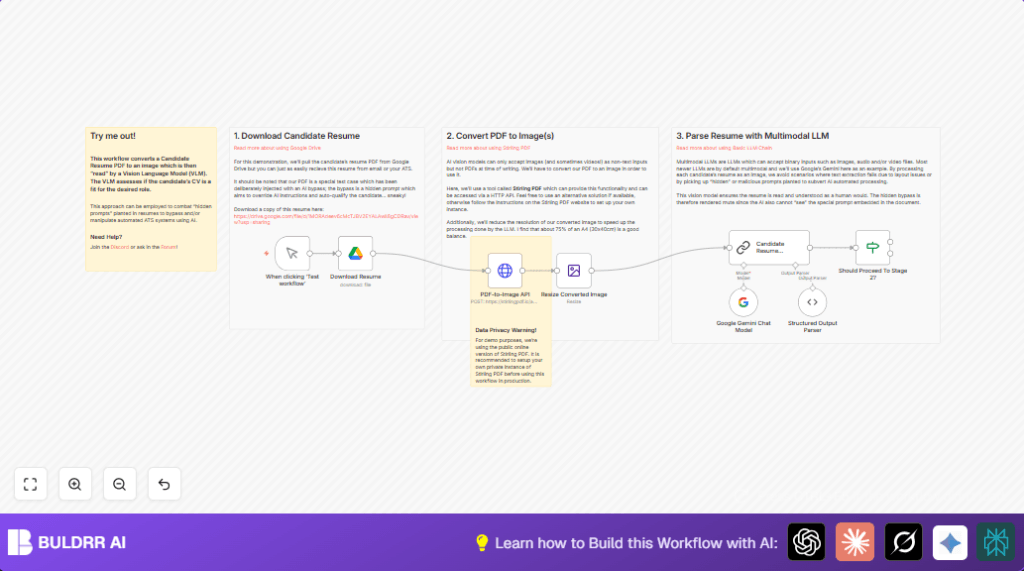
This workflow downloads a candidate’s PDF resume, changes it into a picture, then uses Google’s AI to check if the person fits for the plumber job.
It stops tricky resumes with hidden AI prompts from moving forward wrongly.
The system saves time and helps HR pick truly good candidates faster.
The workflow works by taking a resume from Google Drive, turning the PDF pages into images, making the image smaller, and sending it to Google Gemini’s AI that understands pictures.
The AI gives a simple true/false answer if the candidate is qualified.
After that, the workflow checks AI’s answer and decides if the candidate should continue.
This removes fake qualifications from hidden prompts, giving a fair chance to honest candidates.
Inputs, Processing, and Outputs
Inputs
- Google Drive PDF: Candidate resume files stored as PDF.
Processing Steps
- Download the PDF file using the Google Drive node.
- Send the PDF binary data via an HTTP request to the Stirling PDF API to convert PDF to JPG image.
- Resize the image with the Edit Image node to 75% size.
- Use the Chain LLM node with the Google Gemini multimodal AI to analyze the image.
- Parse AI’s JSON output with a structured parser to read qualification status.
- Use the If node to check if candidate qualifies and continue the hiring process based on AI judgment.
Outputs
- Boolean qualification result showing if candidate passes or not.
- Reason text from AI explaining the decision.
- Automatic filtering that advances good candidates only.
Who Should Use This Workflow
This workflow suits HR people and recruiters facing lots of sample resumes in PDF and needing better screening.
It helps when some candidates try to trick AI systems with hidden prompts in files to pretend fit for roles.
Also good for teams that want to spend less time reading resumes but still want fair checks using AI’s real reading of visuals.
People wanting to add image AI checks in hiring can use this workflow as example.
Tools and Services Used
- n8n Automation Platform: Runs the workflow automation.
- Google Drive API: Downloads candidate resumes in PDF format.
- Stirling PDF HTTP API: Converts downloaded PDFs to image files.
- Edit Image node: Resizes images inside n8n for faster AI processing.
- Google Gemini Multimodal LLM: AI that reads images and judges resume quality.
- Structured Output Parser: Checks AI response quality.
Beginner Step-by-Step: How to Use This Workflow in n8n for Production
1. Import the Workflow
- Download the workflow file using the Download button on this page.
- Open the n8n editor where automation runs.
- Click on “Import from File” to upload the workflow.
2. Configure Credentials and Settings
- Add or update the Google Drive OAuth2 credentials so the workflow can download PDF resumes.
- Provide API key or URL for the Stirling PDF HTTP API in the HTTP Request node.
- Make sure Google Gemini PaLM API key is configured in the Chain LLM node.
- Change any IDs like Google Drive fileId, or email addresses, channels etc. as needed.
- Update the AI prompt inside the Chain LLM node if screening for a different job role.
3. Test the Workflow
- Run the workflow manually using the Manual Trigger node to check for errors.
- Check if resumes download and the AI outputs qualification result.
4. Activate for Production Use
- Switch on the workflow toggle in n8n to run it automatically.
- Replace Manual Trigger with an email or webhook trigger as needed.
- Monitor logs and API usage to avoid quota limits.
- self-host n8n can help run this continuously and securely.
Common Issues and How to Fix Them
- Google Drive download fails: Usually OAuth credentials expired or wrong. Reconnect in n8n and check Drive API enabled.
- PDF to Image API error 415: Check that PDF is sent as multipart/form-data and file input is connected.
- AI output parser error: The structured JSON from AI may differ from schema. Adjust prompt or schema accordingly.
Customization Ideas
- Change the plumber role in the AI prompt to any other job for different screening.
- Replace Manual Trigger with Gmail or IMAP trigger to handle resumes by email.
- Use another PDF to image conversion API by changing HTTP Request URL.
- Adjust image resize percentage to balance quality and speed.
- Add Slack or Email notification nodes to inform HR team instantly.
Summary
✓ The workflow stops fake candidates using hidden AI prompts.
✓ Automatically checks real resume content by turning PDFs into images for AI to read.
✓ Saves hours validating resumes manually.
✓ Makes a yes/no qualification decision for each candidate.
✓ Works inside n8n with easy import and API setup.
