

What This Workflow Does
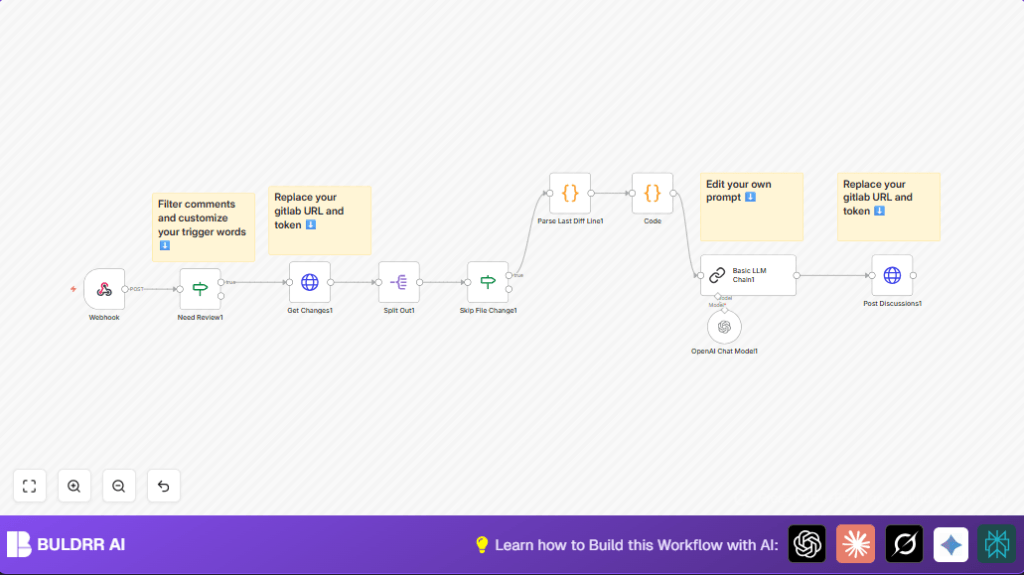
This workflow helps automate code reviews on GitLab merge requests. It listens for a special comment trigger, then fetches the changes made in the request. Next, it asks an AI to check the code and gives feedback right inside GitLab. This saves time and finds problems faster.
The workflow breaks down changed files and skips irrelevant ones. It looks at diffs line by line. Then, AI decides if the change is good or not and scores it. Finally, the AI comments on the exact code lines in the merge request discussion.
Who Should Use This Workflow
Teams or developers who get many merge requests and want faster reviews. Also, anyone who wants to catch bugs and style issues early using AI. It’s good if manual reviews take too long or miss details.
The user of this workflow needs basic GitLab and n8n knowledge and must set API keys for GitLab and OpenAI. It’s also helpful for teams wanting consistent review comments.
Tools and Services Used
- GitLab API: Gets merge request data and posts comments.
- OpenAI API: Runs AI language model to review code.
- n8n Automation Platform: Coordinates workflow steps and triggers.
This workflow can run on self-hosted n8n if preferred. For example, see self-host n8n.
Beginner Step-by-Step: How to Use This Workflow in n8n
Import Workflow
- Download the pre-built workflow file using the Download button on this page.
- Open your n8n editor and select Import from File.
- Upload the downloaded workflow file to add it into your workspace.
Configure Credentials
- Add your GitLab personal access token in the credentials section with required API permissions.
- Add your OpenAI API key to n8n credentials for language model access.
Update Workflow Settings
- In the Webhook node, confirm the webhook path or customize it if needed.
- Update variables like
project_idandmerge_request_iidif your workflow uses static values (usually these are dynamic). - Check that the trigger comment in Need Review1 matches the phrase your team will use (default is
+0). - Review prompts in the Basic LLM Chain1 to ensure AI feedback fits your team’s needs.
Test and Activate
- Post a comment with the trigger phrase on a test GitLab merge request to fire the webhook.
- Check n8n execution to see if the workflow runs successfully and AI comments appear in GitLab.
- When satisfied, toggle the workflow status to Active for production use.
Inputs, Processing, and Outputs
Inputs
- GitLab webhook events for new comments on merge requests.
- GitLab API data for merge request changes.
- User-defined trigger phrase in comments to start review.
Processing Steps
- Filter comments to find review triggers.
- Fetch detailed changes of merge requests via GitLab API.
- Split file changes and ignore non-code diffs such as renames or deletes.
- Parse git diff lines to find original vs new code and the exact line numbers.
- Send code segments to OpenAI language model with a prompt for review decision, comments, and score.
- Post AI feedback back to the GitLab merge request lines as inline comments.
Outputs
- Automated AI review comments on precise code lines in GitLab merge requests.
- A decision status of accept or reject for each changed file segment.
- Change scores and suggested fixes provided by AI.
- Time saved by developers in manual review efforts.
Edge Cases and Failure Points
- If GitLab webhook is not set to trigger on note events, the workflow will not start.
- Incorrect or missing GitLab API key causes failed fetch or post operations.
- OpenAI API key errors or quota limits stop AI review from generating feedback.
- Large merge requests may need tuning because AI reviews happen per file segment.
- The review trigger phrase must match exactly in the Need Review1 filter or reviews won’t start.
Customization Ideas
- Change the review trigger phrase in the Need Review1 node to fit team language.
- Edit the AI prompt in Basic LLM Chain1 to add security checks or style guides.
- Add new file type filters in the Skip File Change1 node to skip docs or config files.
- Swap OpenAI with other AI models by changing the OpenAI Chat Model1 node for preferred LLM services.
- Modify comment formatting in the Post Discussions1 node to add links to team docs or issue trackers.
Sample Code and Prompt Snippets
Parsing Last Diff Line JavaScript
This code block pulls line numbers to post comments on:
const parseLastDiff = (gitDiff) => {
 gitDiff = gitDiff.replace(/\n\\ No newline at end of file/, '')
 const diffList = gitDiff.trimEnd().split('\n').reverse();
 const lastLineFirstChar = diffList?.[0]?.[0];
 const lastDiff = diffList.find(item => /^@@ \-\d+,\d+ \+\d+,\d+ @@/g.test(item)) || '';
 const [lastOldLineCount, lastNewLineCount] = lastDiff
  .replace(/@@ \-(\d+),(\d+) \+(\d+),(\d+) @@.*/g, ($0, $1, $2, $3, $4) => `${+ $1 + +$2},${+ $3 + +$4}`)
  .split(",");
 if (!/^\d+$/.test(lastOldLineCount) || !/^\d+$/.test(lastNewLineCount)) {
  return { lastOldLine: -1, lastNewLine: -1, gitDiff };
 }
 const lastOldLine = lastLineFirstChar === '+' ? null : (parseInt(lastOldLineCount) || 0) - 1;
 const lastNewLine = lastLineFirstChar === '-' ? null : (parseInt(lastNewLineCount) || 0) - 1;
 return { lastOldLine, lastNewLine, gitDiff };
};

return parseLastDiff($input.item.json.diff);
Code to Separate Original and New Code
This separates lines by diff sign:
var diff = $input.item.json.gitDiff;
let lines = diff.trimEnd().split('\n');
let originalCode = '';
let newCode = '';
lines.forEach(line => {
 if (line.startsWith('-')) {
  originalCode += line + "\n";
 } else if (line.startsWith('+')) {
  newCode += line + "\n";
 } else {
  originalCode += line + "\n";
  newCode += line + "\n";
 }
});
return {
 originalCode: originalCode,
 newCode: newCode
};
Summary / Result
✓ Saves hours of manual code review by automating feedback generation.
✓ Gives clear accept/reject decisions on code changes.
✓ Posts precise comments inside the GitLab merge request discussion.
✓ Improves code quality and catches potential issues faster.
✓ Enables consistent, AI-assisted reviews that scale with team needs.
