
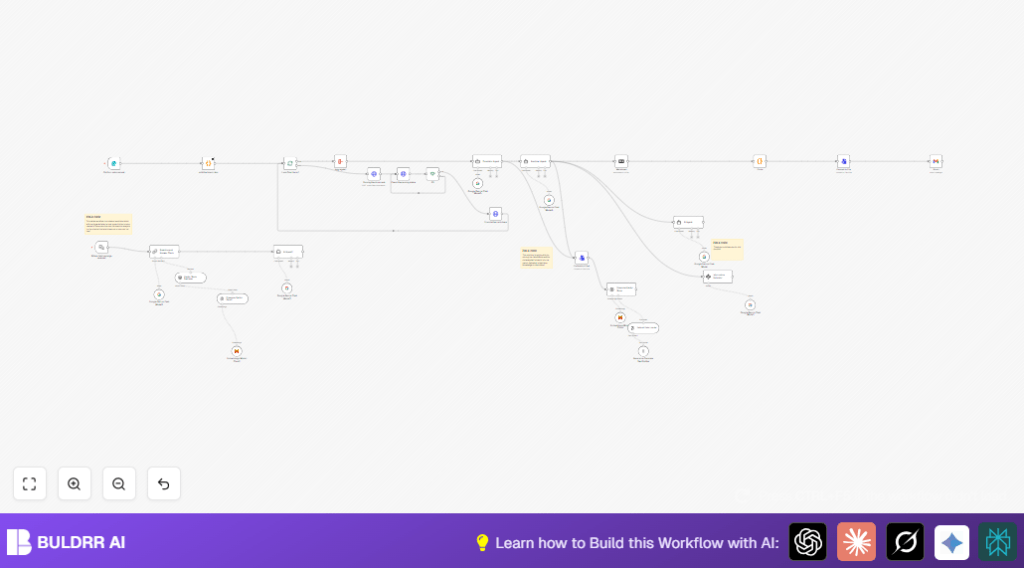

1. What This Workflow Does
This workflow gets triggered when a user submits a form with multiple files and an email address.
It then processes each file separately and turns the content into readable markdown.
The workflow combines all markdown, translates to English if needed, analyzes, and stores the knowledge for search.
Finally, it sends a summary email to the user and keeps listening for chat questions to answer smartly based on uploaded files.
The main problem it solves is saving time by automating long document reading and answering follow-up queries fast.
Inputs
- User submission of form files (binary file1, file2)
- User email address
Processing Steps
- Form Trigger: Catches the form submission event with files and email.
- Code node: Splits all uploaded files into individual workflow items.
- SplitInBatches: Processes files one by one to obey API limits.
- HTTP Request (LlamaIndex API): Uploads each file for parsing.
- Polling node: Repeats checking parsing status until successful.
- HTTP Request: Fetches parsed markdown text.
- Aggregate node: Combines all markdown into one document.
- LangChain Google Gemini Chat nodes: Translate non-English text to English and analyze content.
- ConvertToFile + Pinecone Vector Store nodes: Prepare and store knowledge for chatbot semantic search.
- Gmail node: Send summarized markdown file with chatbot link to user email.
- Chat Trigger + LangChain retrieval nodes: Wait for user chat messages, fetch relevant info, and respond.
Output
- Email with clear document summary and chatbot link.
- Interactive chatbot answering questions using uploaded document data.
2. Who Should Use This Workflow
If you handle many client documents weekly and spend hours reading and summarizing,
you can save time with this workflow.
It is helpful when you want fast, good quality text summaries of many files per submission.
Also useful if you want to give clients fast answers to questions about their submitted files using AI.
It fits project managers, consultants, and anyone needing automated document analysis and follow-up Q&A.
3. Tools and Services Used
- n8n automation platform: Runs the workflow handles triggers and nodes.
- Google Gemini Chat Model (via LangChain nodes): Translates and analyzes text content.
- LlamaIndex API: Parses uploaded document files into structured markdown.
- Pinecone Vector Store: Stores analyzed text for semantic search and chatbot querying.
- Gmail: Sends user emails with document summaries.
Optional: self-host n8n service for more control and privacy.
4. Beginner Step-by-Step: How to Use This Workflow in n8n
Step 1: Import the Workflow
- Download the workflow file using the Download button on this page.
- Open the n8n editor where you want to run this.
- Choose “Import from File” option and select the downloaded workflow.
Step 2: Configure Credentials and Settings
- Add API Keys or credentials for Google Gemini, LlamaIndex API, Pinecone and Gmail in n8n credential manager.
- Update any IDs, email fields, or URLs if the workflow has placeholders.
Step 3: Test the Workflow
- Run a test by submitting the linked form with sample files and your email.
- Check if each node executes well and if the email with summary arrives.
Step 4: Activation for Production
- Once testing is successful, activate the workflow to listen for real submissions.
- Monitor the workflow executions and logs regularly.
By following this, users can easily deploy the workflow without building it from scratch.
5. How the Workflow Works: Details
Inputs
- Form submission with multiple binary file uploads.
- Email address of submitting user.
Processing
- The Form Trigger waits for form submission.
- Next, the Code node named “split the binary item” breaks out each binary file to separate items, so each file is handled alone.
- SplitInBatches runs one file at a time, avoiding API overuse.
- Each file goes via HTTP Request to LlamaIndex API to start document parsing.
- A polling loop checks the LlamaIndex API job status with HTTP Request and If node until parsing completes.
- After success, the parsing output markdown is fetched and aggregated into one long markdown with Aggregate node.
- The combined markdown flows into LangChain Google Gemini Chat nodes—one translates non-English text into English and the other analyzes and restructures for clarity.
- The clean text is saved by ConvertToFile node and stored inside Pinecone Vector Store for semantic search.
- Gmail node sends an email back with the markdown summary attached and includes a chatbot link.
- Finally, the chatbot listens via Chat Trigger and retrieves related knowledge from Pinecone to answer any follow-up questions.
Outputs
- Email summary to user.
- Chatbot interface ready for interactive Q&A.
6. Customizations
- Change accepted file types by adding or removing file fields in Form Trigger.
- Use another parsing API by switching URLs and call details in HTTP Request nodes.
- Edit the email body and subject in Gmail node to personalize messages.
- Tweak chatbot responses by changing LangChain agent system messages for different user needs.
- Adjust batch sizes in SplitInBatches to balance speed and API limitations.
7. Common Troubleshooting
- Parsing never completes: Check LlamaIndex API Key is correct and file formats are supported.
- Email not received: Verify email was correctly extracted from form and Gmail node settings are correct.
- Chatbot answers missing or wrong: Confirm Pinecone stored embeddings properly and re-index if needed.
8. Preparing for Production
- Test form submissions with realistic files and email addresses.
- Watch HTTP request logs to ensure no errors from parsing API.
- Verify the markdown aggregation looks right.
- Confirm emails send successfully.
- Test chatbot responses for appropriate answers.
- Backup workflow setup before live use.
For controlled hosting and scaling, consider self-host n8n on a VPS or cloud.
9. Deployment Guide
Activate the workflow after all tests pass.
Secure all API Keys and Gmail credentials in the n8n credential manager.
Use n8n retry and alert features to catch and handle errors.
Monitor usage carefully to not exceed API rate limits.
Scale your hosting or batch processing if submissions grow much higher.
10. Summary
✓ This workflow automates taking multiple documents from form uploads.
✓ It parses and converts files into clear markdown text.
✓ Combines, translates, and analyzes content for easy reading.
✓ Stores knowledge for quick chatbot searching.
✓ Sends user emails with summaries and chatbot links.
→ Saves many hours of manual effort on document review.
→ Provides instant question answering on uploaded documents.
→ Helps users get their work done faster and with fewer mistakes.
