
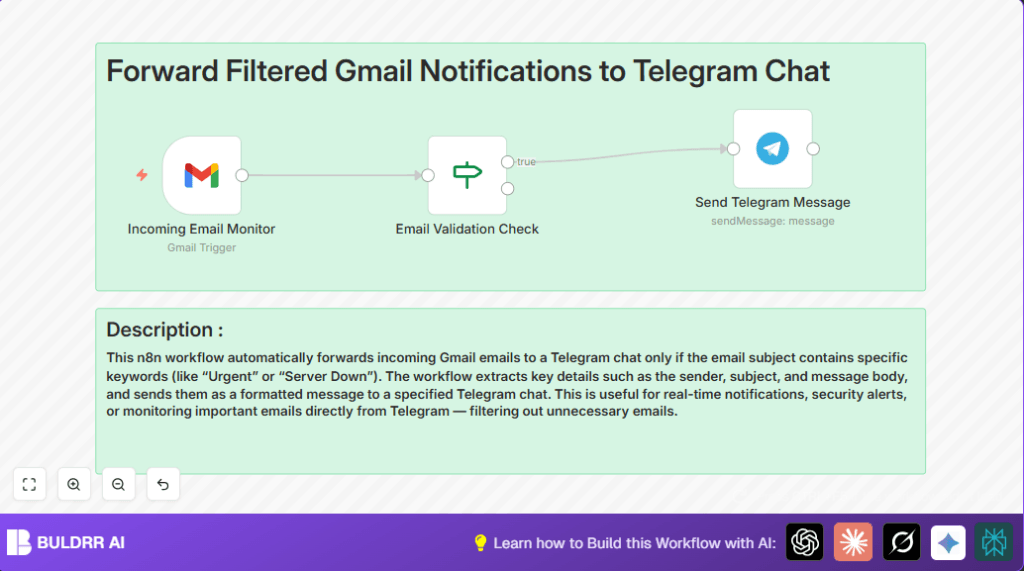

What This Automation Does
This workflow watches for new emails in Gmail and sends a message to a Telegram chat when the email subject contains special words like “Urgent” or “Server Down.”
It helps users avoid missing important alerts by only notifying when needed. This cuts down time wasted checking regular emails.
- Checks Gmail inbox every minute for new messages.
- Filters emails by subject keywords to find urgent ones only.
- Pulls sender, subject, and snippet data from each important email.
- Formats this info into a clear message.
- Sends the message automatically to a chosen Telegram chat.
- Skips unimportant emails to avoid too many alerts.
Inputs, Processing Steps, and Outputs
Inputs
- New emails arriving in the Gmail inbox.
Processing Steps
- Gmail Trigger node polls inbox every minute.
- If node checks if email subject includes “Urgent” or “Server Down.
- Extract sender, subject, and snippet from selected emails.
- Use an expression to format these details into a message.
- Telegram node sends the message to a set chat.
Outputs
- Telegram chat gets alert messages about only critical emails.
Who Should Use This Workflow
Anyone who gets many emails but only needs fast notice of important alerts can use this. It works well for system admins, managers, or anyone monitoring urgent info.
If the user spends lots of time searching inbox for critical messages, this workflow saves that time.
Tools and Services Used
- Gmail Trigger node: Watches Gmail inbox for new emails.
- If node: Filters emails based on subject keywords.
- Telegram node: Sends messages via Telegram Bot.
- n8n automation platform: Runs the workflow.
Beginner Step-by-Step: How to Use This Workflow in n8n
Step 1: Import the Workflow
- Click the Download button on this page to get the workflow file.
- Open n8n editor where you want to run the workflow.
- Use “Import from File” option and select the downloaded workflow.
Step 2: Configure Credentials and Settings
- Add your Gmail OAuth2 credentials in the Gmail Trigger node.
- Add Telegram Bot API Key to the Telegram node.
- Update Telegram chat ID or email folders if needed.
Step 3: Test the Workflow
- Send example emails with “Urgent” or “Server Down” subjects to your Gmail.
- Check Telegram chat to see if alerts come through properly.
Step 4: Activate for Production Use
- Turn on the workflow in n8n to run automatically every minute.
- Make sure n8n is running continuously. For stable hosting, consider self-host n8n options.
Customization Ideas
- Add more keywords in the If node to catch newer alert types like “Alert” or “Warning.”
- Change the message formatting expression to include the full email body with $json.textPlain or $json.textHtml.
- Adjust the Gmail polling time in the Gmail Trigger node for faster or slower checks.
Troubleshooting Common Issues
- Gmail Trigger node not firing: OAuth token expired or Gmail API quota reached. Renew credentials and check Google API status.
- Telegram messages not sent: Bot token wrong or bot not in chat. Fix token or add bot to group.
- If node filter fails: Check expressions and case sensitivity. Use lower-case comparisons if needed.
Pre-Production Checklist
- Confirm Gmail OAuth2 credentials have access and permissions.
- Verify Telegram bot token is correct and bot has chat rights.
- Test with emails containing alert keywords.
- Check the If node’s conditions for correct values.
- Ensure Telegram message format displays info neatly.
- Backup the workflow JSON before activating.
Deployment Guide
After tests, activate the workflow in n8n for constant running.
Keep n8n active by hosting in the cloud or on a server. Check logs often for issues.
Use alerting nodes or adjust polling frequency if monitoring many emails.
Summary
✓ Saves time by sending Telegram alerts only for important Gmail emails.
✓ Reduces missed urgent messages and speeds up response.
✓ Easy to set up and customize inside n8n.
✓ Works well for system admins and anyone needing fast email alerts.
