

What This Automation Does
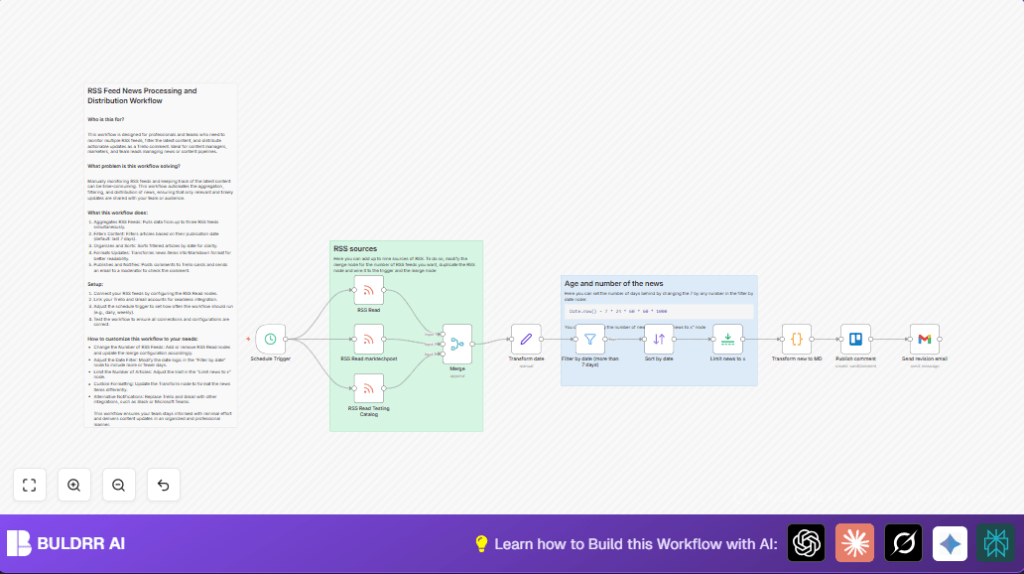
This workflow collects recent news automatically from several RSS feeds.
It saves time by pulling only articles from the last 7 days, sorts them by date, and limits to 10 latest items.
The news is turned into a simple, easy-to-read Markdown list and posted as a comment on a Trello card.
Finally, an email is sent to notify about the update.
The purpose is to stop manual copy-pasting and delays so teams get fresh, organized news every week.
Who Should Use This Workflow
This is for content managers or teams who monitor multiple RSS news sources.
Anyone who wants to save hours weekly and keep their team informed in Trello with no manual work.
Tools and Services Used
- RSS Feed URLs: To get the news articles.
- Trello API: To post the news as a comment on a Trello card.
- Gmail with OAuth2: To send email notifications.
- n8n Workflow Automation: To connect all nodes and automate the process.
Workflow Inputs, Processing Steps, and Outputs
Inputs
- Multiple RSS feed URLs pulling news from their XML endpoints.
Processing Steps
- Read the RSS feeds separately.
- Merge RSS items into one data stream.
- Transform items to extract key fields: title, content, link, publication date (as a timestamp), and categories.
- Filter items to keep only articles newer than 7 days.
- Sort articles by publication date descending.
- Limit the output to the top 10 news items.
- Convert the news items into Markdown format with clickable titles and snippets.
- Post the Markdown as a comment on a Trello card specified by its card ID.
- Send an email using Gmail to notify the manager user that the Trello card is updated.
Outputs
- One Trello card comment with fresh curated news.
- An email notification confirming update completion.
Beginner Step-by-Step: How to Use this Workflow in n8n Production
Step 1: Import Workflow
- Click the Download button on this page to get the workflow file.
- Inside your n8n editor, use the menu to select “Import from File” and upload the file.
Step 2: Configure Credentials and IDs
- Add your Trello API credentials to n8n and connect the Trello nodes.
- Add your Gmail OAuth2 credentials for the email node.
- Update the RSS feed URLs if needed in each RSS Feed Read node.
- Update the Trello card ID in the Trello comment node if using a different card.
- Edit the email recipient address to your own email or the manager’s.
Step 3: Check and Adjust Code
- Open the Transform new to MD code node.
- Copy the provided JavaScript code from below for Markdown formatting.
- Paste it in the node’s code editor to keep formatting correct.
// Loop over input items and format them as markdown
let ret = "";
for (const item of $input.all()) {
ret += `- [${item.json.title}](${item.json.link} ""): \n${item.json.content}\n\n`;
}
return { data: ret };
Step 4: Test the Workflow
- Run the workflow manually inside n8n to see the outputs.
- Check the Trello card for the posted comment.
- See if the email notification arrives.
Step 5: Activate for Production
- Toggle the workflow active.
- Ensure the Schedule Trigger is set to weekly or your desired time.
- Save the workflow in n8n.
You can always update feed URLs or card IDs later by editing the workflow in n8n.
Customization Ideas
- Add more RSS feed nodes by duplicating and changing URLs.
- Increase or decrease the days filter by changing the value in the date filter node expression.
- Change how many articles show in the limit node.
- Edit the JavaScript Markdown formatter to add dates, authors, or categories.
- Replace Gmail or Trello notification nodes with Slack or Microsoft Teams if desired.
- Consider hosting the workflow on your own server using self-host n8n for more control.
Troubleshooting Common Issues
Filter Node Shows No Results
Check the date field is a number timestamp in milliseconds.
Make sure the filter expression exactly matches:
= {{ $json.isoDate }} > {{ Date.now() - 7 * 24 * 60 * 60 * 1000 }}
If still no results, try increasing the days count in the filter.
Trello Comment Fails to Post
Check the Trello card ID for typos.
Refresh Trello API credentials in n8n if expired.
Pre-Production Checklist
- Verify RSS URLs are live and returning data.
- Manually run the workflow to confirm recent posts are included.
- Check Trello card ID correctness and API authentication.
- Send a test email through the Gmail node.
- Backup your workflow before making major changes.
Deployment Guide
Turn on the workflow toggle to activate automated triggers.
The configured schedule node will run the workflow automatically each week.
Use the n8n dashboard to monitor runs and troubleshoot errors.
Check weekly updates on Trello and look for notification emails.
Summary of Benefits
✓ Saves about 4 hours per week from manual news gathering.
✓ Ensures no recent news is missed by filtering by date.
✓ Presents news clearly in Markdown with clickable links.
✓ Posts directly into Trello so teams see updates where they work.
✓ Sends email alerts to keep managers informed.
✓ Easy to customize and expand with more sources and messaging.
