
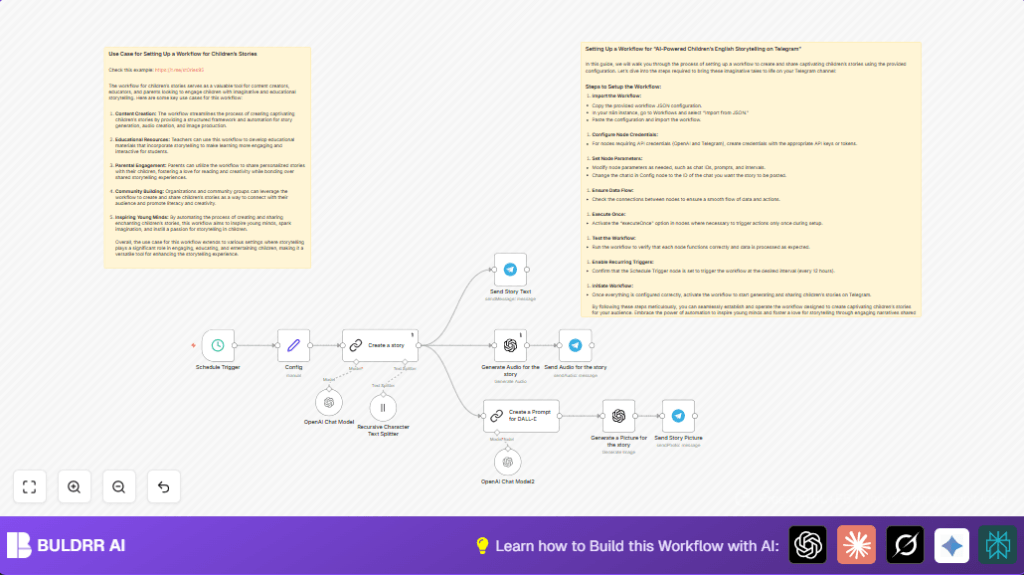

What this workflow does
This workflow creates and posts short English children’s stories every 12 hours. It solves the problem of spending too much time making stories, images, and audio manually. The system writes a magical story, makes a voice recording, draws an illustration, and sends all to Telegram automatically.
The result is twice daily fresh story content shared with kids without any manual work.
Tools and services used
- OpenAI GPT-3.5-turbo-16k: For creating children’s stories and text summaries.
- OpenAI Audio generation: To convert story text to audio narration.
- OpenAI DALL-E: For generating story illustrations from prompts.
- Telegram Bot API: Sends story text, audio, and images to the channel.
- n8n automation platform: Orchestrates all these steps automatically.
Who should use this workflow
Any beginner or non-technical user wanting to post kids’ stories regularly on Telegram without hassle.
It’s good for small content creators, educators, or storytellers lacking time to handle multimedia manually.
The workflow saves hours daily by automating creative and posting work.
Inputs, processing steps, and outputs
Inputs
- 15-minute Schedule Trigger set to run every 12 hours.
- Telegram bot credentials and chat/channel ID.
- OpenAI API keys for GPT, Audio, and Image generation.
Processing Steps
- Schedule Trigger starts workflow twice daily.
- Config node sets Telegram chat ID.
- Create a story node uses GPT-3.5-turbo-16k to craft a 900 character English children’s story.
- Generate Audio for the story converts story text to an audio file.
- Create a Prompt for DALL-E node summarizes characters to form a clean prompt to create an image without text.
- Generate a Picture for the story uses that prompt with a “no-text” instruction and calls DALL-E to make illustration.
- Send Story Text posts the story text to Telegram.
- Send Audio for the story posts audio narration to Telegram with caption.
- Send Story Picture sends the generated image to Telegram.
Output
- New children’s story text appears on Telegram twice per day.
- Audio narration of the story is available in Telegram.
- AI-generated story illustration accompanies the story.
Beginner step-by-step: How to use this workflow in n8n production
Importing the workflow
- Download the workflow file using the Download button on this page.
- Inside the n8n editor, click “Import from File” to load the workflow.
Configure settings
- Open the Config node and enter the correct Telegram chat or channel ID in the
chatIdfield. - Add or update the API keys for OpenAI services and Telegram bot credentials in n8n’s credential manager.
- If needed, update prompts in the Create a story and Create a Prompt for DALL-E nodes to fit preferences.
Testing and running
- Run the workflow manually once to check all nodes work and messages post to Telegram.
- Fix any errors like invalid keys or chat IDs.
- When successful, activate the workflow toggle to enable automatic runs every 12 hours.
Notes
Monitor the workflow logs for errors after activation. You can setup alerts if failures happen.
If hosting n8n yourself, see self-host n8n resources for stable setup.
Customizations
- Change story length or style by editing the prompt in the Create a story node.
- Adjust posting frequency in the Schedule Trigger node interval.
- Send to different Telegram chats by updating
chatIdin the Config node. - Use newer OpenAI models like GPT-4 in story creation nodes for richer text.
- Add titles or author credits in Telegram message captions.
Troubleshooting common issues
No data received from OpenAI
Check that OpenAI API keys are correct and that usage limits are not exceeded.
Telegram message failed to send
Verify the Telegram chat ID and that the bot has permission to post messages.
Image generation includes unwanted text
Make sure the prompt to DALL-E includes a clear instruction to avoid text in images.
Pre-production checklist
- OpenAI API keys work and can create sample outputs.
- Telegram bot is added to the target channel and can send messages.
- Workflow tested manually with successful posting.
- Schedule intervals fit the publishing plan.
- Backup the workflow before changes.
Summary of results
✓ Twice-a-day new children’s story text, audio, and image posted automatically.
✓ Saves hours daily by automating story writing, narration, and illustration.
✓ Keeps Telegram audience engaged with fresh, inspiring content reliably.
✓ Easy to adjust prompts and frequency to match user needs.
