

What this workflow does
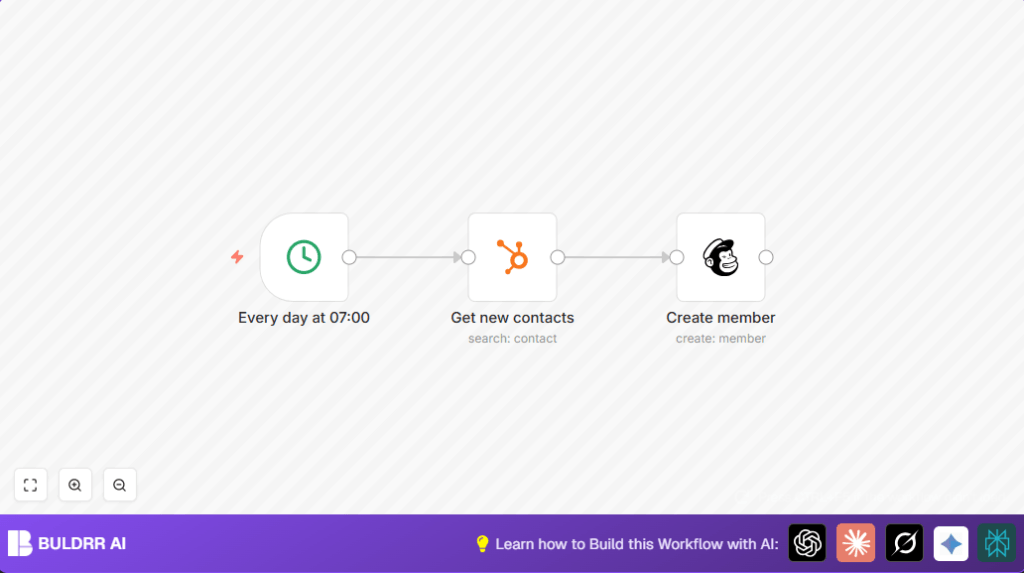
This workflow copies all new contacts added to HubSpot yesterday into Mailchimp every day at 7:00 AM.
It solves the problem of manual exporting and importing contacts by doing it automatically.
The result is a fresh, complete list of subscribers in Mailchimp without extra work or mistakes.
Who should use this workflow
Anyone using HubSpot for managing contacts and Mailchimp for email campaigns.
It is useful if daily manual updates take a lot of time or cause missing or duplicate contacts.
Beginners with basic n8n knowledge can set it up following simple steps.
Tools and services used
- HubSpot: Holds contacts data, accessed with API via OAuth2 in n8n.
- Mailchimp: Email marketing list where contacts are added using API.
- n8n: Automation tool running workflow with Cron, HubSpot, and Mailchimp nodes.
How this workflow works
Inputs
The workflow starts daily at 7:00 AM by a Cron node.
It uses OAuth2 credentials to securely connect to HubSpot and Mailchimp APIs.
Processing Steps
A HubSpot node searches for all contacts created between yesterday 00:00 and before today 00:00 using date filters.
Each contact’s email, first name, and last name are selected for transfer.
Then a Mailchimp node runs for each contact, adding them to a specified Mailchimp list.
The subscription status is set to “subscribed” to start immediate email campaigns.
First and last name fields in Mailchimp are matched correctly with HubSpot data.
Output
The output is an updated Mailchimp list containing all new contacts from yesterday.
This happens every day automatically at the set time.
Beginner step-by-step: How to use this workflow in n8n
Step 1: Import the workflow
- Download the workflow file using the Download button on this page.
- Open the n8n Editor where the workflow will run.
- Use the “Import from File” option to load the downloaded workflow.
Step 2: Configure required settings
- Add OAuth2 credentials for HubSpot and Mailchimp inside n8n if not already set.
- In the Mailchimp node, update the list ID to the correct target list from Mailchimp dashboard.
Step 3: Test the workflow
- Run the workflow once manually inside n8n to check if contacts are retrieved and added correctly.
- Check for errors and fix issues like credentials or list ID if needed.
Step 4: Activate the workflow
- After successful tests, switch the workflow toggle to “Active” so it runs every day automatically.
- Monitor initial runs via execution logs for any unexpected errors.
- Optional: Set up notifications for workflow failures if your n8n setup supports that.
For self hosting n8n users, check resource self-host n8n for tips on running stable timed workflows.
Customization ideas
- Change the Cron node time to run sync at any other hour wanted.
- Add filters in the HubSpot node to send only specific types of contacts, like qualified leads.
- Switch Mailchimp subscription status from “subscribed” to “pending” for double opt-in processes.
- Add more merge fields to Mailchimp, such as phone or company name from HubSpot properties.
Troubleshooting common issues
Problem: No contacts are found by the HubSpot node.
Cause: Date filters are wrong or timezone mismatch.
Fix: Check date expressions and adjust timezone in n8n settings.
Problem: Mailchimp returns list ID invalid or access denied error.
Cause: Wrong list ID or OAuth2 credentials expired.
Fix: Confirm list ID from Mailchimp dashboard and reauthorize credentials.
Summary of results
✓ Removes manual export-import work, saving one hour daily.
✓ Avoids missing or duplicate contacts in email campaigns.
✓ Runs every day without needing manual effort.
→ Your Mailchimp list stays updated with yesterday’s new HubSpot contacts.
