

What This Workflow Does
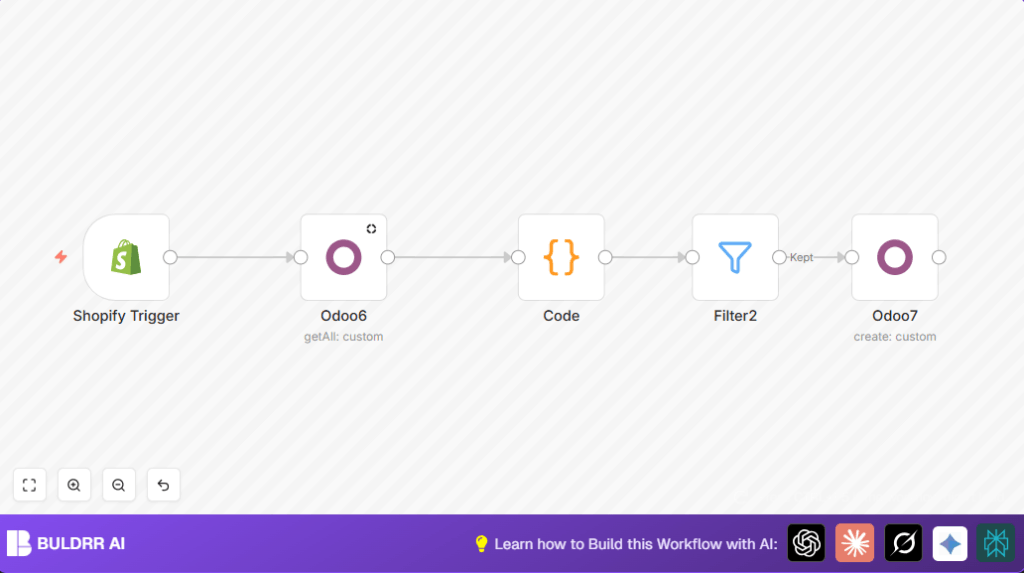
This workflow checks Shopify for new products. When a new product shows, it looks in Odoo to see if the product is already there. If not, it adds the new product into Odoo with details like product name, SKU, description, and price.
This solves the problem of manually entering product data into Odoo after creating it in Shopify. It saves time and stops mistakes from typing or duplicating products.
Tools and Services Used
- n8n: Automates the workflow using visual nodes inside the editor.
- Shopify Admin API: Detects new product creation and sends product data.
- Odoo ERP API: Checks for existing products and creates new ones as needed.
Inputs, Processing Steps, and Output
Inputs
- Shopify webhook event for new product creation.
- Product data like title, variants, SKU, description, and price.
Processing Steps
- Shopify Trigger listens for products/create events.
- Odoo node queries the existing product list filtering by Shopify product ID.
- Code node analyzes if the product exists in Odoo and prepares data.
- Filter node stops the workflow if the product exists.
- Odoo node creates a new product if filtered through.
Output
- New Shopify products added into the Odoo product database without duplicates.
- Saved time and reduced errors from manual data entry.
Who Should Use This Workflow
Anyone managing an online Shopify store with product data kept in Odoo ERP.
This suits store managers, inventory handlers, and businesses who want to sync product info without manual work.
Beginner Step-by-Step: How to Use the Workflow in n8n
Importing the Workflow
- Download the workflow file using the Download button on this page.
- Open the n8n editor where workflows are managed.
- Click on “Import from File” and choose the downloaded workflow.
Configuring After Import
- Add Shopify API Key and store credentials to the Shopify Trigger node.
- Enter Odoo API credentials in both Odoo nodes.
- Check and update any IDs, email addresses, or other specific values if your system uses different codes.
Testing the Workflow
- Create a test product in Shopify to trigger the workflow.
- Watch the workflow run in the n8n UI and check if the product appears in Odoo.
Activating for Production
- Turn on the workflow toggle in n8n to let it run automatically.
- Monitor the workflow for errors or failures in real use.
- Schedule regular reviews for API keys and webhook health.
For users hosting the n8n instance on their own server, see self-host n8n to learn more.
Edge Cases and Troubleshooting
If the workflow does not trigger after product creation in Shopify, check that Shopify’s webhook is set to call the Shopify Trigger node’s URL.
Duplicate products appear if the Filter node does not correctly block existing products. Make sure the filter tests the existing flag equals false.
Customization Ideas
- Add inventory stock quantities from Shopify to Odoo by modifying the product create node.
- Include a trigger for Shopify product updates to keep Odoo data synchronized.
- Add notification nodes to send email or Slack messages when products sync.
Code Snippet Used in Workflow
The Code node uses this JavaScript to check product existence and prepare data:
var product_detail = $('Shopify Trigger').first().json;
var existing_product = $('Odoo6').item.json;
return {existing: existing_product.id ? true : false, product_detail: product_detail};
This code pulls the Shopify product info and checks if Odoo has a product with the same ID.
Summary and Outcomes
✓ Save hours by eliminating manual data entry.
✓ Reduce errors caused by duplicate or wrong data.
✓ Automatically keep product information consistent between Shopify and Odoo.
→ New Shopify products appear in Odoo quickly.
→ Workflow is easy to set up and maintain inside n8n.
