
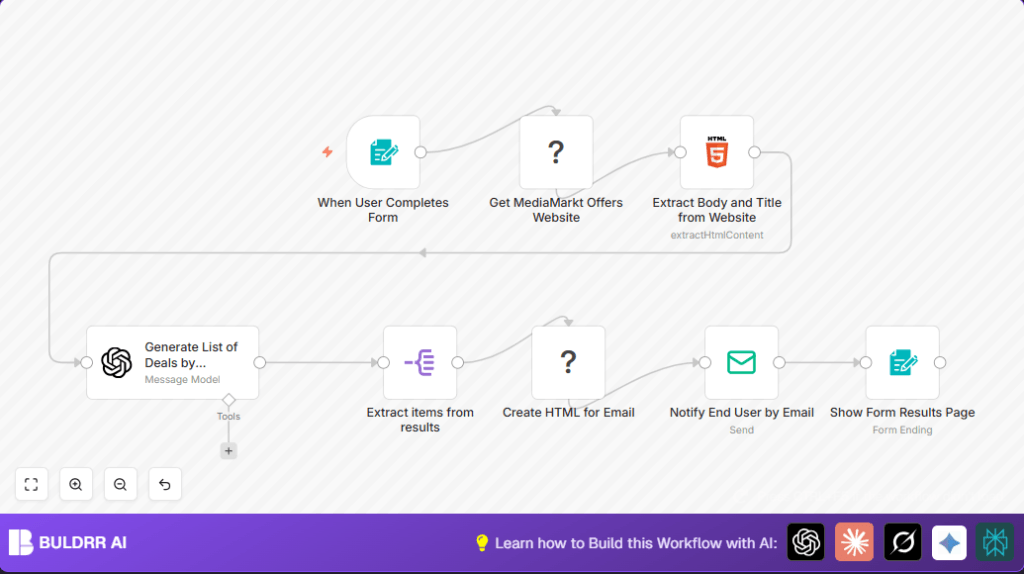

What this workflow does
This workflow fetches deals from MediaMarkt Spain automatically based on chosen categories and sends an email with the best offers.
It solves the problem of spending too much time looking for deals and missing discounts.
Users receive a clear email full of deals for their favorite categories without doing manual searching.
Tools and services used
- n8n: Automation tool where the workflow runs.
- BrightData: Web unlocking proxy to scrape MediaMarkt offers page.
- OpenAI (GPT-4o-mini): Classifies and translates deal info into English JSON.
- SMTP Email: Sends personalized deal emails to users.
Inputs, processing, and outputs
Inputs
- User submits form selecting categories and entering email.
- BrightData scrapes raw deals page HTML.
Processing steps
- Extract HTML content from scraped data.
- Pass HTML text and user categories to OpenAI for classification and translation into JSON.
- Extract individual deal items from OpenAI JSON output.
- Generate formatted HTML email content listing deals.
- Send email via SMTP.
Outputs
- Confirmation page shows count of deals emailed.
- User receives a neat email with personalized deals.
Who should use this workflow
This workflow is for people who want to save time and effort finding daily MediaMarkt deals.
Non-technical users can get customized deal emails without manual searching or coding.
It works well for deal hunters focused on Appliances, Cameras, Cell Phones, and similar categories.
Beginner step-by-step: How to use this workflow in n8n production
Step 1: Import Workflow
- Download this workflow file using the Download button on this page.
- Inside n8n editor, click Import from File and select the downloaded file.
Step 2: Configure Credentials and Settings
- Add required API Keys and credentials for your BrightData, OpenAI, and SMTP email in n8n Credentials section.
- Check and update email addresses inside the EmailSend node, especially the From and dynamic To addresses.
- Verify URLs and zones in the BrightData node if needed.
- Copy and paste the OpenAI system prompt if you want to tweak classification behavior. The prompt is under the OpenAI LangChain node.
Step 3: Test the Workflow
- Submit a test form through the webhook URL shown in the Webhook node section with example categories and a real email.
- Check execution logs to ensure scraping, classification, and email sending are successful.
Step 4: Activate for Production
- Toggle the workflow to active in n8n.
- Share the webhook URL with real users so they can submit categories and emails.
- Monitor workflow runs and email delivery regularly.
For privacy or control, consider self-host n8n on a VPS.
Step-by-step workflow explanation
Input collection
The workflow starts with a Webhook node that opens a form for users.
Users pick deal categories such as Appliances, Cameras, or Cell Phones and enter their email address.
Scraping offers
The BrightData node accesses MediaMarkt’s campaign page while bypassing web restrictions.
The output is the raw HTML page content containing deals.
Parsing HTML content
An HTML Extract node grabs the page title and body text for further analysis.
Classifying and translating deals
The extracted body HTML and user category choices feed into the OpenAI LangChain node.
This node uses the GPT-4o-mini model with a specially crafted prompt to sort deals into categories and translate details into English JSON format.
Breaking down deals
A SplitOut node separates the returned JSON array of deals into individual entries to work with.
Generating email content
A Document Generator node uses a template listing each deal with category, link, name, and price in HTML.
<br>
These are our recommended deals today:<br>
<ul>
{{#each items}}
<li>{{category}}: <a href="https://www.bestbuy.com{{link}}">{{name}}</a> for {{price}}€</li>
{{/each}}
</ul>
<br>
This creates an easy-to-read email body showing the best offers.
Sending the email
The EmailSend node sends the deals email using SMTP.
It uses the user’s email from the form data as the recipient.
Showing confirmation
The final Form Completion node displays a thank-you page, telling users how many deals were emailed.
Edge cases and troubleshooting
- Empty BrightData results: Check correct zone setup and BrightData API usage limits.
- Malformed OpenAI JSON: Verify system prompt correctness and make sure the HTML input to OpenAI is well parsed.
- Email delivery issues: Confirm SMTP settings and email sender address are valid; test with simple emails first.
Customization ideas
- Add more categories like Smart Home or Wearables in the form trigger for more tailored deals.
- Change the BrightData scraping URL to other retailer campaign pages with similar HTML.
- Edit the Document Generator template to include images or discount percentages in deal emails.
- Set up a timer trigger to run this workflow daily for automatic deal alerts.
- Integrate Slack node to send notifications when new deal emails go out.
Summary of benefits
✓ Saves users many hours of manual searching weekly.
✓ Automatically gathers and sorts MediaMarkt deals by user interests.
✓ Sends neat, clear emails so users never miss a discount.
✓ Easy to install and operate inside n8n with minimal setup.
✓ Allows production use with real-time user input or scheduled runs.
