

What this workflow does
This workflow updates images in Google Slides automatically.
You send a simple POST request with the presentation ID, image key, and new image URL.
The workflow finds all images tagged with the given image key and replaces them with the new image.
It also updates image alt text for accessibility.
The result is faster, error-free slide image updates without manual work.
Who should use this workflow
Marketing managers or anyone who needs to update many Google Slides decks with new images often.
This helps if you have branded images tagged by unique alt text and want to update them in bulk.
Tools and services used
- Google Slides API: Accesses and updates slide content.
- n8n Workflow Automation: Runs the workflow to receive requests and process updates.
- Webhook node: Receives external POST requests triggering the workflow.
- HTTP Request node: Calls Google Slides API endpoints.
- Code node: Filters images to update using JavaScript.
- Respond to Webhook node: Sends response back confirming success or error.
Inputs, processing, and output
Inputs
- Google Slides presentation_id (string) to specify which deck to update.
- Unique image_key (string) stored in alt text describing the image to find.
- New image_url (string) to replace matching images with.
Processing steps
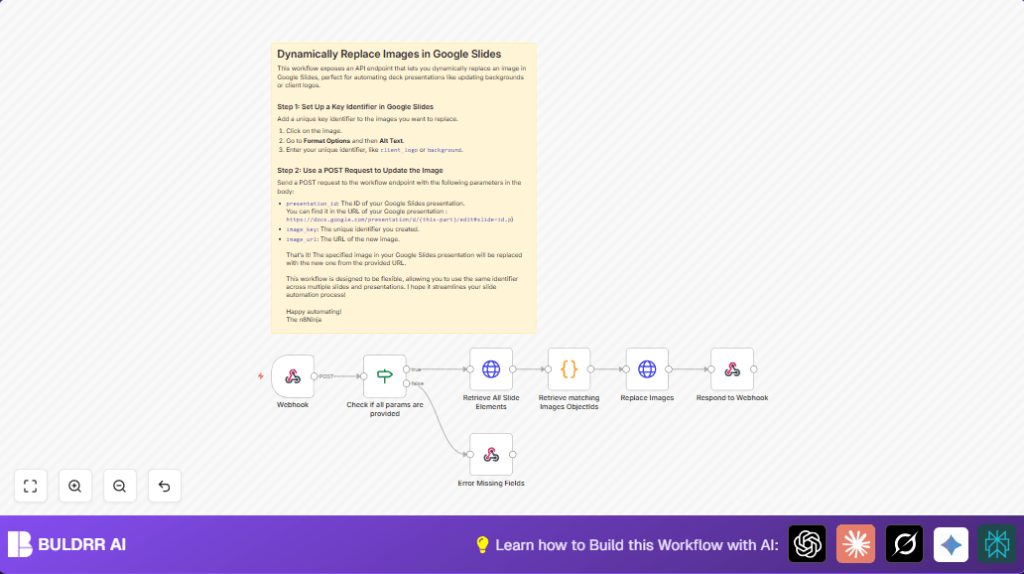
- The Webhook node receives the POST request with inputs.
- The If node checks all required fields are present.
- The HTTP Request node fetches all slides and their elements from Google Slides API.
- The Code node scans slides to find images whose alt text description matches image_key.
- Another HTTP Request node sends a
batchUpdateto replace all identified images with image_url. - The workflow also updates alt text description for replaced images to keep accessibility correct.
Output
- A JSON response confirms if images were replaced successfully or reports missing fields errors.
Beginner step-by-step: How to use this workflow in n8n
Step 1: Import the workflow file
- Inside the n8n editor, click on the menu.
- Choose Import from File.
- Select the workflow file downloaded from this page.
Step 2: Add credentials
- Add Google Slides OAuth2 credentials to n8n or update existing ones.
- Attach these credentials in all HTTP Request nodes calling Google Slides API.
Step 3: Configure the workflow
- Update any IDs or URLs if needed. Normally, the workflow reads these from the webhook POST body.
- Make sure images in your Google Slides have alt text descriptions as unique image keys.
Step 4: Test the workflow
- Send a POST request to the webhook URL with JSON body including
presentation_id,image_key, andimage_url. - Check the JSON response confirms successful replacement.
Step 5: Activate for production
- Toggle the workflow Activate switch inside the n8n editor.
- Use the webhook URL in your apps or tools to automate image updates.
- For secure hosting, consider self-host n8n to run this workflow on your own server.
Errors and edge cases
If the workflow returns a “Missing fields.” error, it means the POST request did not include all three required fields: presentation_id, image_key, and image_url.
Check your request body for correct JSON keys and non-empty values.
If Google Slides API reports authentication errors, the Google OAuth2 credentials may be expired or misconfigured.
Reauthorize or refresh the credentials inside n8n settings.
Customization ideas
- You can tag many images with the same image_key alt text.
The workflow replaces all these images in one batch call. - Change
imageReplaceMethodfromCENTER_CROPtoSCALEorSTRETCHin the replace request JSON to change how images fit. - Add more requests in the batchUpdate call to also change slide text or other elements alongside images.
Summary
✓ Saves a lot of manual time updating images in Google Slides decks.
✓ Reduces errors by automating image replacements using unique alt text keys.
→ Lets you update many images across one or more presentations using one API call.
→ Gives JSON feedback for success or missing fields.
