
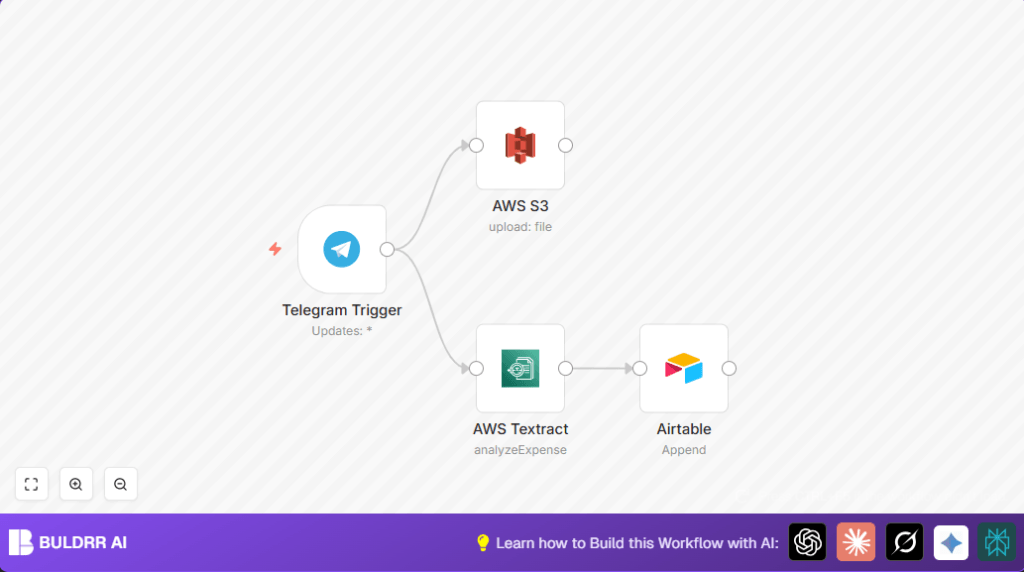

What This Automation Does
This workflow gets receipt images sent via Telegram and turns them into expense records automatically.
It stops manual copy-pasting and lowers mistakes.
Once a receipt is sent, the system saves the image in AWS S3, reads the text with AWS Textract, then puts the data into Airtable.
This means receipts are tracked fast and right every time.
Who Should Use This Workflow
Small business owners or managers getting expense receipts by Telegram.
Users who want to save time and avoid errors entering receipt info.
People tracking expenses on Airtable but tired of manual data entry.
Tools and Services Used
- Telegram Bot API: Receives user messages with images.
- AWS S3: Stores receipt images securely in cloud.
- AWS Textract: Extracts text data from images using OCR.
- Airtable: Holds parsed receipt data for expense tracking.
- n8n Platform: Runs the integration workflow.
Inputs → Process → Output
Inputs
- Receipt images sent as Telegram messages to the bot.
Processing Steps
- Telegram Trigger: Watches for new images from Telegram.
- AWS S3 Upload: Saves the received image file into a specified cloud bucket.
- AWS Textract OCR: Reads text data from the stored image.
- Airtable Append: Adds extracted receipt details as a new row in the expense table.
Output
- New, accurate expense record in Airtable for each receipt image.
- Receipt images kept securely in AWS S3 for future reference.
Beginner Step-by-Step: How to Use This Workflow in n8n for Production
Step 1: Import the Workflow
- Download the workflow file using the Download button on this page.
- Open the n8n editor.
- Click on Import from File and select the downloaded workflow file.
Step 2: Add Your Credentials and Update Settings
- In the Telegram Trigger node, add your Telegram bot API Key in credentials.
- In the AWS S3 and AWS Textract nodes, add the AWS API Keys with proper permissions.
- In the Airtable node, enter your Airtable API Key and select your base and table for expenses.
- Update bucket names, table names, or IDs if your setup differs from defaults.
Step 3: Test the Workflow
- Send a sample receipt image to your Telegram bot.
- Watch the workflow trigger in n8n and check Airtable for the new record.
Step 4: Activate for Production Use
- Switch the Telegram Trigger to active to listen fully for real receipt images.
- Make sure your bot is accessible to your remote team.
- Monitor workflow executions at first to catch any errors.
For users managing their own servers, consider self-host n8n for full control.
Common Customization Ideas
- Change Telegram Trigger image size to balance quality and bandwidth.
- Add a Code node after Textract to parse complex data into vendor, date, amount.
- Split expenses into multiple Airtable tables using IF nodes for categories like travel or meals.
Troubleshooting
- “No file found in Telegram trigger”
Check if the image download option is enabled in the Telegram Trigger. - “Access denied for AWS Textract”
Confirm AWS credentials have Textract permission in IAM settings. - “No bucket found or file upload failed”
Verify bucket name is correct and S3 permissions allow PUT uploads.
Pre-Production Checklist
- Check Telegram bot receives images properly.
- Ensure AWS S3 bucket exists and upload permissions are set.
- Confirm AWS Textract is active and accessible.
- Make sure Airtable base and table exist with valid API key.
- Test full workflow once with a sample receipt before going live.
Deployment Guide
Turn on the Telegram Trigger webhook to start listening.
Make sure the Telegram bot is reachable by users.
Watch n8n logs for errors.
Optionally add alerts for failed runs or missing data records.
This process runs automatically without daily monitoring.
Summary and Results
✓ Hands-free capture of receipt images from Telegram.
✓ Automatic storage of images in AWS S3.
✓ Accurate text extraction from receipts via AWS Textract.
✓ Automatic addition of expense records into Airtable.
→ Saves hours of manual data entry.
→ Reduces errors in expense tracking.
→ Keeps financial records consistent.
