

Opening Problem Statement
Meet Yael, a busy mother of three juggling work, school runs, doctor appointments, and staying connected with family and teachers. Every day, she wastes precious time switching between apps texting, scheduling, emailing, and searching the internet for quick answers. She often forgets appointments or sends messages late due to constant interruptions, leading to frustration and missed opportunities. How could Yael simplify this chaos with minimal effort?
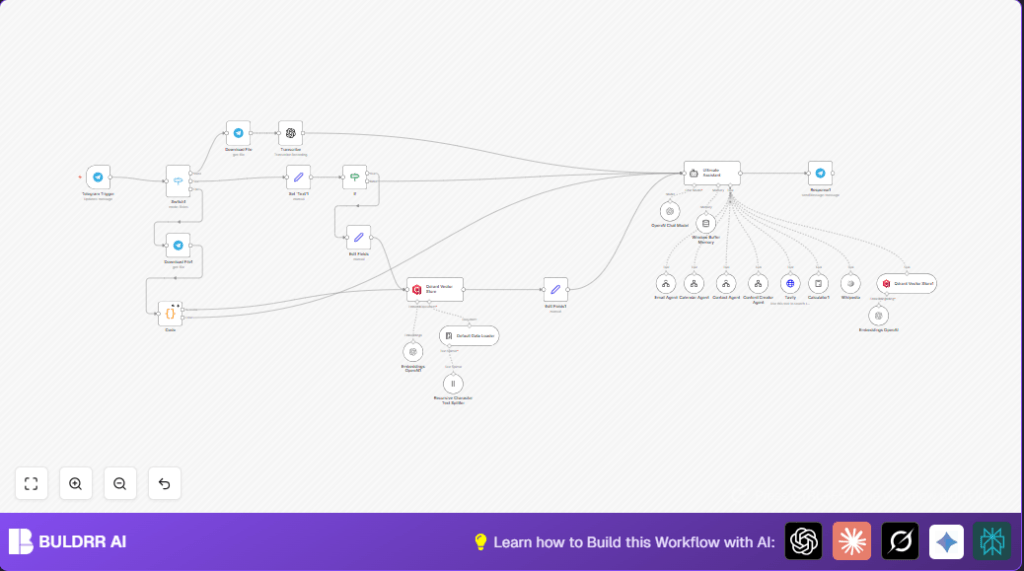
This n8n-powered “Parents smart bot” uses Telegram as the interface to automatically understand Yael’s voice and text commands, then intelligently routes each request to specialized agents that manage emails, calendar events, contacts, content creation, web searches, and calculations. It responds to her in Hebrew with warm, empathetic messages, acting as a gentle, personal assistant designed specifically for parents with hectic lives.
What This Automation Does
When Yael sends a message or voice note to her Telegram bot, here’s what this automation accomplishes:
- Voice Transcription: Converts voice messages to text automatically, allowing her to communicate hands-free.
- Intent Understanding: A powerful AI “Ultimate Assistant” node smartly interprets her commands and decides which specialized tool to use.
- Agent Delegation: Routes tasks to dedicated agents for emails, calendar bookings, contacts, content writing, internet search, or calculations — without manual switching.
- Contextual Memory: Maintains a family-specific context and memory base to tailor responses based on past interactions and family data.
- Responses in Hebrew: Always replies in a warm, calm Hebrew tone suited for busy parents.
- File Handling: Downloads and processes voice or document files sent via Telegram seamlessly within the workflow.
By automating communication, scheduling, and content creation through a familiar messaging app, this workflow saves Yael at least 5 hours a week and avoids errors from missed or forgotten tasks.
Prerequisites ⚙️
- Telegram account and Telegram Bot token to receive and respond to messages. 📧
- OpenAI API key for voice transcription, AI language model, embeddings, and chat intelligence. 🔑
- Qdrant API for vector database storage of family memory and context.
- Tavily API key for web search capabilities.
- At least 5 separate pre-built n8n workflows acting as specialized “agents” for email, calendar, contacts, and content creation—all called dynamically here.
- n8n Account to create and run the workflow, with webhook capability enabled.
- Optional: Self-hosted n8n instance for privacy and control (refer to Hostinger for hosting advice).
Step-by-Step Guide to Build This Smart Parent Assistant Bot
Step 1: Set Up Telegram Trigger for Incoming Messages
Go to n8n, then click Nodes → Add Node → Select “Telegram Trigger”.
Connect your Telegram Bot by providing the Telegram API credentials.
Configure it to listen for “message” updates including text, voice, and documents.
You should see webhook URLs generated for Telegram to send updates.
This will capture every new Telegram chat message automatically.
Common mistake: Forgetting to enable necessary Telegram Bot permissions or update webhook URL in Telegram Bot settings.
Step 2: Use “Switch” Node to Branch Message Type
Add a Switch node named “Switch1.” Configure rules to detect if incoming data contains voice messages, text messages, or document files.
Route to different nodes accordingly—voice goes to the “Download File” node, text goes to “Set ‘Text’1”, file messages go to “Download File1”.
This separates incoming updates for appropriate processing.
Common mistake: Incorrect condition checks causing some messages to be ignored.
Step 3: Download Voice or Document Files from Telegram
Use “Download File” node connected to the Telegram trigger for voice and document file IDs.
Configure the resource type and file ID to download the actual file content.
This enables transcription or JSON parsing next.
Common mistake: Incorrect file ID expression preventing download.
Step 4: Transcribe Voice Messages to Text
Add the “Transcribe” node with OpenAI’s audio transcription feature.
Give it the downloaded audio file from Telegram.
It outputs clear text, converting voice commands to processable input.
Common mistake: Not linking file binary data correctly may cause transcription errors.
Step 5: Prepare Text for AI Intake
Use the “Set ‘Text’1” node to extract the “text” property from the message or transcribed voice.
This ensures consistent text data feeding the AI assistant.
Common mistake: Setting wrong variable names causes AI to get empty text.
Step 6: Use an “If” Node to Detect Relevant Keywords
Add an “If” node with regex patterns for parenting keywords like “רופא” (doctor), “גן” (kindergarten), “תזכורת” (reminder), etc.
If matched, continue to update family memory and improve assistant context.
Common mistake: Regex syntax errors or missing keywords may prevent memory updates.
Step 7: Update Family Memory in Qdrant Vector Store
Use the “Qdrant Vector Store” node to insert or update family-related texts and metadata.
This in-memory context helps the assistant personalize responses and recall previous family details.
Common mistake: Not passing right JSON schema for Qdrant insertion causes silent failures.
Step 8: Use “Ultimate Assistant” AI Agent to Interpret and Delegate
Add the Langchain agent node “Ultimate Assistant”, configured with a rich system prompt describing its role as a smart parent assistant.
It delegates tasks to the child agents: Email Agent, Calendar Agent, Contact Agent, Content Creator, Tavily (web search), and Calculator.
Common mistake: Failing to include all instructions in the system prompt reduces effectiveness.
Step 9: Connect Specialized Agents as Tool Workflows
Add toolWorkflow nodes for Email, Calendar, Contact, and Content Creator agents—each calling separate workflows specialized for those actions.
This modular setup separates concerns and allows easy maintenance.
Common mistake: Wrong workflow ID or missing credentials disables tool calls.
Step 10: Add Web Search and Calculator Tools
Incorporate the Tavily tool HTTP request node to handle web searches for news and facts.
Add the Calculator tool node to evaluate math tasks.
Common mistake: Misconfigured API keys or request structure causes failing search or requests.
Step 11: Memory and Context Handling
Add a Window Buffer Memory node keyed by the Telegram chat session ID.
Add another Qdrant Vector Store” retrieval node to supply context for better AI decisions.
Common mistake: Not synchronizing memory session IDs leads to confusing or out-of-context replies.
Step 12: Send Responses Back to User on Telegram
Use the Telegram node “Response1” to send textual replies.
Ensure the chatId and message text are correctly mapped.
Expect warm, Hebrew messages tailored by the AI.
Common mistake: Missing chat ID causes message delivery failure.
Customizations ✏️
- Add New Keywords to “If” Node Regex
Edit the regex list to include new family-related terms to improve memory capture.
In the If node, update the/(מיה|שוהם|נוי|גן|חוג|רופא|סבתא|שישי|שלישי|תזכורת|יש|ביום|בעבודה|בבית ספר)/iregex.
This expands context awareness for your family. - Customize System Prompt Text
Modify the system message in the Ultimate Assistant node to tailor the assistant’s tone or add more tools.
Adjust the roles it plays or languages supported. - Add More Tool Agents
Integrate additional workflows as new ToolWorkflows in the Ultimate Assistant node.
Example: A grocery shopping agent or homework helper. - Change Language Output
By default responses are in Hebrew; change the language setting in the prompt to add other languages for multilingual households. - Fine-Tune Memory Vector Store
Adjust Qdrant collection names, vector embedding settings, or retrieval topK values to change how much family memory is stored or retrieved for context.
Troubleshooting 🔧
- Problem: “Incorrect file ID or download failure”.
Cause: Expression for file IDs in “Download File” node is incorrect or permissions in Telegram Bot are missing.
Solution: Double-check expressions like{{$json.message.voice.file_id}}and ensure Telegram Bot token has file access enabled. - Problem: “AI assistant not delegating tasks properly”.
Cause: System prompt in Ultimate Assistant missing or incomplete.
Solution: Review the system prompt content fully per the workflow JSON; add all tool instructions and tone settings. - Problem: “Memory retrieval returns no context”.
Cause: Qdrant credentials or collection name incorrect.
Solution: Verify Qdrant API credentials and collection “family-memory” exist and are accessible. - Problem: “Transcription errors or no voice text output”.
Cause: OpenAI API key misconfiguration or file binary data linking issues.
Solution: Check API credentials and data passing from Telegram download node to transcription node carefully.
Pre-Production Checklist ✅
- Verify Telegram webhook is receiving messages correctly by sending test texts and voice notes.
- Test transcription on sample voice messages to confirm accurate text output.
- Check if the Ultimate Assistant AI node correctly routes intents by simulating various commands.
- Confirm contact, email, calendar, and content workflows are callable and return expected results.
- Validate Qdrant vector store inserts and retrieval by checking logs and data consistency.
- Ensure responses send back properly to Telegram chat with no errors.
Deployment Guide
Once tested, activate your workflow by setting it to “active” in n8n.
Regularly monitor logs in n8n execution to catch errors or performance issues.
As this uses external APIs (OpenAI, Qdrant, Tavily), watch for rate limits or quota exhaustion.
Ensure your Telegram Bot webhook URL remains correct and accessible.
Optionally, schedule backups of your workflow and configurations.
FAQs
- Q: Can I use WhatsApp instead of Telegram?
A: This workflow is specifically built for Telegram API triggers and file handling. While it’s possible to adapt, WhatsApp requires different webhook and media handling setup. - Q: Does this consume OpenAI API credits?
A: Yes, transcription, chat model calls, embeddings, and content generation all use OpenAI APIs which may incur costs. - Q: Will my data be secure?
A: Data flows within your private n8n instance and connected services. Ensure you secure API keys and consider running n8n self-hosted for maximal privacy. - Q: Can it handle large family data?
A: Using Qdrant vector store enables scalable memory storage and fast retrieval for ongoing context management.
Conclusion
In this tutorial, you set up a powerful, specialized smart assistant for busy parents using n8n and Telegram. Yael now saves hours weekly, keeping her family’s appointments, communications, and daily logistics effortlessly organized in Hebrew. The modular design means you can expand and customize with more agents or new capabilities. From voice transcription to web searching and context-aware replies, this bot transforms how busy parents manage their lives digitally.
Ready to take the next step? Consider adding a grocery shopping agent, homework helper, or integrating with smart home devices to further simplify your family’s day-to-day tasks. Happy automating!