

What This Automation Does
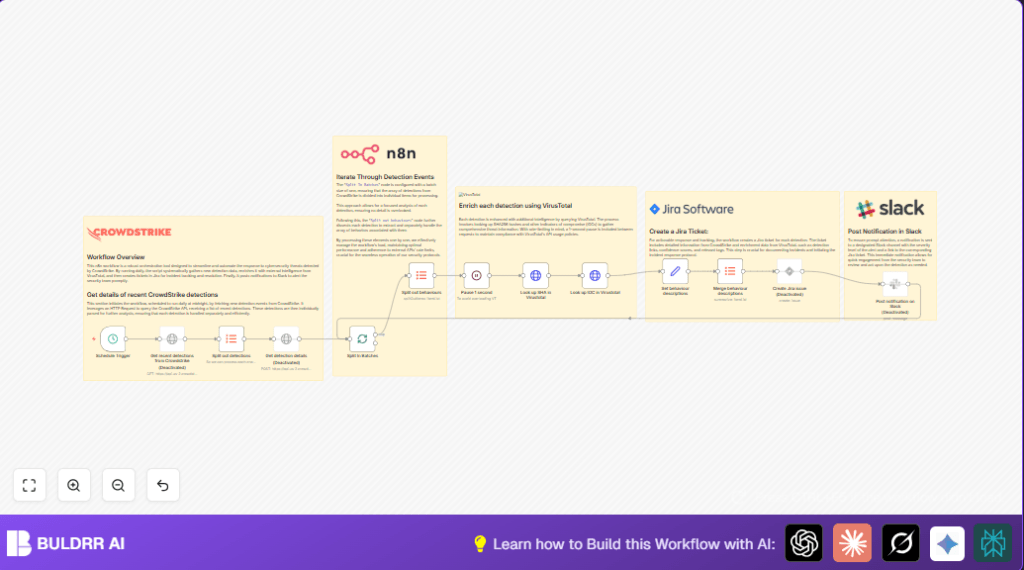
This workflow fetches new security alerts from CrowdStrike every day.
It looks at each alert one by one, pulling out important details and hashes.
Then, it checks those hashes and other indicators with VirusTotal to find out if they are threats.
It collects all the info and writes a Jira ticket with details.
Finally, it sends a Slack message telling the team to review the ticket quickly.
This helps save 3-4 hours daily and stops alerts from being missed.
How This Workflow Works (Input → Process → Output)
Inputs
- CrowdStrike detection events: New, unhandled alerts pulled by API daily.
- VirusTotal API key: To check hashes and indicators of compromise (IOCs).
- Jira project: To create incident issue tickets.
- Slack token and channel/user ID: To send notifications.
Processing Steps
- Pull new detection IDs from CrowdStrike API filtering for fresh alerts.
- Split out detection IDs to handle each alert separately.
- Fetch full details for each detection, including behaviors and hashes.
- Break down behaviors for each detection to analyze them one by one.
- Include a 1-second pause before VirusTotal queries to respect API limits.
- Query VirusTotal with SHA256 hashes and IOC values to get threat details.
- Format a detailed description in markdown with CrowdStrike and VirusTotal info.
- Group all behavior descriptions into a single summary text.
- Create a Jira issue using this enriched data to track the alert.
- Send a Slack message linking to the new Jira ticket to alert the team.
Output
- Jira issues logging every new enriched security detection.
- Slack notifications for fast team response.
- Saved time by automating manual lookup and ticket creation.
Beginner Step-by-Step: How to Use This Workflow in Production
Import the Workflow
- Download the workflow file using the “Download” button on this page.
- Open your n8n editor where you want to run this automation.
- Click on “Import from File” in n8n and choose the downloaded workflow file.
Configure Credentials and Settings
- Add your CrowdStrike API credentials with OAuth2 token in n8n Credentials section.
- Enter your VirusTotal API key in the relevant HTTP Request nodes.
- Configure Jira Software Cloud credentials that have create issue permission.
- Set Slack User OAuth Token with rights to post messages.
- Update any user IDs, channel names, project keys, or email addresses to match your environment.
Test and Activate
- Run the workflow manually once to check each node’s output.
- Fix any errors by double-checking credentials or settings.
- Activate the workflow by turning on the Schedule Trigger node for daily runs.
For self-host n8n users, consider reviewing self-host n8n resources to optimize running this workflow safely and continuously.
Tools and Services Used
- CrowdStrike API: To get detection alerts.
- VirusTotal API: To enrich threat intelligence for hashes and IOCs.
- Jira Software Cloud: To create and track incident tickets.
- Slack API: For sending team notifications.
- n8n automation platform: To orchestrate all API calls and handling.
Customization Ideas
- Change the Slack recipient by editing the Slack node user or channel field.
- Adjust the Wait node duration to match VirusTotal rate limits.
- Add fields like priority or labels in the Jira ticket for better sorting.
- Enable live data fetching by making sure CrowdStrike API nodes are active.
- Add an email notification node after Jira issue creation to inform other teams.
Troubleshooting
- CrowdStrike API authentication fails: Check OAuth2 credentials or refresh tokens in n8n.
- VirusTotal API rate limit errors: Increase wait time or reduce request frequency.
- Jira issue not created: Confirm project key and issue type settings.
- Slack messages missing: Verify OAuth token permissions and correct user or channel ID.
Pre-Production Checklist
- Test CrowdStrike credentials with a sample API call.
- Verify VirusTotal API key works with a known SHA256 hash.
- Ensure Jira user has permission to create issues.
- Send a test message via Slack node.
- Check batch size in Split In Batches node is 1.
- Run full workflow dry test and review results carefully.
Deployment Guide
Once all credentials and settings are correct, turn on the Schedule Trigger node.
Monitor workflow runs inside n8n to spot errors early.
Adjust wait times or batch count if hitting API limits.
After that, alerts will flow automatically through CrowdStrike, VirusTotal enrichment, Jira tickets, and Slack messages.
This will keep your security team informed with fast, detailed info.
Summary of Results
✓ Save several hours daily from manual alert handling.
✓ Reduce errors by automating data lookup.
✓ Get detailed Jira tickets for easier incident tracking.
✓ Receive immediate Slack notifications for quick response.
✓ Improve overall security monitoring and team collaboration.
