
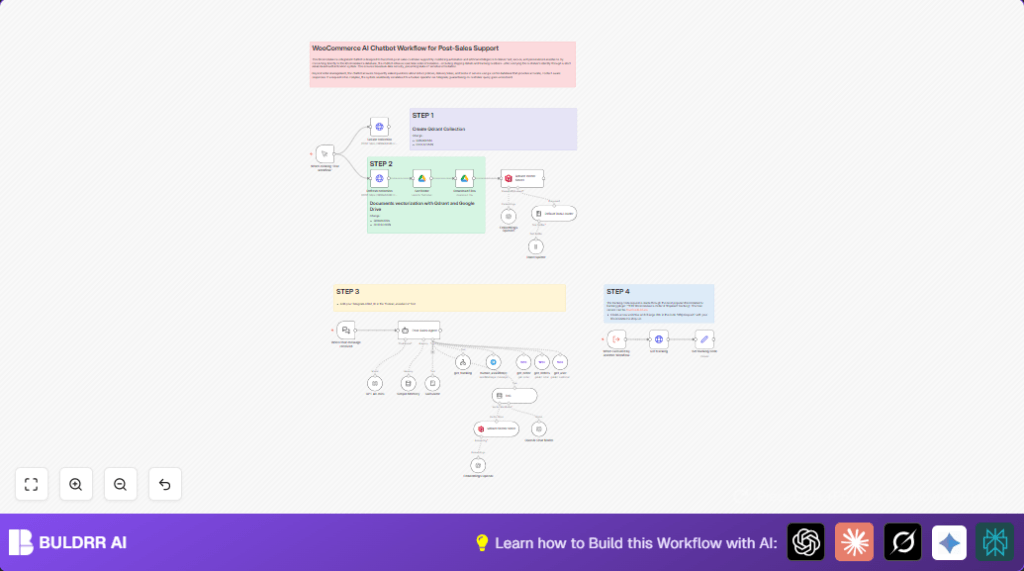

What this workflow does
This workflow automates post-sales support for WooCommerce stores using n8n workflows and AI tools. It helps verify customers by checking their order number and email. The system then fetches real order status and tracking details. It answers frequent questions using a vector search of company policies. Complex issues go to a human via Telegram. This reduces wait time and keeps customer data safe.
Who should use this workflow
Online store owners using WooCommerce who want faster customer support.
Store managers needing to protect customer privacy.
People who want to reduce manual order lookups and mistakes.
Tools and services used
- WooCommerce API: To get order and customer details.
- OpenAI: For AI chat and text embedding.
- Qdrant Vector Database: To store and search company policy documents.
- Google Drive: For storing and loading policy documents.
- Telegram Bot API: Sends messages to humans for help.
- n8n: The automation workflow tool that ties everything together.
Inputs, processing, and output
Inputs
- Customer messages sent to the chatbot webhook.
- Order number and email entered by customers.
- Company policies documents from Google Drive.
Processing
- Verify order number exists in WooCommerce.
- Check customer’s email matches the order email.
- Call WooCommerce tracking API to get delivery info.
- Use OpenAI embeddings and Qdrant to answer FAQs.
- If needed, send unresolved queries to human support via Telegram.
- Maintain conversation context with AI memory node.
Outputs
- Instant answers about order status and shipping.
- Tracking numbers and carrier links returned to customers.
- Replies with company policy answers for FAQ.
- Escalation messages sent to human agents.
Beginner step-by-step: How to use this workflow in n8n
Step 1: Import the workflow
- Download the workflow file using the Download button on this page.
- In the n8n editor, choose “Import from File” and select the downloaded workflow.
Step 2: Add needed credentials and settings
- Enter WooCommerce API admin credentials to allow order and customer lookup.
- Set OpenAI API key for AI chat and embeddings.
- Configure Qdrant API credentials and ensure the vector store collection is ready.
- Link Google Drive account that holds your policy documents.
- Input Telegram bot token and chat ID to enable human escalation.
Step 3: Update any IDs and emails
- Update placeholders for order number or email fields if needed.
- Make sure the Telegram chat ID points to the right support group or person.
- Check URLs used for WooCommerce tracking plugin API.
Step 4: Test and activate
- Send a test message to the webhook URL to check the workflow runs correctly.
- Confirm the workflow fetches order data, verifies email, and returns tracking info.
- Test FAQ answer retrieval from Qdrant.
- Check human escalation triggers for unhandled queries.
- Activate the workflow in n8n to run live.
If hosting on your own server, consider self-host n8n for full control.
Common issues and fixes
- Email verification fails: Check that AI prompts correctly extract email from messages.
- Tracking info missing: Verify WooCommerce tracking plugin API URL and credentials.
- Telegram messages not sent: Confirm valid bot token and correct chat ID.
- Wrong order lookup: Make sure WooCommerce admin API keys have proper read access.
Customization ideas
- Change verification to require phone or other ID.
- Add AI prompts that detect and respond in multiple languages.
- Keep Qdrant policies updated by adding new documents in Google Drive.
- Upgrade the AI node to better OpenAI models for richer replies.
Summary of workflow benefits
✓ Fast, automated customer support with verified order info.
✓ Protects customer privacy by checking emails.
✓ Provides real-time tracking and shipment updates.
✓ Answers FAQs from company policies using vector search.
✓ Sends tough cases to humans via Telegram.
