

1. What This Automation Does
This workflow takes simple text video ideas about job hunting and turns them into ready-to-share short videos for social media.
It solves the problem of slow and hard manual video creation by automating everything end-to-end.
You get fast, consistent, professional videos with captions, voices, and posts done automatically.
It uses AI to make captions, images, videos, voiceovers, and compiles these into final videos.
Then it uploads videos to Google Drive and posts them on TikTok, Instagram, YouTube, Facebook, and LinkedIn by itself.
2. Input, Process & Output Structure
Inputs
- Video ideas list: Loaded from Google Sheets.
- API Keys and Credentials: For OpenAI, PiAPI, Eleven Labs, Creatomate, Google Drive, and upload-post.com.
Processing Steps
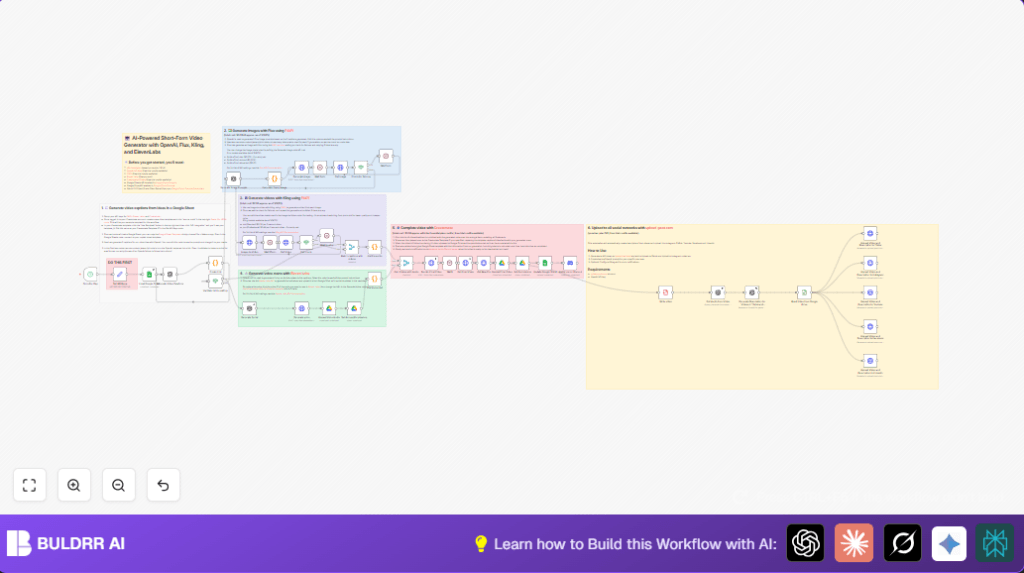
- Generate wild, first-person POV captions using OpenAI GPT-4o-mini.
- Turn captions into detailed, real-life style image prompts.
- Create images with Flux AI through PiAPI HTTP requests.
- Wait and poll to confirm images are ready.
- Animate each image into a 5-second video clip using Kling AI.
- Generate edgy, witty scripts from captions by OpenAI.
- Convert scripts to voice audio via Eleven Labs text-to-speech API.
- Upload voice audio to Google Drive with public sharing.
- Gather video clips, voice, and captions; send to Creatomate API for final video rendering.
- Download final video and upload to Google Drive with public access.
- Update Google Sheet rows to mark video done and add metadata.
- Send notification to Discord webhook about ready video.
- Transcribe audio and create social media descriptions for multiple platforms.
- Upload videos and descriptions to TikTok, Instagram, YouTube, Facebook, and LinkedIn automatically via upload-post.com.
Outputs
- Publish-ready short-form videos with captions and voiceovers.
- Public Google Drive links for videos and voiceovers.
- Social media posts published across five platforms.
- Tracking data in Google Sheets for all video items.
3. Who Should Use This Workflow
This workflow is for content creators who spend too much time making TikTok or social videos.
It suits people wanting to automate from script to upload without using many tools manually.
Users who want consistent, fast output with less errors will find this helpful.
Also good for those learning self-host n8n or cloud users wanting to save hours daily.
4. Tools and Services Used
- n8n automation platform: Connects and runs the workflow.
- OpenAI API: Generates captions, prompts, and scripts using GPT-4o-mini model.
- PiAPI service: Provides Flux AI for images and Kling AI for videos.
- Eleven Labs API: Converts scripts to spoken voice audio.
- Creatomate API: Renders final video combining clips and audio.
- Google Sheets API: Stores video ideas and tracks production state.
- Google Drive API: Stores and shares voiceover and final videos publicly.
- upload-post.com API: Uploads and posts videos with descriptions to social platforms.
- Discord Webhook (optional): Sends notifications when video is ready.
5. Beginner Step-by-Step: How to Use This Workflow in n8n
1. Importing the Workflow
- Download the workflow file using the Download button on this page.
- Open n8n editor where you want to run the workflow.
- Use the Import from File option in n8n to load the downloaded workflow.
2. Configuration After Import
- Open the Set API Keys node or any node asking for credentials.
- Add your API Keys for OpenAI, PiAPI (Flux and Kling services), Eleven Labs, Creatomate, Google Sheets, Google Drive, and upload-post.com.
- Update Google Sheets document ID and sheet name in Load Google Sheet node to your own sheet with video ideas.
- Set Google Drive folder IDs for voice and video uploads.
- Check and update any email, channel, folder, or template IDs matching your environment.
- Review all prompts inside OpenAI nodes, copy-paste or adjust text in prompt fields if needed.
3. Testing the Workflow
- Run the workflow manually once inside n8n to confirm all nodes work and outputs appear.
- Check Google Drive and Google Sheets to see if files and data are saved properly.
- If you use Discord webhook, check for notification messages.
4. Activating for Production
- Enable the scheduled trigger node Once Per Day or change schedule as needed.
- Make sure n8n runs continuously either on cloud or via self-host n8n to run workflow daily.
- Monitor execution logs in n8n and fix errors if any appear.
6. Customizations and Adjustments
- Change Flux AI image generation model by editing the “model” field in the Generate Image HTTP Request node.
- Switch Kling video generation mode from “pro” to “std” for cheaper or different video quality in Image-to-Video node.
- Edit or rewrite the OpenAI prompt text inside Generate Video Captions node to target different themes or speech style.
- Modify Eleven Labs API URL to use different voice IDs for voiceover style changes.
- Add more HTTP Request nodes at the end to post on social networks supported by upload-post.com, extending reach.
7. Troubleshooting Common Issues
Authorization errors HTTP 401: Check all API Keys carefully in the Set API Keys node. Renew keys if expired.
No output from OpenAI nodes: Confirm your prompt format looks right. Check your OpenAI quota and usage limits.
Video generation stuck forever: The workflow waits and retries on failures. Check API status pages for service interruptions. Increase wait times if needed.
Google Sheets or Drive authentication failed: Make sure Google API services are enabled and OAuth credentials are valid.
8. Pre-Production Checklist
- Confirm all API Keys are added correctly.
- Make sure Google Sheets and Drive APIs are enabled and connected.
- Test OpenAI nodes separately to verify outputs like captions and prompts.
- Run a full cycle with debug mode to check image and video generation.
- Check Creatomate template ID matches your video rendering setup.
- Test upload-post.com node uploads with a sample video.
- Verify Discord webhook URL if notification messages are wanted.
9. Deployment Guide
Activate the workflow inside n8n by enabling it.
It will then run on the schedule you set, like once per day.
Use the execution history list in n8n to see if runs succeed or fail.
Set up alerts with Telegram or Discord using webhook nodes to get notified if workflow errors happen.
To handle more videos, increase schedule frequency or run parallel executions.
Consider hosting n8n yourself for better control by visiting self-host n8n.
10. Summary of Benefits and Results
✓ Save 10+ hours per video by automating the full content production.
✓ Get fast, consistent results with less errors across tools.
✓ Publish videos automatically on five social media platforms.
✓ Generate professional AI-powered images, videos, and voices.
✓ Keep production data tracked in Google Sheets for easy monitoring.
