High-Paying Client Onboarding Script (AI Automation / n8n)

Bonus Onboarding Script In The End.

0) Goal of this onboarding call (say this first)

“Today I want to do 3 things:

  1. Understand your current process + where it breaks
  2. Confirm what a ‘successful automation system’ looks like
  3. Lock scope, timeline, access, and next steps so we can start building immediately”

1) Set the frame (premium positioning)

“I don’t build one-off workflows.

I build reliable automation systems that keep working even when:

→ data is messy

→ APIs fail

→ volume increases

→ edge cases happen

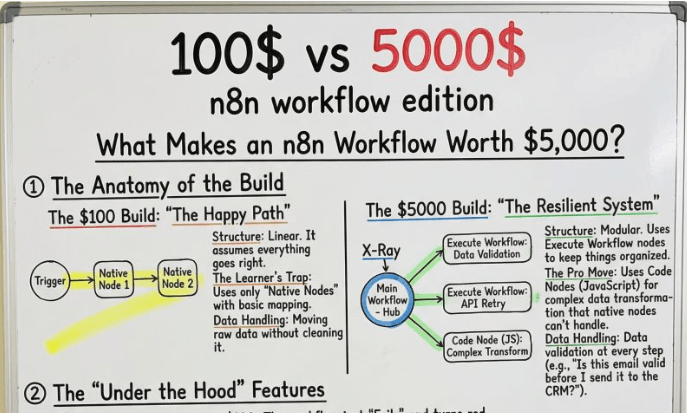
That’s the difference between a $100 workflow and a $5000 build.”


2) Quick business context (5 minutes)

Ask:

  1. “What team will use this daily?”
  2. “What’s the main outcome you want from this automation?”
  3. “What happens if this automation fails for 1 day?”
  4. “What’s the biggest pain right now: time, errors, missed leads, delays, reporting?”

Confirm back (repeat in 1 line):

“Perfect. So the goal is: [Outcome], for [Team], and failure costs you [Impact].”

This makes them feel understood + justifies premium.


3) Process mapping (the real onboarding)

Say:

“Now I’ll map the process exactly like a system.

We’ll go step-by-step from input → processing → output.”

Ask them to explain their current workflow:

“Walk me through it like I’m a new employee.

From the moment data enters… to the moment it’s done.”

While they talk, capture:

A) Inputs

  • Where does the data come from?
    • Form, website, email, CRM, WhatsApp, spreadsheet, webhook, Stripe, etc.
  • What fields do you receive?

B) Processing

  • What decisions happen?
  • What conditions matter?
  • What transformations happen?

C) Outputs

  • Where should the final result go?
    • CRM, Slack, Notion, Google Sheets, Airtable, email, dashboard, etc.

D) Ownership

  • Who needs to be notified?
  • Who approves what?

4) The “high-ticket” questions (this is what upgrades the price)

These are the questions that turn you from workflow builder → automation architect.

A) Data quality + validation

“Before we automate, I need to know what ‘bad data’ looks like.”

Ask:

  • “Do you ever get missing emails / wrong phone numbers?”
  • “Do names come in different formats?”
  • “Do you want the system to block bad entries or fix them automatically?”

Decision:

  • “If email is invalid → do we skip, correct, or send to review?”

B) Duplicate handling

“Duplicates are the silent killer of automations.”

Ask:

  • “What counts as duplicate?”
    • same email? same phone? same company?
  • “If duplicate exists, should we update the old record or ignore the new one?”

C) Failure handling (most important)

“APIs fail. It’s normal. The question is: what should our system do?”

Ask:

  • “If an API fails temporarily, should we retry 3 times or 10?”
  • “Do you want fallback logic?”
  • “Should failures notify you instantly or only after multiple retries?”

D) Rate limiting + scale

“Even if you have 100 records today, we build for 10,000 tomorrow.”

Ask:

  • “How many records per day/week?”
  • “Any seasonal spikes?”
  • “Any tool limitations you’ve hit before?”

E) Human approval points (if needed)

“Should this run fully automatically, or do you want approvals at specific steps?”

Examples:

F) Compliance + security

“Since this touches business data, we’ll do it properly.”

Ask:

  • “Any sensitive data involved? (payments, health, personal IDs)”
  • “Who should have access to credentials?”
  • “Do you want separate dev/prod environments?”

5) Define the scope clearly (avoid scope creep)

Say this:

“To keep this clean, I define scope in 3 layers:

Must-have, Nice-to-have, Later.”

Must-have (Phase 1)

“Let’s lock what must work 100%.”

Examples:

  • Capture leads
  • Validate data
  • Enrich info
  • Push to CRM
  • Notify team

Nice-to-have (Phase 2)

Examples:

  • AI scoring
  • Smart summaries
  • Auto-proposals
  • Advanced routing
  • Analytics dashboard

Later (Phase 3)

Examples:

  • Multi-language
  • Voice agents
  • Full agentic workflows
  • Additional channels (WhatsApp/SMS)

Confirm:

“For this build, we will deliver Phase 1 fully. Phase 2 is optional add-on.”


6) Explain your build structure (premium delivery)

Say:

“I’ll build this like a production system:

→ Main workflow hub

→ Sub-workflows for validation + retries

→ Clean transformations (Code node when needed)

→ Logging + monitoring

→ Separate dev and prod versions

→ Documentation + Loom walkthrough”

This makes the client feel: “this is not a freelancer.”


7) Access checklist (what you need from them)

Say:

“To start building, I need access to the tools involved.

I’ll send a checklist right after this call.”

Ask for:

  • n8n access (or confirm if you’re hosting)
  • API keys / credentials for:
    • CRM
    • Google Sheets
    • Email (SMTP / Gmail)
    • OpenAI / OpenRouter (if AI is involved)
    • Any scraping tools (Apify, etc.)
  • Sample data:
    • 10–20 real examples (good + bad cases)
  • Expected output format:
    • screenshot or example of “ideal final result”

Important line:

“I don’t need admin access to everything.

I only need the minimum permissions required.”


8) Success criteria (make it measurable)

Ask:

“At the end of the project, how will we know this was a win?”

Give options:

  • “Time saved per week”
  • “Lead response time reduced”
  • “Error rate reduced”
  • “No missed follow-ups”
  • “Accurate CRM data”
  • “System runs without manual babysitting”

Then lock it:

“Perfect. Success = [Metric].”


9) Deliverables + handover (this is where high-ticket closes)

Say:

“Once it’s live, you’ll receive:

→ the complete workflow system

→ a Loom walkthrough (how it works + how to edit safely)

→ a README doc (inputs, outputs, logic, failure handling)

→ monitoring setup (alerts if something breaks)

→ a short training session for your team”

This reduces fear and increases trust.


10) Timeline + communication rules (super important)

Say:

“Here’s how we’ll run this smoothly:

→ I build inside dev first

→ You review output

→ We test edge cases

→ Then we push to production”

Confirm communication:

  • “Where should I update you?”
  • “How fast do you want updates?”
    • daily / every 2 days / weekly

Set expectation:

“If something blocks us (missing access or unclear requirement), I’ll pause and message you instantly.”


11) Final confirmation (repeat the whole plan in 20 seconds)

“Just to confirm:

We’re building an automation system that takes [Input], processes it with [Rules + validation], and outputs [Result].

It will include retries, batching, monitoring, and clean documentation.

Next step: I’ll send the access checklist today, and we start build immediately.”


12) Close with next steps (clear + professional)

“Right after this call, you’ll get:

  1. Access checklist
  2. A 1-page scope summary
  3. Start date + delivery milestones
  4. First test run plan

Once I have access + sample data, I start building.”

Bonus Onboarding Script In The End.

0) Goal of this onboarding call (say this first)

“Today I want to do 3 things:

  1. Understand your current process + where it breaks
  2. Confirm what a ‘successful automation system’ looks like
  3. Lock scope, timeline, access, and next steps so we can start building immediately”

1) Set the frame (premium positioning)

“I don’t build one-off workflows.

I build reliable automation systems that keep working even when:

→ data is messy

→ APIs fail

→ volume increases

→ edge cases happen

That’s the difference between a $100 workflow and a $5000 build.”


2) Quick business context (5 minutes)

Ask:

  1. “What team will use this daily?”
  2. “What’s the main outcome you want from this automation?”
  3. “What happens if this automation fails for 1 day?”
  4. “What’s the biggest pain right now: time, errors, missed leads, delays, reporting?”

Confirm back (repeat in 1 line):

“Perfect. So the goal is: [Outcome], for [Team], and failure costs you [Impact].”

This makes them feel understood + justifies premium.


3) Process mapping (the real onboarding)

Say:

“Now I’ll map the process exactly like a system.

We’ll go step-by-step from input → processing → output.”

Ask them to explain their current workflow:

“Walk me through it like I’m a new employee.

From the moment data enters… to the moment it’s done.”

While they talk, capture:

A) Inputs

  • Where does the data come from?
    • Form, website, email, CRM, WhatsApp, spreadsheet, webhook, Stripe, etc.
  • What fields do you receive?

B) Processing

  • What decisions happen?
  • What conditions matter?
  • What transformations happen?

C) Outputs

  • Where should the final result go?
    • CRM, Slack, Notion, Google Sheets, Airtable, email, dashboard, etc.

D) Ownership

  • Who needs to be notified?
  • Who approves what?

4) The “high-ticket” questions (this is what upgrades the price)

These are the questions that turn you from workflow builder → automation architect.

A) Data quality + validation

“Before we automate, I need to know what ‘bad data’ looks like.”

Ask:

  • “Do you ever get missing emails / wrong phone numbers?”
  • “Do names come in different formats?”
  • “Do you want the system to block bad entries or fix them automatically?”

Decision:

  • “If email is invalid → do we skip, correct, or send to review?”

B) Duplicate handling

“Duplicates are the silent killer of automations.”

Ask:

  • “What counts as duplicate?”
    • same email? same phone? same company?
  • “If duplicate exists, should we update the old record or ignore the new one?”

C) Failure handling (most important)

“APIs fail. It’s normal. The question is: what should our system do?”

Ask:

  • “If an API fails temporarily, should we retry 3 times or 10?”
  • “Do you want fallback logic?”
  • “Should failures notify you instantly or only after multiple retries?”

D) Rate limiting + scale

“Even if you have 100 records today, we build for 10,000 tomorrow.”

Ask:

  • “How many records per day/week?”
  • “Any seasonal spikes?”
  • “Any tool limitations you’ve hit before?”

E) Human approval points (if needed)

“Should this run fully automatically, or do you want approvals at specific steps?”

Examples:

F) Compliance + security

“Since this touches business data, we’ll do it properly.”

Ask:

  • “Any sensitive data involved? (payments, health, personal IDs)”
  • “Who should have access to credentials?”
  • “Do you want separate dev/prod environments?”

5) Define the scope clearly (avoid scope creep)

Say this:

“To keep this clean, I define scope in 3 layers:

Must-have, Nice-to-have, Later.”

Must-have (Phase 1)

“Let’s lock what must work 100%.”

Examples:

  • Capture leads
  • Validate data
  • Enrich info
  • Push to CRM
  • Notify team

Nice-to-have (Phase 2)

Examples:

  • AI scoring
  • Smart summaries
  • Auto-proposals
  • Advanced routing
  • Analytics dashboard

Later (Phase 3)

Examples:

  • Multi-language
  • Voice agents
  • Full agentic workflows
  • Additional channels (WhatsApp/SMS)

Confirm:

“For this build, we will deliver Phase 1 fully. Phase 2 is optional add-on.”


6) Explain your build structure (premium delivery)

Say:

“I’ll build this like a production system:

→ Main workflow hub

→ Sub-workflows for validation + retries

→ Clean transformations (Code node when needed)

→ Logging + monitoring

→ Separate dev and prod versions

→ Documentation + Loom walkthrough”

This makes the client feel: “this is not a freelancer.”


7) Access checklist (what you need from them)

Say:

“To start building, I need access to the tools involved.

I’ll send a checklist right after this call.”

Ask for:

  • n8n access (or confirm if you’re hosting)
  • API keys / credentials for:
    • CRM
    • Google Sheets
    • Email (SMTP / Gmail)
    • OpenAI / OpenRouter (if AI is involved)
    • Any scraping tools (Apify, etc.)
  • Sample data:
    • 10–20 real examples (good + bad cases)
  • Expected output format:
    • screenshot or example of “ideal final result”

Important line:

“I don’t need admin access to everything.

I only need the minimum permissions required.”


8) Success criteria (make it measurable)

Ask:

“At the end of the project, how will we know this was a win?”

Give options:

  • “Time saved per week”
  • “Lead response time reduced”
  • “Error rate reduced”
  • “No missed follow-ups”
  • “Accurate CRM data”
  • “System runs without manual babysitting”

Then lock it:

“Perfect. Success = [Metric].”


9) Deliverables + handover (this is where high-ticket closes)

Say:

“Once it’s live, you’ll receive:

→ the complete workflow system

→ a Loom walkthrough (how it works + how to edit safely)

→ a README doc (inputs, outputs, logic, failure handling)

→ monitoring setup (alerts if something breaks)

→ a short training session for your team”

This reduces fear and increases trust.


10) Timeline + communication rules (super important)

Say:

“Here’s how we’ll run this smoothly:

→ I build inside dev first

→ You review output

→ We test edge cases

→ Then we push to production”

Confirm communication:

  • “Where should I update you?”
  • “How fast do you want updates?”
    • daily / every 2 days / weekly

Set expectation:

“If something blocks us (missing access or unclear requirement), I’ll pause and message you instantly.”


11) Final confirmation (repeat the whole plan in 20 seconds)

“Just to confirm:

We’re building an automation system that takes [Input], processes it with [Rules + validation], and outputs [Result].

It will include retries, batching, monitoring, and clean documentation.

Next step: I’ll send the access checklist today, and we start build immediately.”


12) Close with next steps (clear + professional)

“Right after this call, you’ll get:

  1. Access checklist
  2. A 1-page scope summary
  3. Start date + delivery milestones
  4. First test run plan

Once I have access + sample data, I start building.”

Author

Written By

Vikash Kumar

Building AI agents, n8n workflows and end-to-end automation for 30+ Brands across India, the US, Europe, Dubai & Australia. 7+ years of Experience saving founders real hours every week - no code required.

Ask more Questions about this Blog with AI:

Our AI Articles

Learn from our AI Articles to excel in your profession ;)

Complete Guide To Claude Code Agent Teams

Agent Teams are one of the most advanced features inside Claude Code. Instead of using one AI agent to complete...

How To Build Realistic AI Voice Agents With 11Labs + Make.com

How Agent Teams turn Claude Code into a collaborative AI workforce for building complex systems....

100 SECRET CLAUDE PROMPT CODES

Practical Claude prompt systems that improve writing, research, strategy, automation, and workflows....

The Real Claude AI Business Guide for 2026

5 Claude AI business models solving expensive problems businesses already pay for in 2026....

Complete Guide: How To Build A Claude Skill For SEO Content Writing

Reusable Claude workflows that turn generic AI writing into personalized, scalable SEO systems....

Complete Breakdown: How To Build AI Backlink Systems Using Claude Skills + Automation

Complete Breakdown: How To Build AI Backlink Systems Using Claude Skills + Automation...

Claude AI SEO Automation Guide

This AI SEO workflow automates content creation, optimization, publishing, and indexing at scale....

Complete AI Lead Generation Workflow Using Claude AI + ChatGPT

AI workflow to automate lead generation, outreach emails, and scalable client acquisition....

Use Amazon Bedrock To Try Claude, OpenAI, DeepSeek, And More

Beginner guide to using Amazon Bedrock with Claude, OpenAI, DeepSeek, APIs, and AI workflows....

Build n8n Automations With Claude Code

This guide shows how to build AI automation systems using Cursor, Claude Code, n8n, MCP, and agents....
1:1 Free Strategy Session
Your competitors are already automating. Are you still paying for it manually?

Do you want to adopt AI Automation?

Every hour your team does repetitive work, you're burning real money.
While you wait, faster businesses are cutting costs and moving quicker.
AI and automations aren't the future anymore — they're the present.

Book a live 1-on-1 session where we show you exactly which of your daily tasks can be automated — and what it’s costing you not to.