

What this workflow does
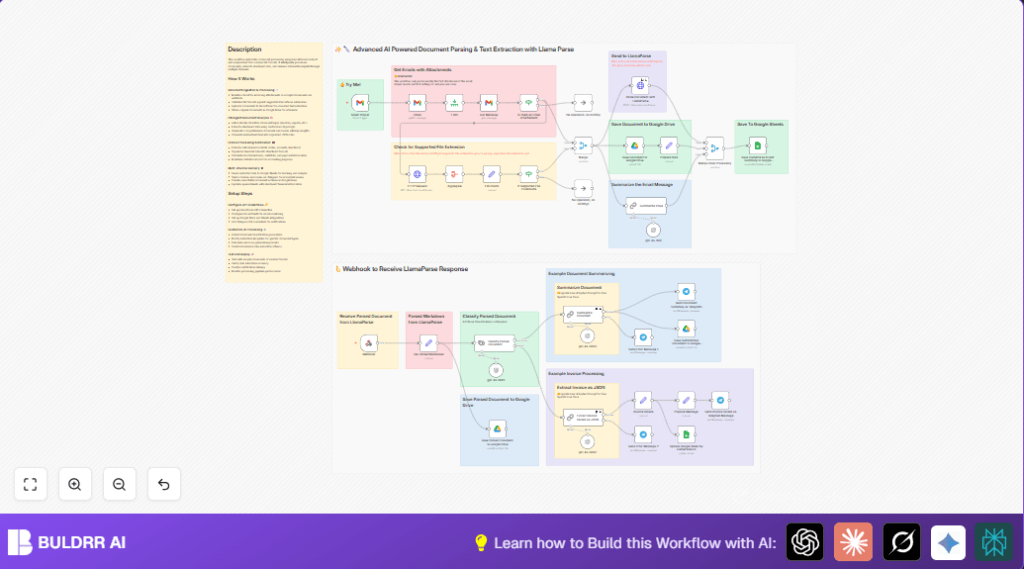
This workflow helps to automatically handle invoices sent by email. It looks for new emails with attachments, downloads those attachments, and sends them to an AI service that reads and extracts invoice data. Then, it saves the original and processed files, updates a Google Sheet with invoice details, and sends a short invoice summary via Telegram. This removes hours of manual work, reduces mistakes, and speeds up invoice processing.
The main problem solved is the slow, error-prone task of manually opening emails, reading invoices, and copying data into systems. The outcome is a fast, automated system that manages invoices accurately and keeps records organized.
Who should use this workflow
This workflow fits any user who receives many invoices by email and wants to save time on data entry. It works well for accounting teams, small business managers, and finance professionals who want fewer errors and faster invoice management. No advanced technical skills are needed to use it once it is set up.
Tools and services used
- Gmail: Checks email for new messages with attachments.
- LlamaParse API: Uses AI to extract structured data and summaries from invoice documents.
- Google Drive: Stores original invoice files and extracted text files.
- Google Sheets: Updates spreadsheet rows with extracted invoice data.
- Telegram Bot API: Sends quick invoice summaries to users or groups.
- n8n Automation platform: Runs the whole workflow with nodes and triggers.
For self hosting n8n, consider a VPS or hosting provider with stable uptime and accessible webhook URLs, for example self-host n8n resources.
How this workflow works: Inputs → Processing → Outputs
Inputs
- Incoming Gmail emails from specified senders containing invoice attachments.
- Attachments in supported document formats (PDF, Word, images).
Processing Steps
- Monitor Gmail inbox and filter emails by sender and attachment presence.
- Limit to last 28 recent emails to avoid overload.
- Download email attachments in binary form.
- Check if email contains attachments; skip if none.
- Call LlamaParse API to get list of supported file extensions.
- Verify each attachment is supported; skip unsupported files.
- Upload supported documents to LlamaParse using multipart form, including webhook URL for callback.
- Listen on the Webhook node for parsed text returned from LlamaParse.
- Classify document type using AI to confirm if it is an invoice.
- If invoice, use LangChain AI to extract detailed invoice data in JSON format.
- Save original attachments to Google Drive with unique filenames.
- Save extracted markdown text as text files in Google Drive.
- Update a Google Sheet row with invoice ID, amounts, payment info, and summary.
- Send concise invoice summary message via Telegram to team or user.
Outputs
- Organized archive of original and parsed invoice documents on Google Drive.
- Automated invoice records updated live in Google Sheets.
- Instant invoice summary messages in Telegram.
- Faster invoice processing with minimal manual work.
Beginner step-by-step: How to use this workflow in n8n
1. Import Workflow
- Download the workflow file from this page using the Download button.
- In your open n8n editor, click “Import from File” and select the downloaded workflow file.
2. Add Credentials and Settings
- Connect Gmail credential with OAuth access to monitor inbox and download attachments.
- Enter the LlamaParse API Key in the HTTP Request nodes configured to call the API.
- Link Google Drive account using OAuth to save documents.
- Connect Google Sheets with OAuth and specify the spreadsheet ID and sheet name where invoices will be logged.
- Set up Telegram Bot credentials to send messages to desired chat or user.
- Update email sender filters and Google Drive folder IDs if needed to match your environment.
3. Test and Activate
- Manually run the trigger once or send a sample invoice email to the monitored Gmail account to test the workflow.
- Check Google Drive and Google Sheets for correct file uploads and data entries.
- Verify Telegram messages are received.
- If all tests succeed, turn on the workflow toggle to activate it for production.
Once activated, the workflow will automatically process incoming invoices without any manual steps.
Handling Errors and Edge Cases
If errors occur such as “401 Unauthorized” from LlamaParse API, check API key validity and update credentials.
If webhook responses from LlamaParse do not arrive, confirm the webhook URL is correct, publicly reachable, and firewall rules allow inbound connections.
If Google Sheets fails to update, verify spreadsheet ID, sheet name, and OAuth permissions.
If emails have no attachments or unsupported formats, those emails are skipped to save resources.
Customization Ideas
- Change LangChain prompts to adjust how invoice details or document summaries are extracted.
- Expand Gmail sender filters to include multiple vendors.
- Save files to different Google Drive folders based on department or client.
- Add more categories in document classification node to handle other document types.
- Adjust the email Limit node to control processing volume as per system capacity.
Summary of Benefits
✓ Automatically finds and downloads incoming invoices from Gmail.
✓ Uses AI to extract detailed invoice data without manual reading.
✓ Saves documents and data in Google Drive and Sheets for easy tracking.
✓ Sends quick summaries to Telegram for fast review.
✓ Cuts hours of manual work to minutes with fewer errors.
