Automate Invoice Processing with n8n and AI Agents

Updated: June 26, 2026

Manual invoice entry is one of the most repetitive and error-prone tasks in finance operations.
Different email formats, inconsistent PDFs, missing fields, and approval rules often turn simple bookkeeping into a time sink.

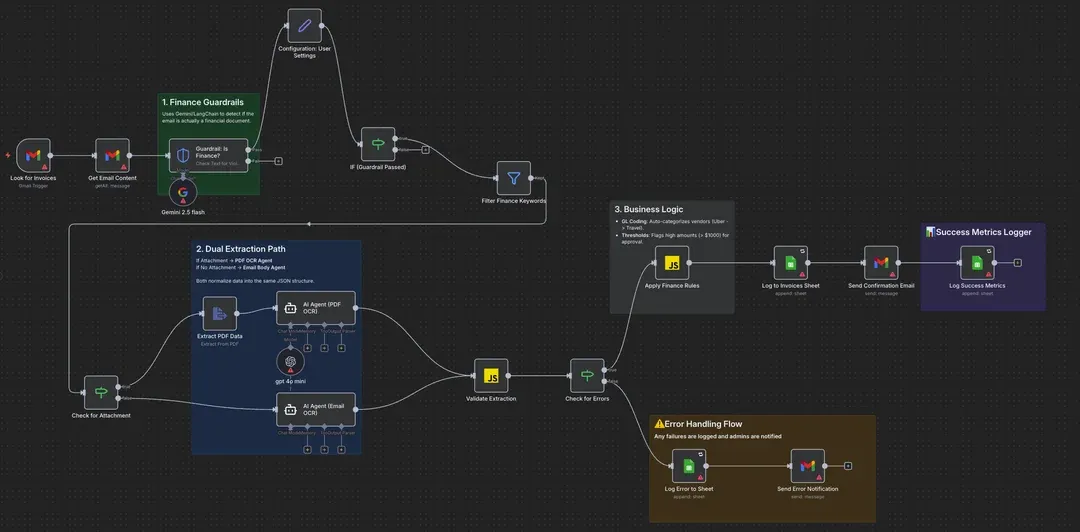
To solve this, we designed an AI-powered Financial Controller workflow using n8n that automates invoice and receipt processing from inbox to ledger — with guardrails, business logic, and error handling built in.

This is not a basic “email-to-sheet” automation.
It’s a production-ready system that behaves like a real financial controller.


The Problem with Traditional Invoice Automation

Most invoice automations fail for three reasons:

• They process every email, including spam and newsletters
• They rely on brittle regex rules that break on layout changes
• They lack real accounting logic (categorization, approvals, validation)

Finance automation needs judgment, not just extraction.

That’s where AI agents + workflow logic shine.


Architecture Overview

This workflow uses n8n as the orchestration layer, combined with AI models for decision-making and extraction.

Core components:

• Gmail as the ingestion source
• Google Gemini for intelligent filtering
• OpenAI GPT-4o Mini for structured data extraction
• Code nodes for finance logic
• Google Sheets as the system of record

Each step is designed to reduce cost, increase reliability, and prevent downstream errors.


Step 1: Smart Email Guardrails (Gemini Flash)

Instead of processing every incoming email, the workflow first applies an AI-based guardrail.

→ Email content is sent to Google Gemini Flash
→ Gemini acts as a classifier, not an extractor

Decision logic:

• Newsletter or spam → workflow stops
• Invoice, bill, or receipt → workflow continues

This prevents unnecessary API usage and ensures only financially relevant emails enter the system.

Result:
Lower costs, cleaner data, and fewer false positives.


Step 2: AI-Powered Data Extraction (GPT-4o Mini)

Once an email passes validation, the workflow checks for invoice data.

Two supported paths:

PDF attachment → Text is extracted and sent to an AI agent
Email body invoice → Text is parsed directly

GPT-4o Mini is used to normalize the data into a strict JSON schema, including:

• Vendor name
• Invoice date
• Total amount
• Tax amount
• Currency
• Invoice reference

This approach handles inconsistent layouts far better than static parsing rules.


Step 3: Embedded Finance Business Logic

Automation without accounting logic is incomplete.

A dedicated Code Node functions as a General Ledger (GL) coder.

Examples:

• Vendor contains “Uber” → Category: Travel & Meals
• Vendor contains “AWS” → Category: Software & Hosting

Approval rules:

• Amount > $1,000 → Status: Manager Approval Needed
• Amount ≤ $1,000 → Status: Auto-Approved

This layer ensures the workflow aligns with internal finance policies, not just data capture.


Step 4: Output, Monitoring, and Error Handling

Once processed, results are logged and monitored.

Outputs include:

• Structured entry in Google Sheets
Automated summary email with approval status
• Dedicated error handler for parsing failures or AI hallucinations

If dates are invalid or required fields are missing, alerts are triggered immediately — preventing silent data corruption.


Technology Stack

n8n (self-hosted or cloud)
Gmail Trigger
Google Gemini Flash (fast, low-cost filtering)
OpenAI GPT-4o Mini (precise extraction)
Google Sheets (lightweight finance database)

This stack balances speed, cost efficiency, and reliability.


Why This Approach Works

Invoices are unstructured by nature.
Trying to tame them with regex or static templates is fragile.

AI agents introduce contextual understanding, while n8n provides deterministic control through logic, approvals, and error handling.

The result is an automation that scales with volume and complexity — without sacrificing accuracy.


Workflow Template

The full n8n workflow JSON is available here:


Final Takeaway

Effective finance automation isn’t about extracting data faster.
It’s about making correct decisions automatically.

By combining n8n, AI agents, and business logic, this workflow demonstrates how invoice processing can move from manual admin work to a controlled, scalable system — ready for modern finance operations and future GPT-5-level automation.

Manual invoice entry is one of the most repetitive and error-prone tasks in finance operations.
Different email formats, inconsistent PDFs, missing fields, and approval rules often turn simple bookkeeping into a time sink.

To solve this, we designed an AI-powered Financial Controller workflow using n8n that automates invoice and receipt processing from inbox to ledger — with guardrails, business logic, and error handling built in.

This is not a basic “email-to-sheet” automation.
It’s a production-ready system that behaves like a real financial controller.


The Problem with Traditional Invoice Automation

Most invoice automations fail for three reasons:

• They process every email, including spam and newsletters
• They rely on brittle regex rules that break on layout changes
• They lack real accounting logic (categorization, approvals, validation)

Finance automation needs judgment, not just extraction.

That’s where AI agents + workflow logic shine.


Architecture Overview

This workflow uses n8n as the orchestration layer, combined with AI models for decision-making and extraction.

Core components:

• Gmail as the ingestion source
• Google Gemini for intelligent filtering
• OpenAI GPT-4o Mini for structured data extraction
• Code nodes for finance logic
• Google Sheets as the system of record

Each step is designed to reduce cost, increase reliability, and prevent downstream errors.


Step 1: Smart Email Guardrails (Gemini Flash)

Instead of processing every incoming email, the workflow first applies an AI-based guardrail.

→ Email content is sent to Google Gemini Flash
→ Gemini acts as a classifier, not an extractor

Decision logic:

• Newsletter or spam → workflow stops
• Invoice, bill, or receipt → workflow continues

This prevents unnecessary API usage and ensures only financially relevant emails enter the system.

Result:
Lower costs, cleaner data, and fewer false positives.


Step 2: AI-Powered Data Extraction (GPT-4o Mini)

Once an email passes validation, the workflow checks for invoice data.

Two supported paths:

PDF attachment → Text is extracted and sent to an AI agent
Email body invoice → Text is parsed directly

GPT-4o Mini is used to normalize the data into a strict JSON schema, including:

• Vendor name
• Invoice date
• Total amount
• Tax amount
• Currency
• Invoice reference

This approach handles inconsistent layouts far better than static parsing rules.


Step 3: Embedded Finance Business Logic

Automation without accounting logic is incomplete.

A dedicated Code Node functions as a General Ledger (GL) coder.

Examples:

• Vendor contains “Uber” → Category: Travel & Meals
• Vendor contains “AWS” → Category: Software & Hosting

Approval rules:

• Amount > $1,000 → Status: Manager Approval Needed
• Amount ≤ $1,000 → Status: Auto-Approved

This layer ensures the workflow aligns with internal finance policies, not just data capture.


Step 4: Output, Monitoring, and Error Handling

Once processed, results are logged and monitored.

Outputs include:

• Structured entry in Google Sheets
Automated summary email with approval status
• Dedicated error handler for parsing failures or AI hallucinations

If dates are invalid or required fields are missing, alerts are triggered immediately — preventing silent data corruption.


Technology Stack

n8n (self-hosted or cloud)
Gmail Trigger
Google Gemini Flash (fast, low-cost filtering)
OpenAI GPT-4o Mini (precise extraction)
Google Sheets (lightweight finance database)

This stack balances speed, cost efficiency, and reliability.


Why This Approach Works

Invoices are unstructured by nature.
Trying to tame them with regex or static templates is fragile.

AI agents introduce contextual understanding, while n8n provides deterministic control through logic, approvals, and error handling.

The result is an automation that scales with volume and complexity — without sacrificing accuracy.


Workflow Template

The full n8n workflow JSON is available here:


Final Takeaway

Effective finance automation isn’t about extracting data faster.
It’s about making correct decisions automatically.

By combining n8n, AI agents, and business logic, this workflow demonstrates how invoice processing can move from manual admin work to a controlled, scalable system — ready for modern finance operations and future GPT-5-level automation.

Author
Written By
Vikash Kumar
Building AI agents, n8n workflows and end-to-end automation for 30+ Brands across India, the US, Europe, Dubai & Australia. 7+ years of Experience saving founders real hours every week - no code required.
Ask more Questions about this Blog with AI:

Our AI Articles

Learn from our AI Articles to excel in your profession ;)

n8n Automation Services in Jacksonville: What a Real Local Setup Looks Like

Discover what professional n8n automation services include, how they streamline your workflows, reduce manual tasks, and keep your business running...

AI Search Optimization for Jacksonville Small Businesses: Where to Start

Learn how to start AI search optimization for your Jacksonville business with practical steps to improve AI visibility, build trust,...

Hire an n8n Developer Near Jacksonville, FL: Questions to Ask First

Hiring an n8n developer? Ask these 8 essential questions about support, security, ownership, pricing, and maintenance before you sign a...

Best Free OpenRouter Models for Coding in 2026

The best free OpenRouter models for coding in 2026, with a comparison table, rate limit breakdown, and step-by-step setup for...

What Is OpenRouter? A Beginner’s Guide to Getting Started

OpenRouter gives you one API key for hundreds of AI models. Here's what it is and how to get started...

n8n Cloud vs Self-Hosted: Which One Should You Pick in 2026?

n8n Cloud vs self-hosted: the real differences in cost, data privacy, and setup time, so you can pick the right...

Best n8n Templates in 2026: 15 Free Workflows to Copy

Discover the best free n8n templates in 2026. See 15 beginner workflows to copy and learn how to import one...

n8n MCP: How to Use It (Beginner Guide 2026)

What n8n MCP is in plain English, the two nodes that make it work, and a step-by-step beginner setup for...

n8n Pricing 2026: Is It Really Free?

A clear beginner breakdown of n8n pricing in 2026, when it is truly free, what Cloud plans cost, and how...

The AI Business Blueprint

How Claude Code’s Creator Thinks the Next Generation of Companies Will Be Built...

Best AI Agent Builders in 2026 (No-Code Guide)

The best no-code AI agent builders in 2026, compared for beginners. See what each tool costs, who it fits, and...

OpenRouter Free Models List 2026: All 27+ Models Ranked & Tested

Search “best free OpenRouter models” and you’ll find ten different lists, half naming model IDs pulled months ago. One older...

1:1 Free Strategy Session
Your competitors are already automating. Are you still paying for it manually?

Do you want to adopt AI Automation?

Every hour your team does repetitive work, you're burning real money.
While you wait, faster businesses are cutting costs and moving quicker.
AI and automations aren't the future anymore — they're the present.

Book a live 1-on-1 session where we show you exactly which of your daily tasks can be automated — and what it’s costing you not to.