
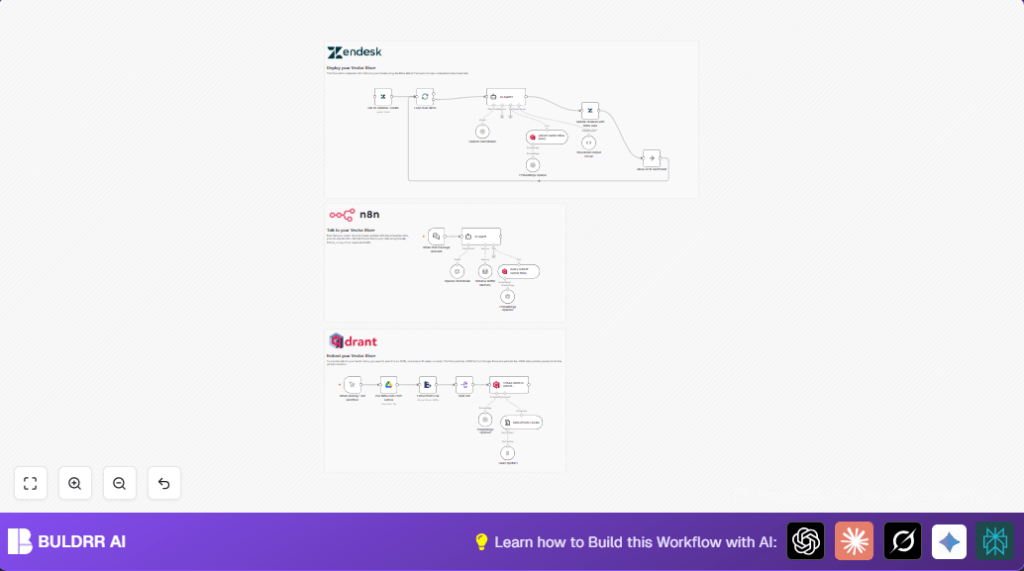

What This Workflow Does
This workflow automatically reads security alerts from SIEM systems and finds the right MITRE ATT&CK tactics and techniques inside them. It adds helpful advice about fixing these threats and updates Zendesk tickets with that information. This saves time and reduces mistakes for security teams by automating manual work.
The outcome is faster, better incident responses with detailed context and remediation directly inside the ticket system.
Who Should Use This Workflow
This workflow helps security analysts and SOC teams who face many SIEM alerts each day and struggle to match those alerts to MITRE ATT&CK data and remediation steps manually.
It suits teams using n8n automations, OpenAI APIs, Qdrant vector databases, Google Drive for MITRE data, and Zendesk for ticket management.
Tools and Services Used
- n8n Automation Platform: Runs and connects all nodes.
- OpenAI GPT-4o Model: Extracts tactics, techniques, and remediation guidance from alerts.
- Qdrant Vector Database: Stores and queries MITRE ATT&CK embeddings.
- Google Drive: Provides the latest MITRE ATT&CK JSON data files.
- Zendesk API: Fetches and updates ticket data automatically.
- Langchain Chat Trigger & Agent Nodes: Enables interactive queries and AI processing.
Inputs, Processing, and Outputs
Inputs
- The workflow receives SIEM alert text data from sources like Zendesk ticket descriptions.
- It downloads the latest MITRE ATT&CK dataset from Google Drive.
- OpenAI and Qdrant credentials provide access to external AI and vector services.
Processing Steps
- The AI Agent uses the GPT-4o model to read SIEM alerts and find relevant MITRE TTPs (Tactics, Techniques, Procedures).
- MITRE data is split, tokenized, and embedded into vectors stored in Qdrant.
- Incoming alerts are embedded and matched against Qdrant to find the closest MITRE techniques related to the alert.
- The AI Agent generates structured, detailed remediation advice in HTML and JSON formats.
- The workflow loops through Zendesk tickets, enriching each with MITRE context and adding notes.
Outputs
- Zendesk tickets updated with internal notes on MITRE technique IDs, tactics, and remediation steps.
- Chat interface availability for security analysts to query threat information interactively.
Beginner Step-by-Step: How to Use This Workflow in n8n
Import the Workflow
- Download the workflow file using the Download button on this page.
- In the n8n editor, click the menu and choose Import from File.
- Select the downloaded workflow file to import.
Configure Credentials and IDs
- Add your OpenAI API Key in the OpenAI Chat Model and embedding nodes.
- Enter Qdrant API credentials and verify the vector collection is named exactly “mitre”.
- Provide Google Drive credentials for file access in the Google Drive nodes.
- Fill Zendesk API details for fetching and updating tickets.
- Check node parameters that use specific IDs, emails, or folder names and update if needed.
Test and Activate
- Run the workflow once with a test SIEM alert or ticket to verify proper extraction and ticket update.
- Watch node executions for any errors or missing data.
- Activate the workflow by turning it on or scheduling triggers as preferred.
- Monitor logs regularly to catch any failures early.
Consider self-host n8n to keep control over sensitive security data and API keys.
Customization Ideas
- Change AI models in the OpenAI Chat Model and embedding nodes for different cost or speed options.
- Add more custom fields like severity or status in the Zendesk update node to enhance ticket details.
- Expand MITRE data by altering the Google Drive node to pull other JSON files for more threat intelligence.
- Use the chat trigger node with a custom UI or chat app to perform real-time threat queries.
Handling Errors and Problems
- If the workflow fails to get data from Qdrant, check API keys and the “mitre” collection name.
- Unstructured AI Agent output means prompts or output parsers need fixing – verify the system message and the Structured Output Parser node.
- Zendesk ticket update failures usually come from wrong ticket IDs or missing API rights – confirm fields and permissions.
Summary of Workflow Results
✓ Automatically tag SIEM alerts with MITRE ATT&CK tactics and techniques.
✓ Enrich Zendesk tickets with clear remediation steps and MITRE IDs.
✓ Save security teams hours by automating alert analysis and ticket updates.
✓ Allow interactive chat queries to inspect threats on demand.
→ Greater accuracy and speed in security incident handling.
