

What This Automation Does
This workflow helps you turn Hacker News articles into videos with summaries and images automatically.
It solves the problem of spending many hours reading, summarizing, and creating videos manually.
When you run it, you get ready-to-share videos that include AI summaries, images, and voiceovers.
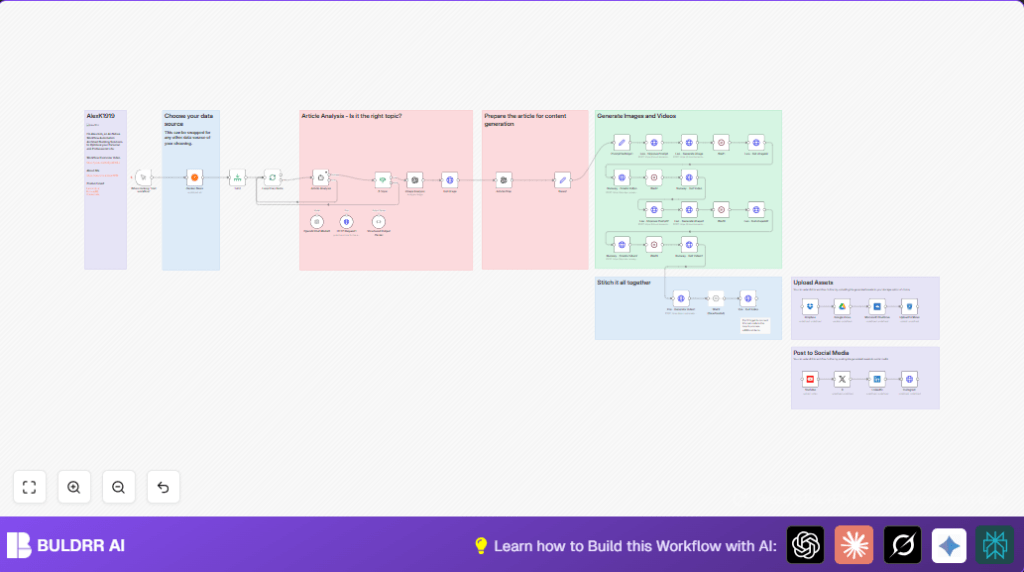
The workflow pulls articles, checks if they are about AI or automation, makes summaries, creates images, builds videos, and posts to social media.
All these steps happen in n8n without needing to write code.
Inputs → Processing → Output
Inputs
- Latest Hacker News articles: up to 50 recent posts to read.
- Article URLs: to fetch content for analysis.
- User API keys: OpenAI, Leonardo.ai, RunwayML, Creatomate, and social media platforms.
Processing Steps
- Fetch top articles from Hacker News.
- Limit the number to 50 for manageable processing.
- Cycle through articles one by one to avoid API limits.
- Download and analyze article content using AI to summarize and find if it is about AI or automation.
- Filter out articles that are not relevant.
- Create small text blurbs and image prompts for newsletter and videos.
- Improve image prompts and generate artistic images with Leonardo.ai.
- Make videos from the images using RunwayML and wait for them to finish.
- Combine videos, images, voice audio, and subtitles into a finished video with Creatomate.
- Optionally upload assets to cloud storage.
- Post final videos to LinkedIn, Instagram, Twitter (X), and YouTube.
Output
- Polished videos with AI summaries, images, and voice recorded audio.
- Video files automatically uploaded or posted to social platforms.
Beginner Step-by-Step: How to Use This Workflow in n8n
Step 1: Download and Import Workflow
- Find the Download button for this workflow on this page.
- Click to save the workflow file to your computer.
- Open your n8n editor where you work.
- Use the “Import from File” option in n8n and select the saved workflow file.
Step 2: Add Your Credentials
- Go to n8n credentials area.
- Add your API Keys for OpenAI, Leonardo.ai, RunwayML, Creatomate, and social media APIs.
- If you want to upload videos to cloud storage, add those credentials too.
Step 3: Update IDs and Settings
- Check for nodes with IDs for email, channels, folders, or tables.
- Update them to your personal or project-specific values.
- If prompts or URLs are inside any node, copy and paste necessary info from this guide.
Step 4: Test the Workflow
- In the n8n editor, click the Manual Trigger node and press the trigger button.
- Watch the workflow run step-by-step to check if no errors happen.
Step 5: Activate for Production
- If test passes, activate the workflow in n8n.
- Set the workflow to run on schedule or manual triggers as needed.
- Monitor your runs via the execution logs.
- If using self-host n8n, refer to self-host n8n for deployment.
Who Should Use This Workflow
Automation beginners who want more video content without much manual work.
Content creators posting tech news and AI or automation topics.
People wanting hands-off AI-powered summaries and visuals.
Users who want social media posts automatically generated.
Tools and Services Used
- Hacker News API: Gets recent tech articles.
- OpenAI (GPT-4o-mini): Summarizes articles, checks topic relevance, creates blurbs.
- Leonardo.ai: Makes artistic images from text prompts.
- RunwayML Gen3a Turbo: Turns images into videos.
- Creatomate API: Composes final videos with audio and subtitles.
- Cloud Storage APIs: Minio, Dropbox, Google Drive, OneDrive for backup.
- Social Media APIs: LinkedIn, Instagram (HTTP), Twitter (X), YouTube for posting.
Customization Ideas
- Change the data source by replacing the Hacker News node with an RSS feed or another news API.
- Adjust the topic filter node to include different keywords beyond AI and automation.
- Swap Creatomate video templates or change subtitle styles and fonts.
- Add more social media channels or schedule posts using n8n nodes.
- Tweak Leonardo.ai parameters to change image look, color style, or theme.
Common Problems and Fixes
Timeout waiting for image or video generation:
The Leonardo or RunwayML APIs sometimes need more time.
Increase Wait nodes delays to 30+ seconds for images and 3+ minutes for videos.
No articles pass topic filter:
The If Topic node filter might be too strict.
Broaden keywords or test the workflow with articles known to be about AI/automation.
API authentication errors:
Make sure all API keys are correct and valid.
Update keys if expired in n8n credentials.
Pre-Production Checklist
- Check API keys for OpenAI, Leonardo.ai, RunwayML, Creatomate, and social media.
- Test Hacker News node to confirm articles load.
- Verify OpenAI agent summary outputs and topic detection.
- Ensure Leonardo.ai image generation completes properly.
- Confirm RunwayML video creation returns URLs.
- Test Creatomate video rendering responses.
- Check social posting nodes with demo accounts before live use.
Deployment Guide
Once configured, activate workflow in n8n.
Run manually or set a schedule with the Scheduler node.
Watch execution logs in n8n for errors.
Make sure API quotas cover expected usage.
If managing server hosting yourself, consider self-host n8n for control and stability.
Summary
✓ You get videos from Hacker News articles with minimal manual work.
✓ The workflow uses AI to summarize text and generate images.
✓ Videos include audio summaries and subtitles ready for social sharing.
✓ The process runs entirely inside n8n with API integrations.
✓ Saves 5+ hours of work weekly by automating content creation.
