
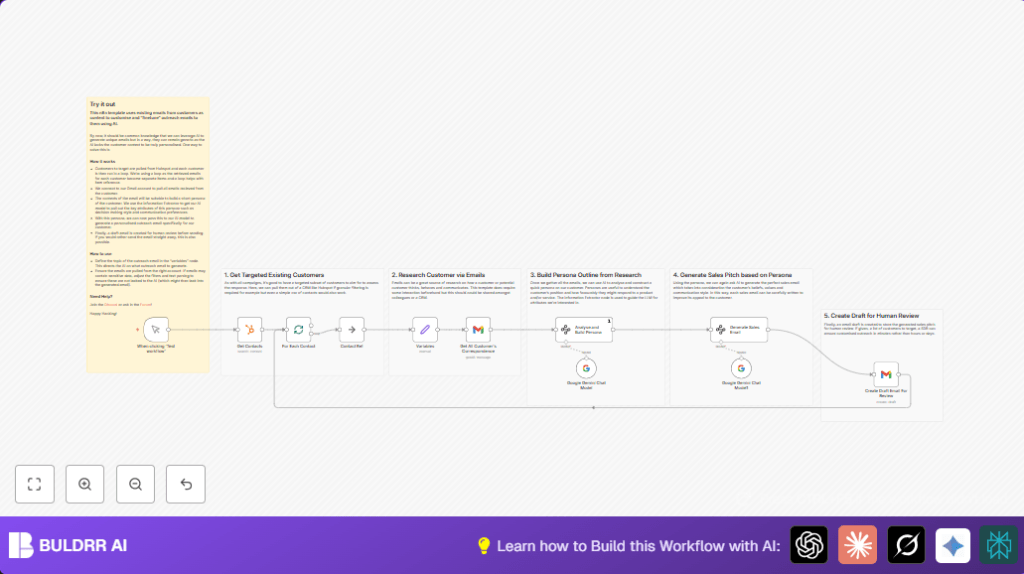

What This Workflow Does
This workflow pulls contacts who are decision-makers from HubSpot CRM.
It fetches recent email conversations from Gmail for each contact.
Then it uses Google Gemini AI to learn about each contact’s communication style and pain points.
Finally, it creates a personalized sales email draft in Gmail tailored to each contact.
The goal is to save time and write better emails that match the contact’s personality.
Who Should Use This Workflow
Salespeople who send many outreach emails can use this.
It helps those wanting personal emails without spending hours researching.
The user needs an account on HubSpot, Gmail, and Google Cloud with API access.
Also, some basic knowledge of n8n workflow automation helps.
Tools and Services Used
- HubSpot CRM: To get contact details focused on decision-makers.
- Gmail API: For reading recent emails and creating draft email messages.
- Google Gemini API: To analyze conversation text and generate persona plus sales email drafts.
- n8n Automation Platform: Runs the workflow connecting all services.
Beginner Step-by-Step: How to Use This Workflow in Production
Download and Import
- Download the workflow file from the Download button on this page.
- Open the n8n editor where you want to run the automation.
- Use the “Import from File” option to upload the downloaded workflow.
Configure Credentials and Settings
- Add or update the HubSpot API Key in the Get Contacts node.
- Update Gmail OAuth2 credentials in both the Get All Customer’s Correspondence and Create Draft Email For Review nodes.
- Make sure Google Gemini API Key is set in the Google Gemini Chat Model nodes.
- Review any filters like email addresses, HubSpot list IDs, or limits to match your data.
Test and Activate
- Run the workflow manually by pressing “Execute Workflow” on the trigger node.
- Observe output at each step to confirm it finds contacts, fetches emails, and generates drafts.
- When satisfied, activate the workflow to run on a schedule or trigger as needed.
Using self-host n8n is possible for better control over your automation.
Workflow Input → Processing → Output
Inputs
- HubSpot contacts filtered by role to find decision-makers.
- Gmail messages filtered by contact email addresses (last 20 emails).
- The product description or variables set in n8n for the sales offer.
Processing Steps
- The workflow loops through each contact one-by-one.
- For each contact, it gets recent emails for context.
- Google Gemini AI analyzes emails to build a persona profile like communication style and motivations.
- A second AI call creates a tailored sales email draft using the persona and sales product info.
- The draft email is created in Gmail for review and sending.
Output
- One custom draft email per contact saved inside Gmail.
- The draft uses the right tone and highlights product benefits matching the contact’s style.
Edge Cases or Failures and How to Fix
- Authentication Errors: Occur if Gmail or HubSpot API keys expire or are invalid.
Fix by re-adding OAuth credentials in n8n. - No Contacts Found: Happens if HubSpot filters are misconfigured or no contacts match.
Check filter settings and HubSpot list contents. - No Emails Retrieved: Can be caused by wrong email filters or missing Gmail permissions.
Test queries directly in Gmail to confirm syntax. - Incomplete AI Persona Data: May result from API rate limits or prompt issues.
Review Google Cloud quota and prompts used with Gemini API.
Customization Ideas
- Change product details in the variables node to reflect current offerings.
- Adjust the number of emails fetched per contact in the Gmail node.
- Modify the email creation node to send directly without review by switching from draft creation to sending.
- Edit persona attributes extracted by AI to better fit your sales approach.
- Replace HubSpot contact node with other CRM connectors supported by n8n.
Summary of Benefits
✓ Saves many hours by automating email personalization.
✓ Creates emails that reflect how each person prefers to communicate.
✓ Lets sales reps review emails before sending.
✓ Works in batch mode for many contacts.
Example AI Prompt Used in Google Gemini Chat Model Node
This prompt asks AI to understand persona from email texts:
Analyze these email conversations between the sales rep and the client.
Extract client personality traits such as communication style, decision-making behavior, pain points, and motivations.
Deliver the result as JSON with fields: communication_preferences, decision_making_style, pain_points, professional_goals_motivations.
Use the output to guide the sales email generation.
Example Prompt for Generating Sales Email
This AI prompt tells Gemini to draft the email:
Act as a sales rep writing a closing email.
Use this customer persona to match tone and content.
Include product benefits related to the customer pain points.
Format the email in HTML.
This ensures emails feel personal and professional.
