
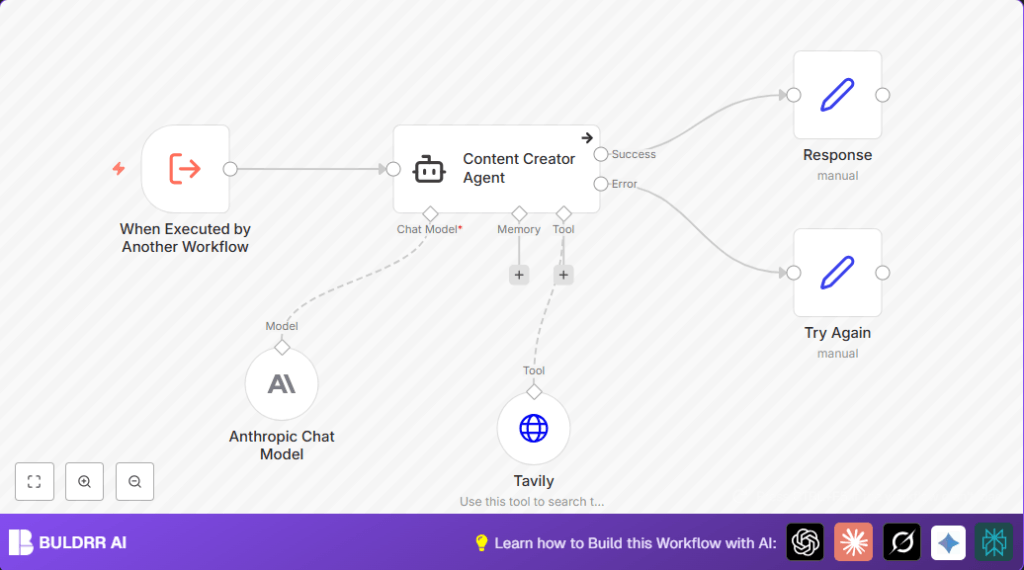

What This Automation Does ????:
This workflow is the “Content Creator Agent”. It solves the slow, hard task of writing blog posts by hand.
You give it a blog topic.
It finds up to 3 good internet sources.
Then AI uses those to write a full blog post for you, with headings and links.
The blog is SEO-friendly and ready to publish in HTML.
If something breaks, it shows a simple error message.
This saves lots of time and helps avoid mistakes.
Step-by-Step Guide to Build the Content Creator Agent ✏️:
Beginner steps to use this workflow in n8n
- Download the workflow file here on this page.
- Go to your n8n editor and choose “Import from File”. Upload the downloaded workflow.
- Inside n8n, add your Tavily API Key and Anthropic API Credentials in the respective node settings.
- Check if the Content Creator Agent node prompt or any inputs need custom values like blog style or query fields.
- Run the workflow once with a sample blog topic to test it.
- If the test works, activate the workflow by clicking the active toggle.
Now it is ready to use in real production.
For hosting consistency, learn more about self-host n8n if needed.
Workflow Inputs, Processing, and Output
Inputs
- User provides a blog topic search term.
Processing
- Tavily node sends the blog topic to internet search API and pulls 3 sources.
- Content Creator Agent node uses those sources plus the Anthropic Chat AI to create a blog.
- The blog content is generated with headings, paragraphs, and citation links.
Output
- Rich HTML blog post ready to publish.
- Error message if AI or search fails.
Customizations ✏️:
- Change how many search results you get by editing Tavily
max_resultsfrom 3 to any number.
- Change how many search results you get by editing Tavily
- Change blog style or tone by editing the
systemMessagein the Content Creator Agent prompt.
- Change blog style or tone by editing the
- Add more AI models like OpenAI or ChatGPT nodes and connect them for different text styles.
- Add publishing nodes (like Gmail or WordPress) to send or post blogs automatically.
Troubleshooting ????:
Problem: “API key invalid or authentication error from Tavily node.”
Cause: API key is wrong or expired.
Solution: Check and update the API key inside the Tavily node settings.
Problem: “No output from Content Creator Agent.”
Cause: Connections missing or wrong keys.
Solution: Verify the Content Creator Agent connects properly to Tavily and Anthropic Chat Model nodes.
Problem: “Workflow does not start when called by another workflow.”
Cause: When Executed by Another Workflow not set up.
Solution: Confirm this trigger node is configured and the calling workflow uses Execute Workflow correctly.
Pre-Production Checklist ✅:
- Make sure the Tavily API Key and Anthropic credentials work.
- Test blogging with many topic examples to check quality.
- Check JSON format in the Tavily node body is correct.
- Look at n8n logs if errors happen.
- Backup your workflow before big changes.
Deployment Guide:
When testing passes, click the active toggle in n8n to turn on the workflow.
Use it in your content pipeline by calling the trigger or linking it inside other workflows.
For big content work, log outputs to watch post quality and update prompts over time.
3. Prerequisites ⚙️:
- An active n8n account to run and manage workflows.
- Tavily API key for accessing the internet search node.
- Anthropic API credentials for the AI language model node.
- Basic familiarity with n8n node configuration and workflow triggering.
- Optional: Knowledge of how to self-host n8n.
3. Prerequisites ⚙️:
- An active n8n account to run and manage workflows.
- Tavily API key for accessing the internet search node.
- Anthropic API credentials for the AI language model node.
- Basic familiarity with n8n node configuration and workflow triggering.
- Optional: Knowledge of how to self-host n8n.
Conclusion:
- By running this workflow, writing blogs becomes faster and easier.
- You get SEO-ready posts that use real source info automatically.
- It saves 6 to 8 hours per article and helps do more topics or clients.
- Next steps include connecting it to publishing tools or adding richer AI models.
- Start using this with n8n, Tavily, and Anthropic today.
