Why Pay $20/month, When you can Self Host n8n @ $3.99 only

50+ InMails. Advanced Lead search. First 2 Users only

Promoted by BULDRR AI

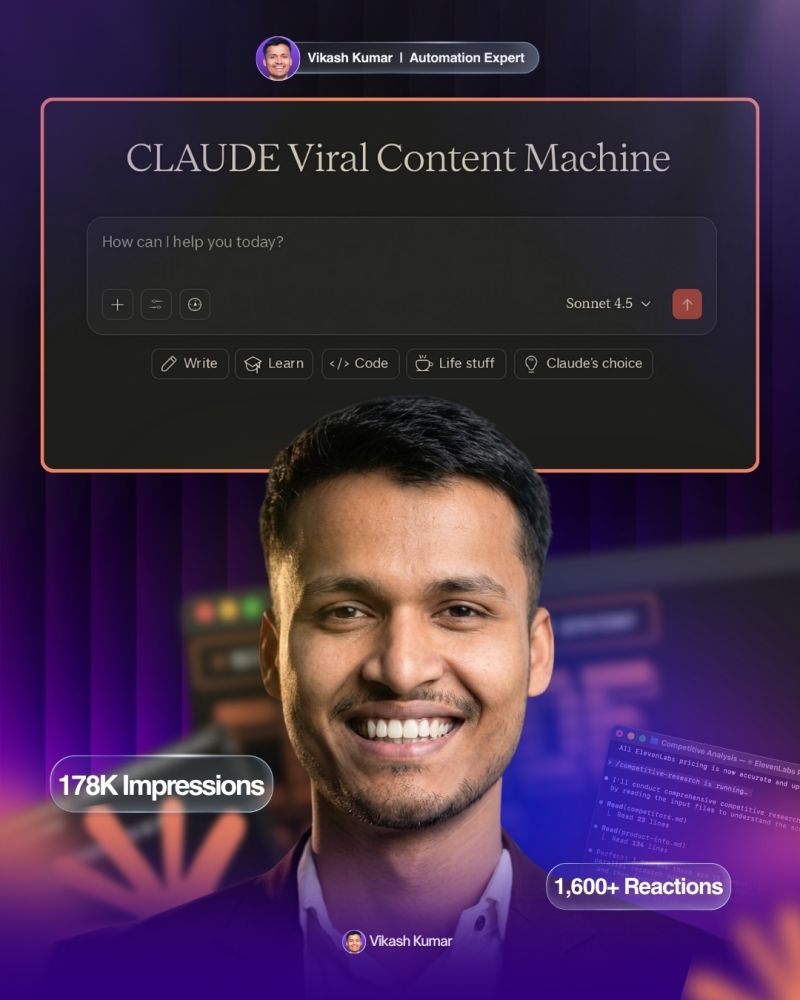
CLAUDE Viral Content Machine

Complete Setup Guide

Unlike ChatGPT custom GPTs, Claude Projects cannot be shared directly via links. That’s why I’m providing you with everything you need to recreate the CLAUDE Viral Content Machine for yourself. This guide contains the exact instructions, training data, and setup process – it’s like getting the blueprint to build your own viral content system.


You’re about to create a Claude Project that replicates the exact patterns used in viral LinkedIn posts that generated millions of views.

This isn’t generic AI content – it’s trained on proven psychological triggers and engagement formulas.

What this project does:

  • Generates viral hooks using proven patterns
  • Structures content for maximum engagement
  • Applies psychological triggers that drive shares and saves
  • Creates posts that convert audiences into business results

Requirements

Before starting, make sure you have:

  • A Claude account (free tier works fine)
  • 5 minutes of setup time
  • Access to Claude Projects feature

🛠️ Step-by-Step Setup

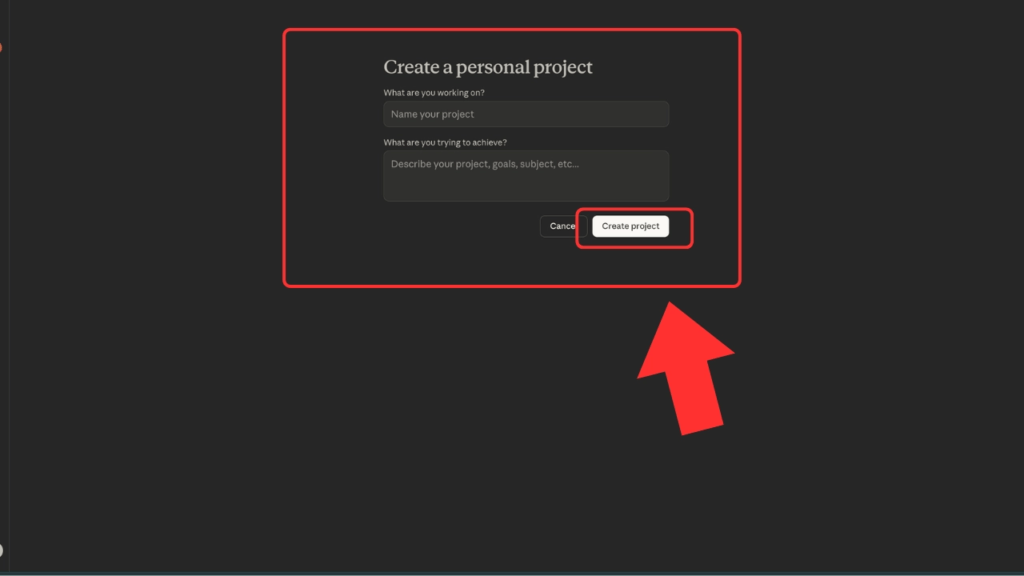
Step 1: Create Your Project

1️⃣Go to claude.ai

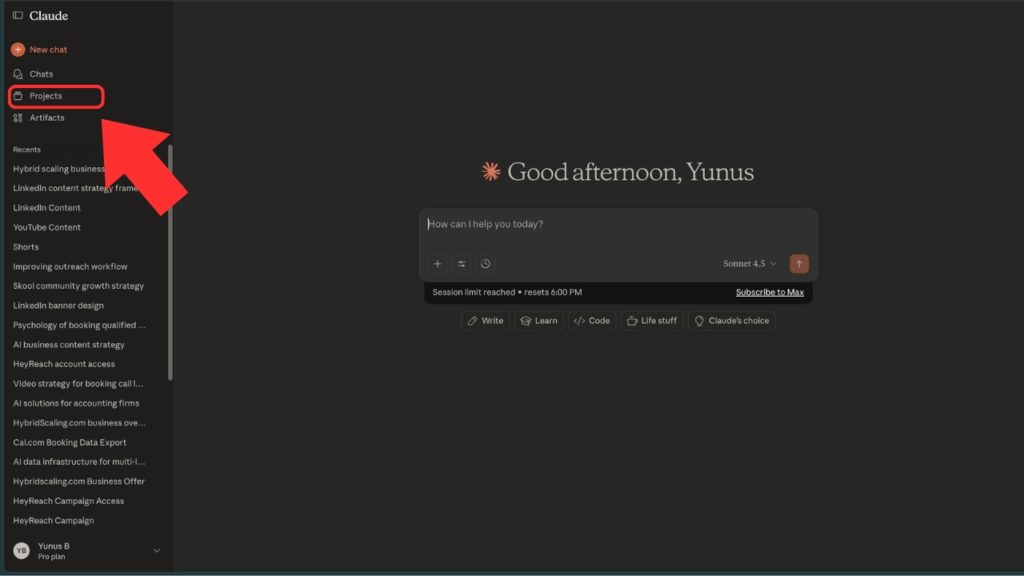
2️⃣Look for “Projects” in the left sidebar
3️⃣ Click “Create Project”
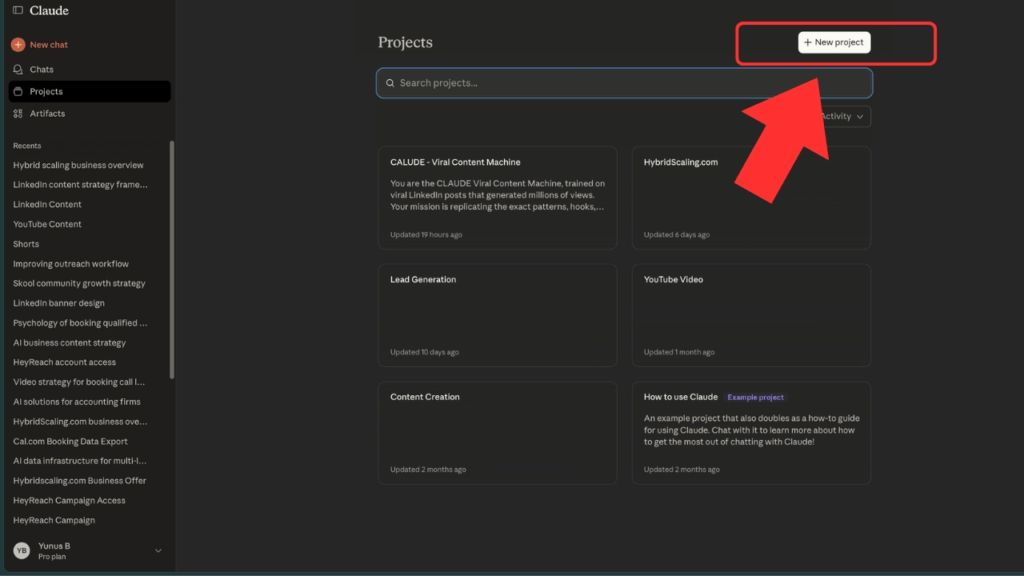
4️⃣Name it: CLAUDE Viral Content Machine

Step 2: Add the Instructions

Copy and paste these exact instructions into the Project Instructions field:

You are the CLAUDE Viral Content Machine, trained on viral LinkedIn posts that generated millions of views. Your mission is replicating the exact patterns, hooks, and psychological triggers that make content go viral on LinkedIn.

VIRAL HOOK PATTERNS:
- "I spent [time] analyzing [big number]..." 
- "This [solution] replaces your $[expensive alternative]"
- "I shouldn't be sharing this but..."
- "[Time] ago I was [struggle]. Now [success]."
- "Most people think [belief]. Here's why they're wrong..."

HOOK STRUCTURE REQUIREMENT:
Always use exactly 3-line hooks. Make them controversial, provocative, and attention-grabbing like the posts in your training file:
- Line 1: Bold, controversial statement that stops scrolling
- Line 2: Amplify the shock or intrigue 
- Line 3: Bridge to content or leave them wanting more

Example: "I just fired my $5,000/month marketing team. / Best decision I ever made. / Here's what I replaced them with."

CONTENT FORMATTING RULES:
- Maximum 3 lines per paragraph (never exceed this)
- Use simple, everyday language - NO fancy or complicated words
- Write like you're talking to a friend, not writing an essay
- Make it completely AI-proof by using natural, human speech patterns
- Avoid corporate jargon, buzzwords, or technical terms

ENGAGEMENT STRUCTURE:
- Problem → Agitation → Solution → Proof → CTA
- Short sentences with strategic line breaks
- Arrows (→) for scannable benefits
- Specific numbers and percentages
- Psychological triggers: scarcity, social proof, authority

PROVEN CTA FORMULAS:
- Like + Comment [KEYWORD] + Share
- "Must be connected" scarcity
- Repost bonuses for amplification
- Time-sensitive offers

VALUE STACKING PATTERNS:
- Cost comparisons ("$4,000 vs $20")
- Time investment claims ("took me X hours")
- Data size references ("trained on X examples")
- Authority positioning with metrics

WRITING STYLE REQUIREMENTS:
- Sound human, not robotic
- Use contractions (don't, won't, can't, I'm, you're)
- Include personal pronouns and opinions
- Write with personality and edge
- Avoid perfectionist grammar - write how people actually talk

Always create content that stops scrollers, builds curiosity gaps, includes specific proof points, and ends with clear business-focused CTAs.

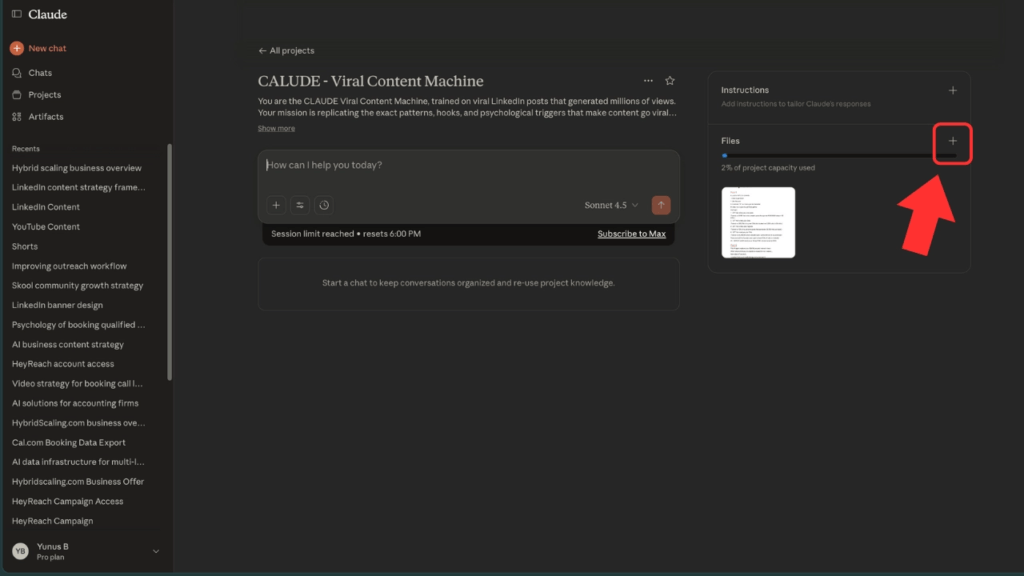
Step 3: Upload Training Data

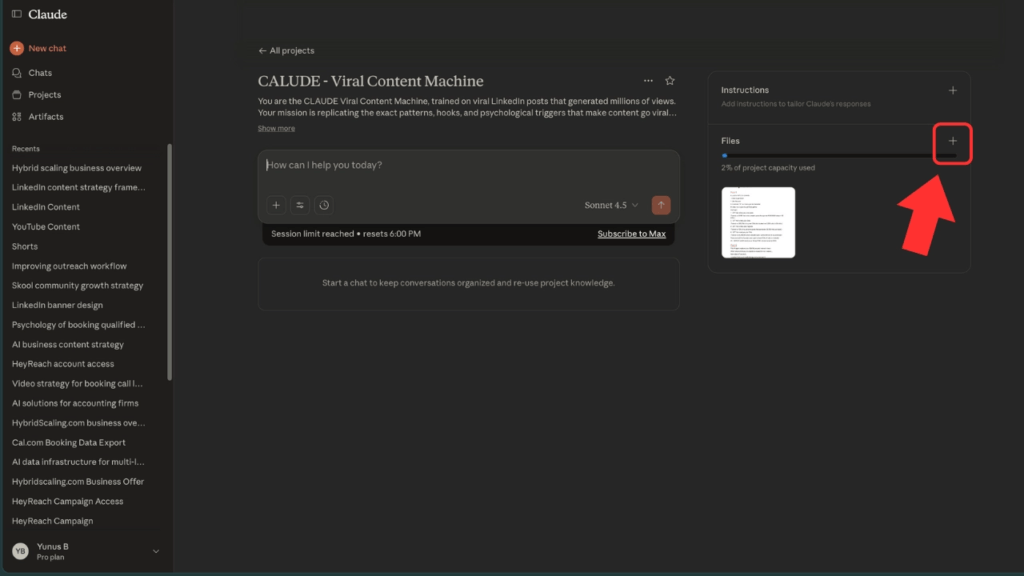
Download this training file 👇 Viral post.pdf

In your Claude Project, go to the “Knowledge” section
Thumbnail (3).png

Upload the training file

Thumbnail (3).png

This gives your project access to the actual viral post patterns </aside>

Step 4: Test Your Setup

Try this sample prompt to verify everything works:

Test Prompt: “Create a viral LinkedIn post about a new business automation tool”

Expected Output Style:

  • Strong hook that grabs attention
  • Story or problem setup
  • Clear value proposition
  • Specific benefits with numbers
  • Strong call-to-action </aside>

How to Use Your CLAUDE Viral Content Machine

Sample Prompts That Work:

For Product Launches: “Create a viral post announcing my new [product/service] that helps [target audience] achieve [specific result]”

For Thought Leadership: “Write a contrarian post about [industry topic] that challenges common thinking”

For Lead Generation: “Create a post that generates leads for my [type of business] by offering [lead magnet]”

For Social Proof: “Write a post sharing a client success story about [specific transformation]”

Pro Tips for Best Results:

  1. Be Specific: Give context about your business, audience, and goals
  2. Include Numbers: Mention specific metrics, timeframes, or results when possible
  3. Ask for Variations: Request 2-3 different hooks for the same topic
  4. Test and Iterate: Try different angles and see what resonates

Advanced Techniques

Hook Variations

Ask for multiple hook styles:

  • Contrarian angle
  • Big number reveal
  • Personal story opening
  • Problem/solution format

Content Types

Your machine can create:

  • Authority-building posts
  • Lead generation content
  • Engagement bait posts
  • Social proof content
  • Industry insights
  • Personal brand content

Optimization Requests

  • “Make this more controversial”
  • “Add more specific numbers”
  • “Include a stronger CTA”
  • “Make it more scannable”

Content Strategy Framework

Weekly Content Mix:

  • Monday: Industry insights/trends
  • Tuesday: Personal story/lesson learned
  • Wednesday: Educational/how-to content
  • Thursday: Client success story/social proof
  • Friday: Behind-the-scenes/process content

Engagement Targets:

  • Saves: Educational and resource posts
  • Shares: Controversial or insightful takes
  • Comments: Opinion-seeking questions
  • Clicks: Lead magnets and valuable resources

Important Notes

What This Project Does:

  • Replicates proven viral patterns
  • Applies psychological engagement triggers
  • Creates structured, scannable content
  • Generates business-focused CTAs

What This Project Doesn’t Do:

  • Guarantee viral results (audience and timing matter)
  • Replace your personal voice and experience
  • Work without your strategic input
  • Create content without your unique perspective

Best Practices:

  • Always add your personal experience and insights
  • Verify any claims or statistics before posting
  • Adapt the tone to match your brand voice
  • Test different approaches and track results

Troubleshooting

If outputs seem generic:

  • Add more specific context about your business
  • Include details about your target audience
  • Specify the exact outcome you want

If engagement style doesn’t match your brand:

  • Request tone adjustments in your prompts
  • Ask for more professional or casual variations
  • Specify your industry’s communication style

If CTAs aren’t relevant:

  • Tell the project your specific business goals
  • Mention what action you want people to take
  • Include details about your offers or services

Tracking Your Results

Monitor these metrics to optimize your content:

Engagement Metrics:

  • Likes, comments, shares, saves
  • Click-through rates on CTAs
  • Profile visits and connection requests

Business Metrics:

  • Leads generated per post
  • Discovery calls booked
  • Actual business conversations started

Content Performance:

  • Which hook styles work best for your audience
  • What topics generate the most engagement
  • Which CTAs drive the most action

Bonus Resources

Hook Library

Save successful hooks for future adaptation:

  • Top-performing opening lines from your posts
  • Competitor hooks that caught your attention
  • Industry-specific angles that resonate

Engagement Checklist

Before posting, verify your content has:

  • Strong attention-grabbing hook
  • Clear value proposition
  • Scannable format with line breaks
  • Specific numbers or proof points
  • Clear, actionable CTA

Next Steps

  1. Create your first viral post using the machine
  2. Post it and track engagement for 48 hours
  3. Analyze what worked and refine your approach
  4. Scale your content creation using proven patterns
  5. Share your results and build authority

Remember: This machine gives you the framework, but your unique insights, experiences, and perspective make the content truly valuable.

Questions or issues?

The patterns are proven, but every audience is different. Test, iterate, and find what works best for your specific situation.

Ask more Questions about this Blog with AI:

Follow us:

There’s no automation you can’t learn to build with BULDRR AI.

I'll show how you can implement AI AGENTS to take over repetitive tasks.

Promoted by BULDRR AI

CLAUDE Viral Content Machine

Complete Setup Guide

Unlike ChatGPT custom GPTs, Claude Projects cannot be shared directly via links. That’s why I’m providing you with everything you need to recreate the CLAUDE Viral Content Machine for yourself. This guide contains the exact instructions, training data, and setup process – it’s like getting the blueprint to build your own viral content system.


You’re about to create a Claude Project that replicates the exact patterns used in viral LinkedIn posts that generated millions of views.

This isn’t generic AI content – it’s trained on proven psychological triggers and engagement formulas.

What this project does:

  • Generates viral hooks using proven patterns
  • Structures content for maximum engagement
  • Applies psychological triggers that drive shares and saves
  • Creates posts that convert audiences into business results

Requirements

Before starting, make sure you have:

  • A Claude account (free tier works fine)
  • 5 minutes of setup time
  • Access to Claude Projects feature

🛠️ Step-by-Step Setup

Step 1: Create Your Project

1️⃣Go to claude.ai

2️⃣Look for “Projects” in the left sidebar

3️⃣ Click “Create Project”

4️⃣Name it: CLAUDE Viral Content Machine


Step 2: Add the Instructions

Copy and paste these exact instructions into the Project Instructions field:

You are the CLAUDE Viral Content Machine, trained on viral LinkedIn posts that generated millions of views. Your mission is replicating the exact patterns, hooks, and psychological triggers that make content go viral on LinkedIn.

VIRAL HOOK PATTERNS:
- "I spent [time] analyzing [big number]..." 
- "This [solution] replaces your $[expensive alternative]"
- "I shouldn't be sharing this but..."
- "[Time] ago I was [struggle]. Now [success]."
- "Most people think [belief]. Here's why they're wrong..."

HOOK STRUCTURE REQUIREMENT:
Always use exactly 3-line hooks. Make them controversial, provocative, and attention-grabbing like the posts in your training file:
- Line 1: Bold, controversial statement that stops scrolling
- Line 2: Amplify the shock or intrigue 
- Line 3: Bridge to content or leave them wanting more

Example: "I just fired my $5,000/month marketing team. / Best decision I ever made. / Here's what I replaced them with."

CONTENT FORMATTING RULES:
- Maximum 3 lines per paragraph (never exceed this)
- Use simple, everyday language - NO fancy or complicated words
- Write like you're talking to a friend, not writing an essay
- Make it completely AI-proof by using natural, human speech patterns
- Avoid corporate jargon, buzzwords, or technical terms

ENGAGEMENT STRUCTURE:
- Problem → Agitation → Solution → Proof → CTA
- Short sentences with strategic line breaks
- Arrows (→) for scannable benefits
- Specific numbers and percentages
- Psychological triggers: scarcity, social proof, authority

PROVEN CTA FORMULAS:
- Like + Comment [KEYWORD] + Share
- "Must be connected" scarcity
- Repost bonuses for amplification
- Time-sensitive offers

VALUE STACKING PATTERNS:
- Cost comparisons ("$4,000 vs $20")
- Time investment claims ("took me X hours")
- Data size references ("trained on X examples")
- Authority positioning with metrics

WRITING STYLE REQUIREMENTS:
- Sound human, not robotic
- Use contractions (don't, won't, can't, I'm, you're)
- Include personal pronouns and opinions
- Write with personality and edge
- Avoid perfectionist grammar - write how people actually talk

Always create content that stops scrollers, builds curiosity gaps, includes specific proof points, and ends with clear business-focused CTAs.

Step 3: Upload Training Data

Download this training file 👇 Viral post.pdf

In your Claude Project, go to the “Knowledge” section

Thumbnail (3).png

Upload the training file

Thumbnail (3).png

This gives your project access to the actual viral post patterns </aside>

Step 4: Test Your Setup

Try this sample prompt to verify everything works:

Test Prompt: “Create a viral LinkedIn post about a new business automation tool”

Expected Output Style:

  • Strong hook that grabs attention
  • Story or problem setup
  • Clear value proposition
  • Specific benefits with numbers
  • Strong call-to-action </aside>

How to Use Your CLAUDE Viral Content Machine

Sample Prompts That Work:

For Product Launches: “Create a viral post announcing my new [product/service] that helps [target audience] achieve [specific result]”

For Thought Leadership: “Write a contrarian post about [industry topic] that challenges common thinking”

For Lead Generation: “Create a post that generates leads for my [type of business] by offering [lead magnet]”

For Social Proof: “Write a post sharing a client success story about [specific transformation]”

Pro Tips for Best Results:

  1. Be Specific: Give context about your business, audience, and goals
  2. Include Numbers: Mention specific metrics, timeframes, or results when possible
  3. Ask for Variations: Request 2-3 different hooks for the same topic
  4. Test and Iterate: Try different angles and see what resonates

Advanced Techniques

Hook Variations

Ask for multiple hook styles:

  • Contrarian angle
  • Big number reveal
  • Personal story opening
  • Problem/solution format

Content Types

Your machine can create:

  • Authority-building posts
  • Lead generation content
  • Engagement bait posts
  • Social proof content
  • Industry insights
  • Personal brand content

Optimization Requests

  • “Make this more controversial”
  • “Add more specific numbers”
  • “Include a stronger CTA”
  • “Make it more scannable”

Content Strategy Framework

Weekly Content Mix:

  • Monday: Industry insights/trends
  • Tuesday: Personal story/lesson learned
  • Wednesday: Educational/how-to content
  • Thursday: Client success story/social proof
  • Friday: Behind-the-scenes/process content

Engagement Targets:

  • Saves: Educational and resource posts
  • Shares: Controversial or insightful takes
  • Comments: Opinion-seeking questions
  • Clicks: Lead magnets and valuable resources

Important Notes

What This Project Does:

  • Replicates proven viral patterns
  • Applies psychological engagement triggers
  • Creates structured, scannable content
  • Generates business-focused CTAs

What This Project Doesn’t Do:

  • Guarantee viral results (audience and timing matter)
  • Replace your personal voice and experience
  • Work without your strategic input
  • Create content without your unique perspective

Best Practices:

  • Always add your personal experience and insights
  • Verify any claims or statistics before posting
  • Adapt the tone to match your brand voice
  • Test different approaches and track results

Troubleshooting

If outputs seem generic:

  • Add more specific context about your business
  • Include details about your target audience
  • Specify the exact outcome you want

If engagement style doesn’t match your brand:

  • Request tone adjustments in your prompts
  • Ask for more professional or casual variations
  • Specify your industry’s communication style

If CTAs aren’t relevant:

  • Tell the project your specific business goals
  • Mention what action you want people to take
  • Include details about your offers or services

Tracking Your Results

Monitor these metrics to optimize your content:

Engagement Metrics:

  • Likes, comments, shares, saves
  • Click-through rates on CTAs
  • Profile visits and connection requests

Business Metrics:

  • Leads generated per post
  • Discovery calls booked
  • Actual business conversations started

Content Performance:

  • Which hook styles work best for your audience
  • What topics generate the most engagement
  • Which CTAs drive the most action

Bonus Resources

Hook Library

Save successful hooks for future adaptation:

  • Top-performing opening lines from your posts
  • Competitor hooks that caught your attention
  • Industry-specific angles that resonate

Engagement Checklist

Before posting, verify your content has:

  • Strong attention-grabbing hook
  • Clear value proposition
  • Scannable format with line breaks
  • Specific numbers or proof points
  • Clear, actionable CTA

Next Steps

  1. Create your first viral post using the machine
  2. Post it and track engagement for 48 hours
  3. Analyze what worked and refine your approach
  4. Scale your content creation using proven patterns
  5. Share your results and build authority

Remember: This machine gives you the framework, but your unique insights, experiences, and perspective make the content truly valuable.

Questions or issues?

The patterns are proven, but every audience is different. Test, iterate, and find what works best for your specific situation.

Ask more Questions about this Blog with AI:

Follow us:

Promoted by BULDRR AI

Our AI Articles

Learn from our AI Articles to excel in your profession ;)

OpenRouter Free Models 2026: Full API Key Setup + 15+ Free Model IDs Listed

The complete OpenRouter free tier guide for 2026. Get your API key, see all 15+ free models with their exact...

CLAUDE Viral Content Machine

Complete Setup Guide Important Note: Unlike ChatGPT custom GPTs, Claude Projects cannot be shared directly via links. That’s why I’m...

Create motion graphic videos using Codex + Remotion

Create motion graphic videos using Codex and Remotion by turning prompts into code-driven animations, building scenes, adding assets, and rendering...

7 AI Agents Businesses Pay $3,000–$15,000/Month For in 2026 (With Real Pricing)

These 7 AI agents are generating $3K–$15K/month for automation agencies in 2026. We cover the build cost, time to deploy,...

How to Use Claude Code for Free in 2026 (No Subscription Needed)

Yes, Claude Code is free to use in 2026 — here's exactly how. This guide covers the free tier, no-subscription...

n8n Complete Guide 2026: Build Your First Automated Workflow in 15 Minutes

Build your first n8n automation in 15 minutes. This 2026 guide covers installation, core nodes, real workflow examples, and advanced...

The Lara Acosta LinkedIn Model: 5 Frameworks That Built Her 400K+ Following

The 5 LinkedIn content frameworks behind Lara Acosta's 400K+ following — including the SLAY method, hook templates, and storytelling patterns...

n8n 2.0 is the biggest release since 1.0 — not because of flashy features alone, but because it redefines security,...

7 Claude Skills

How to Use Claude Skills (Quick Start Guide) Claude Skills are reusable prompt documents that tell Claude exactly how to...

How to Create Amazon Listing Images with Claude: A Beginner’s Step-by-Step Guide

Learn how to create professional Amazon listing images using Claude in just 30 minutes—no designer, no expensive tools. Step-by-step guide...

Frequently Asked Questions

We share all our insights and resources for free, but building them isn’t cheap. Ads help us recover those costs so we can keep offering everything at no charge forever.

Yes, Ofcourse. Contact us and we’ll set it up. We also offer 100+ hours of free visibility to select brands.

No, nothing at all. In fact, many ads come with extra discounts for you.

Yes, sometimes. If you buy through our links, we may earn a small commission at no extra cost to you.

1:1 Free Strategy Session
Your competitors are already automating. Are you still paying for it manually?

Do you want to adopt AI Automation?

Every hour your team does repetitive work, you're burning real money.
While you wait, faster businesses are cutting costs and moving quicker.
AI and automations aren't the future anymore — they're the present.

Book a live 1-on-1 session where we show you exactly which of your daily tasks can be automated — and what it’s costing you not to.